
Your Sitemap Has 500 Pages. Google Crawled 12.
You submitted your sitemap weeks ago. Google acknowledged it. But when you check Search Console, most of your URLs show "Discovered - currently not indexed." Google knows your pages exist. It just doesn't care enough to look at them.
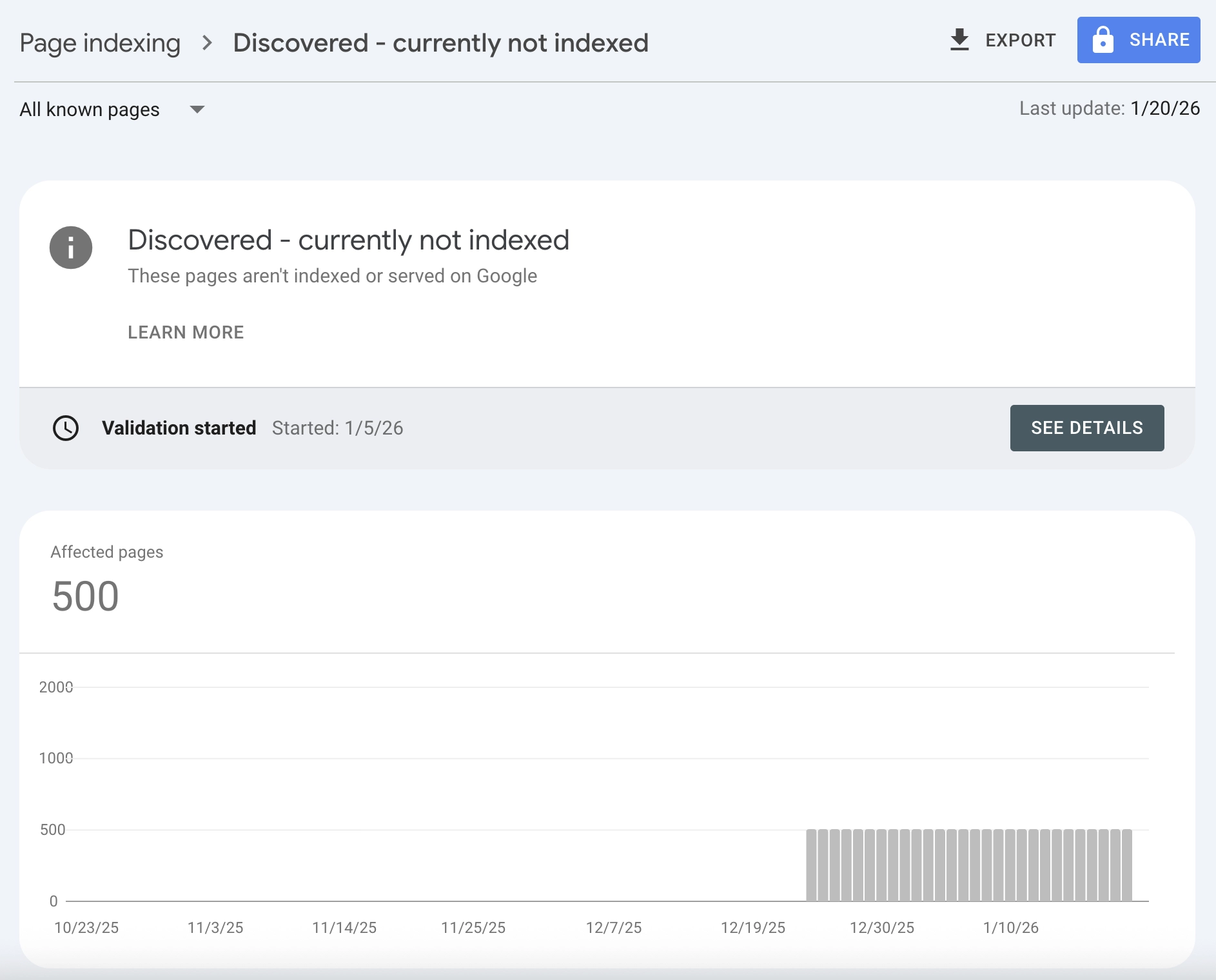
This status is different from "Crawled - currently not indexed" (where Google read your page and rejected it). With "Discovered - currently not indexed," Google hasn't even bothered to visit. Your pages are sitting in a queue, waiting for a crawler that may never come.
I've seen this affect new sites launching with ambitious content plans, enterprise sites with thousands of product pages, and established blogs that suddenly stopped getting new content indexed. The frustration is real: you did everything right technically, but Google won't give you the time of day.
In this guide, you'll learn exactly why pages get stuck in discovery limbo, how to diagnose your specific situation, and the systematic fixes that actually get Google to crawl. No vague advice. Just a diagnostic framework that works.
Google found your URL. Now you need to make it worth visiting.
What "Discovered - Currently Not Indexed" Actually Means
Let's be precise about what this status tells you.
Google's Two-Phase Indexing Process
Google processes URLs through distinct stages:
| Stage | Status in GSC | What Happened |
|---|---|---|
| 1. Discovery | "Discovered - currently not indexed" | Google found the URL (via sitemap, link, etc.) but hasn't crawled it |
| 2. Crawl | (no separate status) | Googlebot fetched the page content |
| 3. Evaluation | "Crawled - currently not indexed" | Google read the page but chose not to index |
| 4. Indexing | "Indexed" | Page entered Google's search index |
"Discovered - currently not indexed" means your page is stuck at stage 1. Google added it to a queue but hasn't allocated resources to actually fetch it.
Why Discovery Doesn't Guarantee Crawling
Google discovers billions of URLs. It can only crawl a fraction of them. Every URL competes for limited crawl resources, and Google prioritizes based on:
- Site authority: Trusted domains get crawled faster and more frequently
- Expected value: If similar pages on your site provide low value, Google assumes new pages will too
- Crawl budget: Your site has an implicit limit on how much Google will crawl
- Technical signals: Fast, accessible sites get more crawler attention
When your pages sit in "Discovered" status for weeks or months, Google is telling you: "I'll get to this eventually, maybe, if nothing more important comes up."
The Key Difference: Discovered vs. Crawled Not Indexed
These two statuses require completely different fixes:
| Status | Google's Action | Root Cause | Fix Approach |
|---|---|---|---|
| Discovered - not indexed | Found URL, hasn't visited | Crawl priority too low | Increase site authority, improve crawl signals |
| Crawled - not indexed | Visited and rejected | Page quality too low | Improve content quality and uniqueness |
If you're seeing "Discovered - currently not indexed," your problem isn't content quality (yet). Google hasn't even looked at your content. Your problem is getting Google's attention.
For pages stuck in "Crawled - currently not indexed," see our separate guide on why Google skips pages after crawling.
The 6 Causes of Discovery Without Crawling
Based on hundreds of indexing audits, these are the reasons URLs stay stuck in discovery.
1. New or Low-Authority Domain
The problem: Google doesn't trust your site enough to invest crawl resources.
Signs this is your issue:
- Domain is less than 6 months old
- Few or no backlinks from external sites
- Even your homepage struggles to rank for branded searches
- Other new sites in your niche have the same problem
Why it happens:
Google's crawl budget allocation isn't democratic. Sites with established authority get the lion's share. A new domain with no track record gets minimal attention until it proves itself.
The reality check:
If your domain is brand new, some delay is normal. Google won't immediately crawl 500 pages from an unknown site. Patience plus authority-building is the answer.
2. Crawl Budget Exhaustion
The problem: Your site has more URLs than Google is willing to crawl in a given period.
Signs this is your issue:
- Your site has thousands of pages
- You recently launched many new pages at once
- Important pages are indexed, but newer/deeper pages aren't
- Search Console's Crawl Stats show a low crawl rate relative to site size
Why it happens:
Every site has an implicit crawl budget. It's determined by your site's authority (how much Google wants to crawl) and your server's capacity (how much Google can crawl without overloading you). If you have 10,000 URLs but Google only crawls 100 per day, new pages wait months in the queue.
The math:
If Google crawls 50 pages per day on your site and you add 200 new pages, it takes 4 days just to see each page once. That's best-case. In reality, Google re-crawls existing pages too, so new pages compete for limited slots.
3. Orphan Pages (Weak Internal Linking)
The problem: Pages aren't connected to the rest of your site structure.
Signs this is your issue:
- Pages are only discoverable via sitemap (no internal links)
- The page is buried deep in navigation (4+ clicks from homepage)
- Few or no contextual links from related content
- Running a crawl shows the page as "orphaned"
Why it happens:
Google uses internal links as a signal of page importance. A page linked from your homepage and 10 other relevant pages looks important. A page that only exists in your sitemap looks like an afterthought.
Sitemaps help discovery, but they don't convey importance. Internal links do both.
4. Poor Site Performance
The problem: Your server is slow or unreliable, limiting how much Google can crawl.
Signs this is your issue:
- Server response times over 500ms
- Frequent timeout errors in Crawl Stats
- Hosting is shared or budget-tier
- Site speed scores are poor (especially Time to First Byte)
Why it happens:
Google is polite. It won't hammer a slow server with requests. If your server takes 2 seconds to respond per page, Google can only crawl 30 pages per minute without overloading you. A fast server (100ms responses) allows 600 pages per minute.
Slow performance directly limits your crawl budget ceiling.
5. Sitemap Issues
The problem: Your sitemap isn't helping Google discover or prioritize pages.
Signs this is your issue:
- Sitemap not submitted in Search Console
- Sitemap contains URLs that return errors (404, 500)
- Sitemap is massive (millions of URLs) with no segmentation
- Sitemap priority and lastmod values are meaningless (all pages priority 1.0, all updated "today")
Why it happens:
A well-structured XML sitemap helps Google understand your site. A poorly maintained one creates noise. If your sitemap contains broken URLs, Google may deprioritize it entirely.
6. Site-Wide Quality Signals
The problem: Google has decided your site overall doesn't warrant deep crawling.
Signs this is your issue:
- Many existing pages have "Crawled - not indexed" status
- Site was hit by a helpful content update or spam update
- Significant portion of content is thin, duplicate, or low-value
- Site-wide traffic has been declining
Why it happens:
Google evaluates your entire site, not just individual pages. If 70% of your pages are low-quality, Google may reduce crawl investment for the whole domain. It assumes new pages will be similarly low-value.
This is the hardest cause to fix because it requires site-wide quality improvement.
Diagnostic Flowchart: Find Your Root Cause
Use this decision tree to identify why your pages are stuck.
Step 1: Check Site Age and Authority
Question: Is your domain less than 6 months old with few backlinks?
- Yes: Low authority is likely the primary cause. Focus on building domain trust before expecting full crawl coverage.
- No: Proceed to Step 2.
Step 2: Check Crawl Stats
Go to Search Console > Settings > Crawl stats.
Question: Is Google crawling fewer than 100 pages per day on a site with 1,000+ URLs?
- Yes: You have a crawl budget problem. Check server performance and URL count.
- No: Proceed to Step 3.
Step 3: Check Internal Linking
Pick a "Discovered - not indexed" URL. Search your site: site:yourdomain.com "exact page title"
Question: Do fewer than 3 pages on your site link to this URL?
- Yes: Weak internal linking is likely the cause. Add contextual links from related content.
- No: Proceed to Step 4.
Step 4: Check Site-Wide Indexing Health
Go to Search Console > Pages (Index Coverage).
Question: Are more than 30% of your crawled pages in "Crawled - not indexed" status?
- Yes: Site-wide quality issues are affecting crawl priority. Fix content quality before expecting discovery to improve.
- No: Proceed to Step 5.
Step 5: Check Server Performance
Run a speed test on your homepage and several inner pages.
Question: Is Time to First Byte (TTFB) over 500ms?
- Yes: Server performance is limiting crawl capacity. Improve hosting or caching.
- No: The issue is likely a combination of factors. Review sitemap health and continue with systematic fixes.
Summary: Root Cause → Primary Fix
| Root Cause | Primary Fix |
|---|---|
| New/low-authority domain | Build backlinks, publish cornerstone content, wait |
| Crawl budget exhaustion | Prune low-value pages, improve server speed |
| Orphan pages | Add internal links from high-traffic pages |
| Poor site performance | Upgrade hosting, implement caching |
| Sitemap issues | Clean up sitemap, segment by content type |
| Site-wide quality problems | Audit and improve existing content first |
Step-by-Step Fixes for Each Cause
Now that you've identified your root cause, here's how to fix it.
Fix 1: Building Authority for New Sites
You can't force Google to trust a new domain. But you can accelerate the process.
Quick wins:
1. Get your site mentioned (and linked) in relevant directories, industry publications, or resource lists
2. Create one genuinely excellent piece of content that could earn natural links
3. Submit your homepage and key landing pages to Google manually via URL Inspection
4. Be active on platforms where your audience exists (links from social profiles help establish legitimacy)
What not to do:
- Don't buy links or participate in link schemes (Google will eventually catch this)
- Don't submit hundreds of URLs for indexing manually (this doesn't scale and doesn't solve the authority problem)
- Don't expect 1,000 pages to be indexed in the first month (that's not how it works)
Timeline: New sites typically need 3-6 months of consistent activity before Google crawls deeply.
Fix 2: Expanding Crawl Budget
If crawl budget is your bottleneck, you have two levers: reduce demand or increase supply.
Reduce demand (fewer URLs competing):
1. Audit your site for low-value pages that don't need indexing
2. Add noindex to pages like tag archives, search results, or thin category pages
3. Consolidate duplicate or near-duplicate content into single canonical URLs
4. Remove or redirect pages with zero traffic and zero links
Increase supply (more crawl capacity):
1. Improve server response time (TTFB under 200ms is ideal)
2. Implement server-side caching
3. Use a CDN to reduce latency
4. Ensure your server can handle crawl spikes without throttling
Monitor in Search Console:
Go to Settings > Crawl stats > Open report. Watch for:
- Crawl requests over time (should be stable or increasing)
- Average response time (should be decreasing)
- Host status (should show no availability issues)
For sites that launched thousands of pages at once, also see our guide on programmatic SEO pitfalls.
Fix 3: Strengthening Internal Linking
Orphan pages rarely get crawled. Connected pages do.
Systematic approach:
1. Identify your highest-traffic pages (Search Console > Performance, sort by clicks)
2. For each "Discovered - not indexed" page, find 3-5 topically relevant existing pages
3. Add contextual links from those pages to the stuck page
4. Update your navigation if the page deserves prominent placement
5. Create hub pages that link to related content clusters
Example:
You have a new blog post about "email marketing automation" stuck in discovery. Find your existing posts about email marketing, automation tools, or marketing workflows. Add contextual links like: "For a deeper dive into automation, see our guide on email marketing automation."
Quick win: Link from your homepage to your most important stuck pages. Homepage links carry significant weight.
Fix 4: Improving Server Performance
Google can't crawl what it can't reach quickly.
Technical checklist:
| Metric | Target | How to Check |
|---|---|---|
| Time to First Byte | < 200ms | WebPageTest, Lighthouse |
| Server uptime | > 99.9% | UptimeRobot, Pingdom |
| Error rate | < 0.1% | Search Console Crawl Stats |
| Response during crawl spikes | Stable | Server logs during known crawl periods |
Common fixes:
- Upgrade from shared hosting to VPS or dedicated
- Implement page caching (Redis, Varnish, or application-level)
- Use a CDN (Cloudflare, Fastly, AWS CloudFront)
- Optimize database queries that slow down page generation
- Enable HTTP/2 or HTTP/3
Fix 5: Cleaning Up Your Sitemap
Your XML sitemap should be a curated list of pages worth indexing, not a dump of every URL on your site.
Sitemap best practices:
1. Only include URLs you want indexed (no noindex pages, no redirects, no error pages)
2. Segment large sitemaps by content type (blog posts, products, categories)
3. Update lastmod dates only when content actually changes
4. Keep each sitemap file under 50,000 URLs or 50MB
5. Submit sitemap index file to Search Console
What to remove from sitemaps:
- URLs returning 404, 410, or 5xx errors
- URLs with noindex tags
- Paginated URLs beyond page 2-3
- Parameter-based URLs that duplicate content
- Staging or development URLs that leaked in
Validation:
After updating your sitemap, go to Search Console > Sitemaps > click your sitemap > check for errors and warnings.
Fix 6: Addressing Site-Wide Quality Issues
If Google has downgraded your site's crawl priority due to quality concerns, individual page fixes won't help much. You need to improve the overall signal.
Content audit process:
1. Export all URLs from Search Console with their indexing status
2. Identify patterns: which content types or sections have the most "not indexed" pages?
3. For each section, evaluate: Is this content actually valuable? Or is it thin, outdated, or redundant?
4. Make hard decisions: prune, consolidate, or substantially improve
The pruning path:
If you have hundreds of low-quality pages, consider removing them. A site with 200 excellent pages outperforms a site with 200 excellent pages and 800 mediocre ones. Google evaluates your site as a whole.
See our guide on content pruning vs. publishing for a framework on these decisions.
The improvement path:
If the content has potential, invest in making it genuinely better:
- Add original research, data, or case studies
- Expand thin content into comprehensive resources
- Update outdated information
- Add expert perspectives or first-hand experience
When to Use "Request Indexing" (And When Not To)
Search Console's URL Inspection tool lets you request indexing for specific URLs. This can help, but it's not a solution.
When to request indexing:
- You've made significant improvements to a stuck page
- The page is genuinely important and well-linked
- You're dealing with a small number of pages (under 10)
How to do it:
- Go to Search Console > URL Inspection
- Enter the URL
- Click "Request Indexing"
- Wait 1-2 weeks
When NOT to request indexing:
- You haven't fixed the underlying problem (won't help)
- You're trying to submit hundreds of URLs (doesn't scale, rate-limited)
- The page has no internal links (Google will deprioritize it anyway)
- You're submitting the same URL repeatedly (doesn't speed things up)
The truth: Request Indexing is a one-time nudge, not a fix. If you've requested indexing and the page still shows "Discovered - not indexed" weeks later, the page isn't important enough to Google. Fix the signals, don't keep hitting the button.
Special Considerations for Large Sites
If your site has 10,000+ pages, the "Discovered - not indexed" problem requires scale-appropriate solutions.
Prioritize ruthlessly
You cannot get every page indexed immediately. Decide which pages matter most:
- Revenue pages: Product pages, service pages, pricing pages
- High-intent content: Comparison pages, buying guides, solution pages
- Cornerstone content: Comprehensive guides that demonstrate expertise
- Everything else: Can wait or might not need indexing at all
Focus your internal linking, sitemap priority, and quality improvements on the top tiers.
Segment and monitor
Don't treat all content equally in your analysis:
| Segment | Expected Indexing Rate | Action if Below Target |
|---|---|---|
| Product pages | > 90% | Investigate immediately |
| Blog posts | > 70% | Review content quality |
| Category pages | > 50% | Check for duplication |
| Tag/archive pages | Variable | Consider noindex |
Use log file analysis
For enterprise sites, Search Console data isn't enough. Analyze your server logs to see:
- Which URLs Googlebot actually requests
- How frequently different sections get crawled
- Whether crawl patterns correlate with indexing success
- If important pages are being skipped entirely
Tools like Screaming Frog Log Analyzer or custom scripts can reveal patterns Search Console hides.
Consider the Indexing API
For certain content types (job postings, livestream videos, news), Google offers an Indexing API that provides faster indexing than standard crawling. If your content qualifies, this can bypass the discovery queue entirely.
Eligible content:
- JobPosting structured data
- BroadcastEvent structured data (livestreams)
Not eligible:
- General blog content
- Product pages
- Most other content types
Monitoring and Measuring Progress
Fixing discovery issues takes time. Here's how to track whether your changes are working.
Weekly checks
- Search Console > Pages: Track the ratio of "Discovered - not indexed" to "Indexed" over time
- Search Console > Crawl stats: Watch for increases in crawl rate and decreases in response time
- Spot-check URLs: Use URL Inspection on a sample of stuck pages to see if status has changed
What improvement looks like
| Metric | Baseline | After 4 Weeks | After 8 Weeks |
|---|---|---|---|
| Discovered - not indexed | 500 URLs | 400 URLs | 250 URLs |
| Indexed pages | 100 URLs | 150 URLs | 250 URLs |
| Avg crawl requests/day | 50 | 75 | 100 |
| Avg response time | 800ms | 500ms | 300ms |
When to escalate
If you've made systematic fixes and waited 8+ weeks with no improvement:
- Revisit your diagnosis (the root cause may be different than you thought)
- Consider whether site-wide quality issues are more severe than expected
- Look for technical issues you may have missed (server logs, Core Web Vitals)
- If appropriate for your business, consider professional SEO consultation
Frequently Asked Questions
What does "Discovered - currently not indexed" mean?
Google found your URL (through a sitemap, internal link, or external link) but hasn't crawled it yet. The page is in a queue waiting for Googlebot to visit. This is different from "Crawled - currently not indexed," where Google visited the page and decided not to index it.
How long does it take for a discovered page to get crawled?
For established, trusted sites: days to a few weeks. For new sites or sites with crawl budget constraints: weeks to months. Some pages may never get crawled if Google doesn't see enough signals that they're worth visiting.
Should I keep requesting indexing for stuck pages?
No. Repeatedly requesting indexing doesn't help and may get rate-limited. Request indexing once after making improvements, then wait. If the page still isn't crawled after 2-4 weeks, the underlying signals need more work.
Does sitemap priority affect crawl order?
Minimally. Google has stated they largely ignore sitemap priority values. Focus on internal linking and content quality instead. Sitemap priority is less important than actual site structure.
Will more backlinks help pages get crawled?
Yes, indirectly. Backlinks increase site authority, which increases crawl budget allocation. Pages that receive direct external links also signal importance to Google. But don't build links specifically to get pages crawled. Build links to improve overall domain authority.
Is "Discovered - not indexed" bad for SEO?
Having some pages in this status is normal for any site. Having a large percentage of your important pages stuck here indicates a problem. The status itself doesn't hurt your site. It just means those pages aren't in Google's index and won't appear in search results.
Can I force Google to crawl my pages?
No. You can request indexing via URL Inspection (limited to a few URLs per day) or submit sitemaps, but Google decides what and when to crawl. You can't force it. You can only improve the signals that influence Google's decisions.
Stop Waiting. Start Signaling.
"Discovered - currently not indexed" isn't a bug or a penalty. It's Google saying: "I know this URL exists, but I haven't decided it's worth my time yet."
Your job is to change that calculation.
Here's your action plan:
- Diagnose your specific root cause using the flowchart above
- Fix the primary issue (authority, crawl budget, internal links, server speed, or quality)
- Request indexing for a few priority pages after making improvements
- Monitor weekly to track whether the ratio of discovered to indexed is improving
- Iterate if progress stalls after 8 weeks
Most discovery problems come down to one thing: Google doesn't see your pages as high-priority. Improve that signal through better internal linking, faster servers, and site-wide quality, and the crawling follows.
Stop asking "when will Google crawl my page?" Start asking "why should Google crawl my page?"
Answer that question with real signals, and the discovery queue will start moving.