
You Don't Need $100/Month Tools to Find Great Keywords
Here's a secret the SEO industry doesn't advertise: you can do comprehensive keyword research without spending a dollar on tools.
Premium keyword research tools like Ahrefs and Semrush are excellent. They save time, provide extensive data, and offer features that free alternatives can't match. But they also cost $100-400+ per month, putting them out of reach for solo bloggers, bootstrapped startups, and small business owners just getting started with SEO.
The good news? Google itself provides free tools with real search data. Combined with a few other free resources and some strategic thinking, you can build a keyword research workflow that rivals what agencies use for their clients.
In this guide, you'll learn a complete step-by-step process for finding valuable keywords using only free keyword research tools. We'll cover brainstorming with Google Autocomplete, expanding ideas with free keyword generators, validating with Google Keyword Planner, analyzing competition manually, and organizing everything into an actionable content plan.
Free doesn't mean inferior. It means resourceful.
What You'll Need (All Free)
Before we dive into the workflow, here's your free keyword research toolkit:
Essential Tools (100% Free)
1. Google Search (with Autocomplete)
- No account needed
- Real-time search suggestions based on actual queries
- Available at google.com
2. Google Keyword Planner
- Requires a Google Ads account (free to create, no spending required)
- Provides search volume ranges and competition indicators
- Access at ads.google.com/home/tools/keyword-planner
3. Google Trends
- No account needed
- Shows relative interest over time and by region
- Available at trends.google.com
4. Google Search Console
- Requires website verification
- Shows actual queries driving impressions to your site
- Essential if you have an existing website
Helpful Additions (Free Tiers)
5. AnswerThePublic (3 free searches/day)
- Visualizes question-based keywords
- Great for finding "how to" and "what is" queries
6. Ubersuggest (3 free searches/day)
- Provides keyword suggestions with volume estimates
- Shows basic difficulty scores
7. A Spreadsheet
- Google Sheets (free) or Excel
- For organizing and prioritizing your findings
That's it. With these free keyword research tools, you can discover thousands of keyword opportunities. Let's get started.
Step 1: Brainstorm Seeds with Google Autocomplete
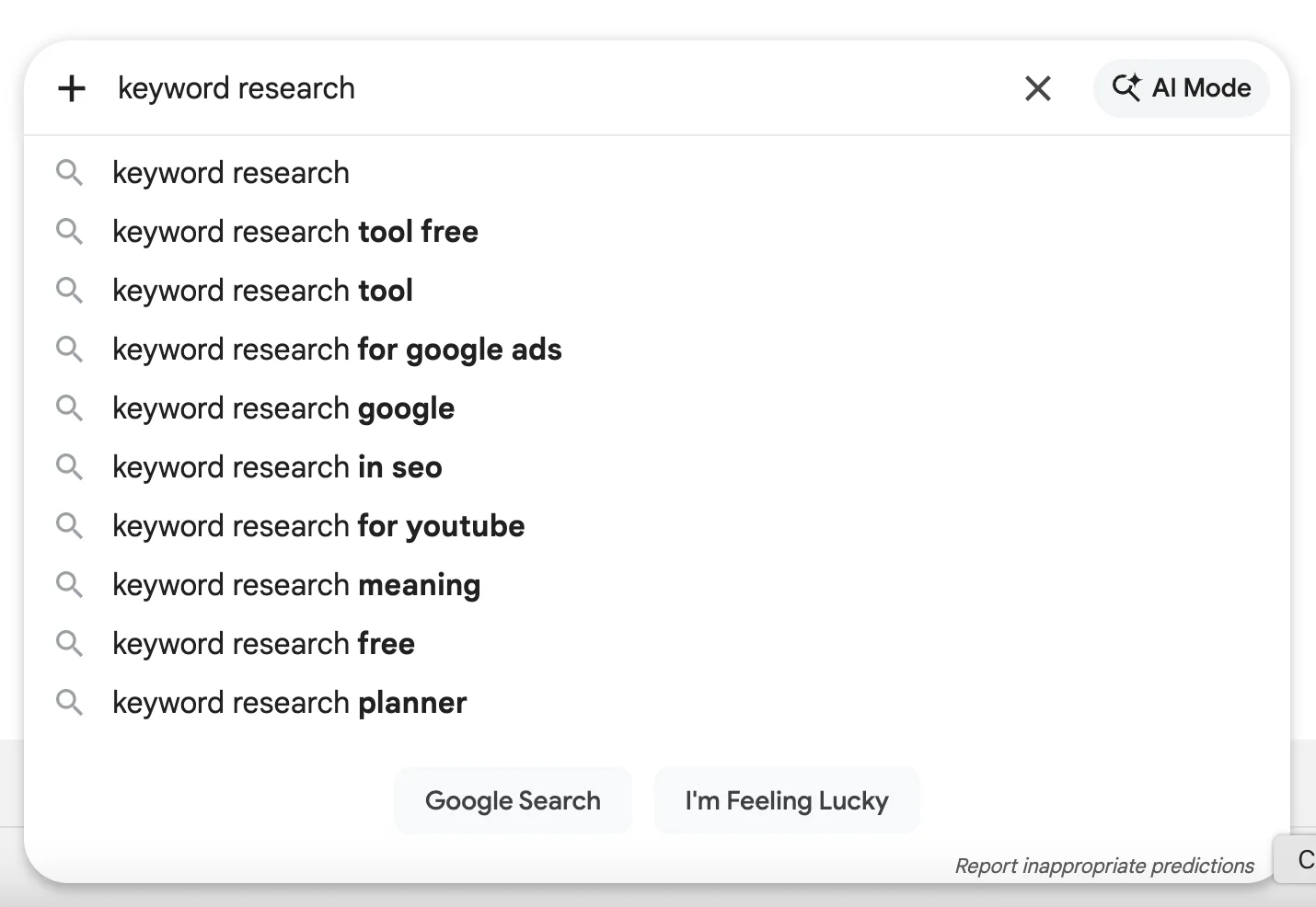
Every keyword research project starts with seed topics, the core terms related to your business or content. Google Autocomplete turns these seeds into real keyword opportunities.
How Google Autocomplete Works
When you start typing in Google's search bar, it suggests completions based on:
- Actual searches people perform
- Your location and language
- Trending topics
- Search frequency
These aren't random suggestions. They're data-driven predictions of what people search for.
The Autocomplete Technique
Step 1: Open Google in an incognito/private browser window
This prevents your personal search history from influencing suggestions.
Step 2: Type your seed keyword followed by each letter of the alphabet
For example, if your seed is "keyword research":
- "keyword research a" → keyword research agency, keyword research and analysis, keyword research automation
- "keyword research b" → keyword research basics, keyword research best practices, keyword research beginners
- "keyword research c" → keyword research checklist, keyword research course, keyword research competitor
Step 3: Try question modifiers
- "how to keyword research"
- "what is keyword research"
- "why keyword research"
- "best keyword research"
Step 4: Add industry or audience modifiers
- "keyword research for bloggers"
- "keyword research for ecommerce"
- "keyword research for youtube"
- "keyword research for local business"
Recording Your Findings
Create a spreadsheet with columns for:
| Keyword | Source | Notes |
|---|---|---|
| keyword research for beginners | Google Autocomplete | Educational intent |
| keyword research tools free | Google Autocomplete | Tool-seeking intent |
| how to do keyword research | Google Autocomplete | How-to content opportunity |
At this stage, quantity matters more than quality. Capture 50-100 keyword ideas before moving to validation.
Pro Tip: Check "People Also Ask"
When you search for your seed keyword, Google often shows a "People Also Ask" box with related questions. These are gold for content ideas:
- Click each question to expand it
- Note the question and the follow-up questions that appear
- These represent real questions your audience is asking
Step 2: Expand Ideas with Free Keyword Generators
Google Autocomplete gives you a starting point. Now let's expand your list with dedicated keyword suggestion tools.
AnswerThePublic (Free: 3 Searches/Day)
AnswerThePublic specializes in question keywords and preposition-based queries.
How to use it:
1. Go to answerthepublic.com
2. Enter your seed keyword
3. Select your country/language
4. Review the visualization or data view
What you'll get:
- Questions: who, what, where, when, why, how
- Prepositions: for, with, without, near, vs
- Comparisons: vs, or, and, like
- Alphabeticals: similar to Google Autocomplete
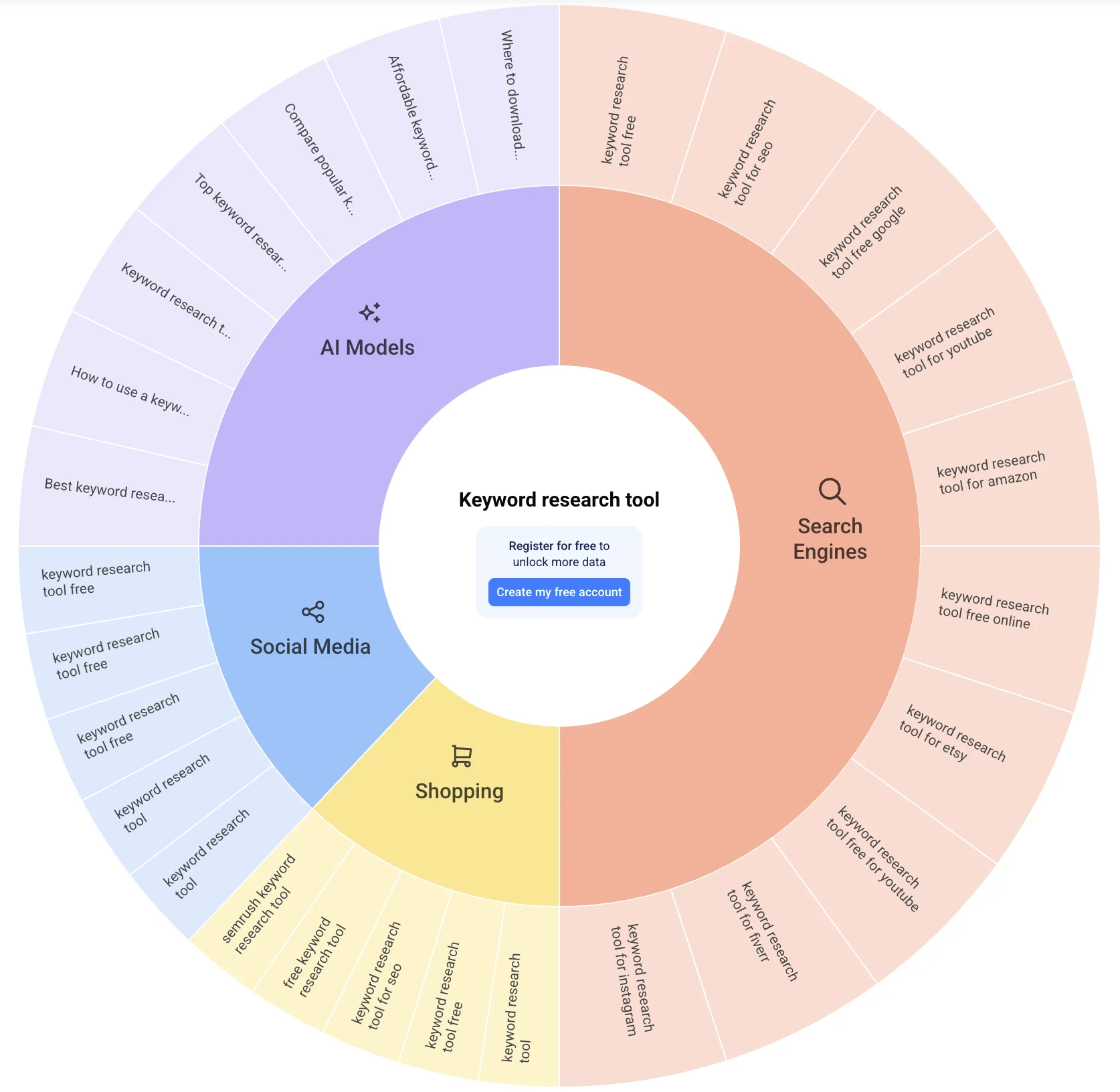
Export the results to CSV and add relevant keywords to your master spreadsheet.
Ubersuggest (Free: 3 Searches/Day)
Ubersuggest provides keyword suggestions with estimated search volume and SEO difficulty.
How to use it:
1. Go to neilpatel.com/ubersuggest
2. Enter your seed keyword
3. Select your target country (if you're researching multiple countries, see our guide on international keyword research)
4. Review keyword ideas, questions, and related terms
What to look for:
- Keywords with volume but manageable difficulty (under 40 for new sites)
- Question keywords for blog content
- Long tail variations with specific intent
YouTube Search (For Video Keywords)
If you create video content or want to understand what topics have visual search intent:
- Go to YouTube.com
- Type your seed keyword and note suggestions
- Look at suggested videos and their titles
- Check video descriptions for keyword patterns
YouTube keyword research often reveals topics where video content ranks in Google's main results.
Reddit and Forums
Community discussions reveal how real people talk about your topic:
- Search Reddit for your topic:
site:reddit.com [your topic] - Read thread titles and common questions
- Note the exact language people use
- Look for problems mentioned repeatedly
These become long tail keywords that tools often miss.
Building Your Expanded List
By now, you should have 100-200+ keyword ideas. Organize them in your spreadsheet:
| Keyword | Source | Intent | Priority |
|---|---|---|---|
| best free keyword research tools | Ubersuggest | Commercial | High |
| how to find long tail keywords | AnswerThePublic | Informational | Medium |
| keyword research for small business | Google Autocomplete | Informational | High |
Step 3: Validate with Google Keyword Planner
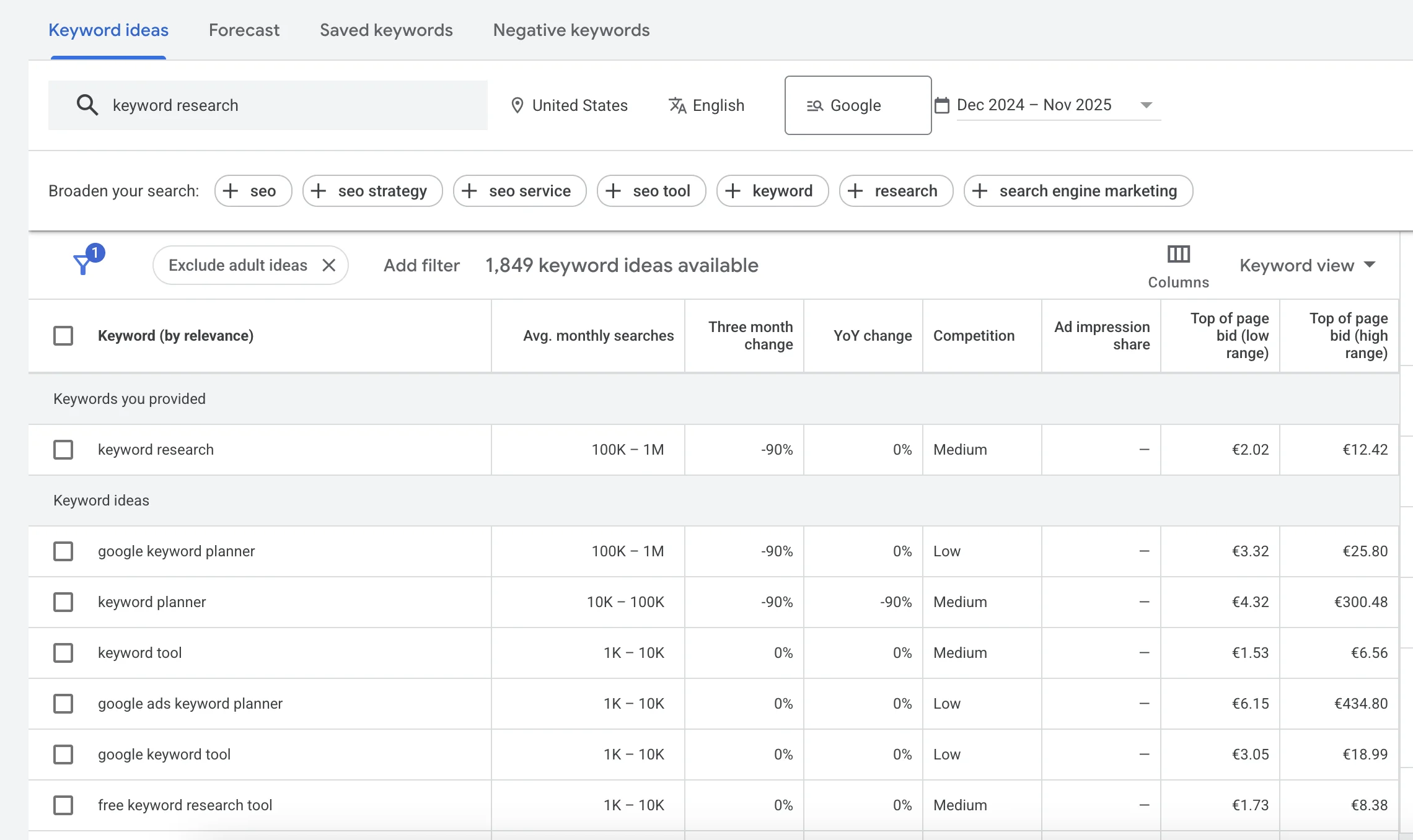
Now comes the critical step: checking which keywords have actual search volume. Google Keyword Planner provides this data for free.
Setting Up Google Keyword Planner (No Ads Required)
You need a Google Ads account, but you don't need to run ads or spend money.
Setup process:
1. Go to ads.google.com
2. Click "Start Now"
3. When prompted to create a campaign, look for "Switch to Expert Mode" at the bottom
4. Click "Create an account without a campaign"
5. Confirm your business information
6. Access Keyword Planner from Tools & Settings → Keyword Planner
Using Keyword Planner for Validation
Option 1: Discover New Keywords
1. Click "Discover new keywords"
2. Enter up to 10 seed keywords
3. Set your target location and language
4. Review the results
Option 2: Get Search Volume (Better for Validation)
1. Click "Get search volume and forecasts"
2. Paste your keyword list (up to 1,000 keywords)
3. Review volume ranges for each
Understanding Keyword Planner Data
Search Volume Ranges:
Without active ad spend, Keyword Planner shows ranges instead of exact numbers:
- 0-10
- 10-100
- 100-1K
- 1K-10K
- 10K-100K
These ranges are directional. A keyword showing "1K-10K" has meaningful volume; one showing "0-10" might not be worth targeting.
Competition:
The "Competition" column refers to advertiser competition, not SEO difficulty. However, high advertiser competition often correlates with commercial value.
Top of Page Bid:
This shows what advertisers pay per click. Higher bids indicate commercial intent and keyword value. If you run Google Ads alongside SEO, this data becomes even more valuable. Learn how to combine SEO and PPC keyword strategies for better results across both channels.
Filtering Your List
After validation, remove keywords that:
- Show 0-10 volume (unless highly relevant to your niche)
- Have no data available (Keyword Planner doesn't recognize them)
- Don't match your content capabilities
Keep keywords that show meaningful volume (100+) and align with your goals.
Step 4: Check Trends and Seasonality
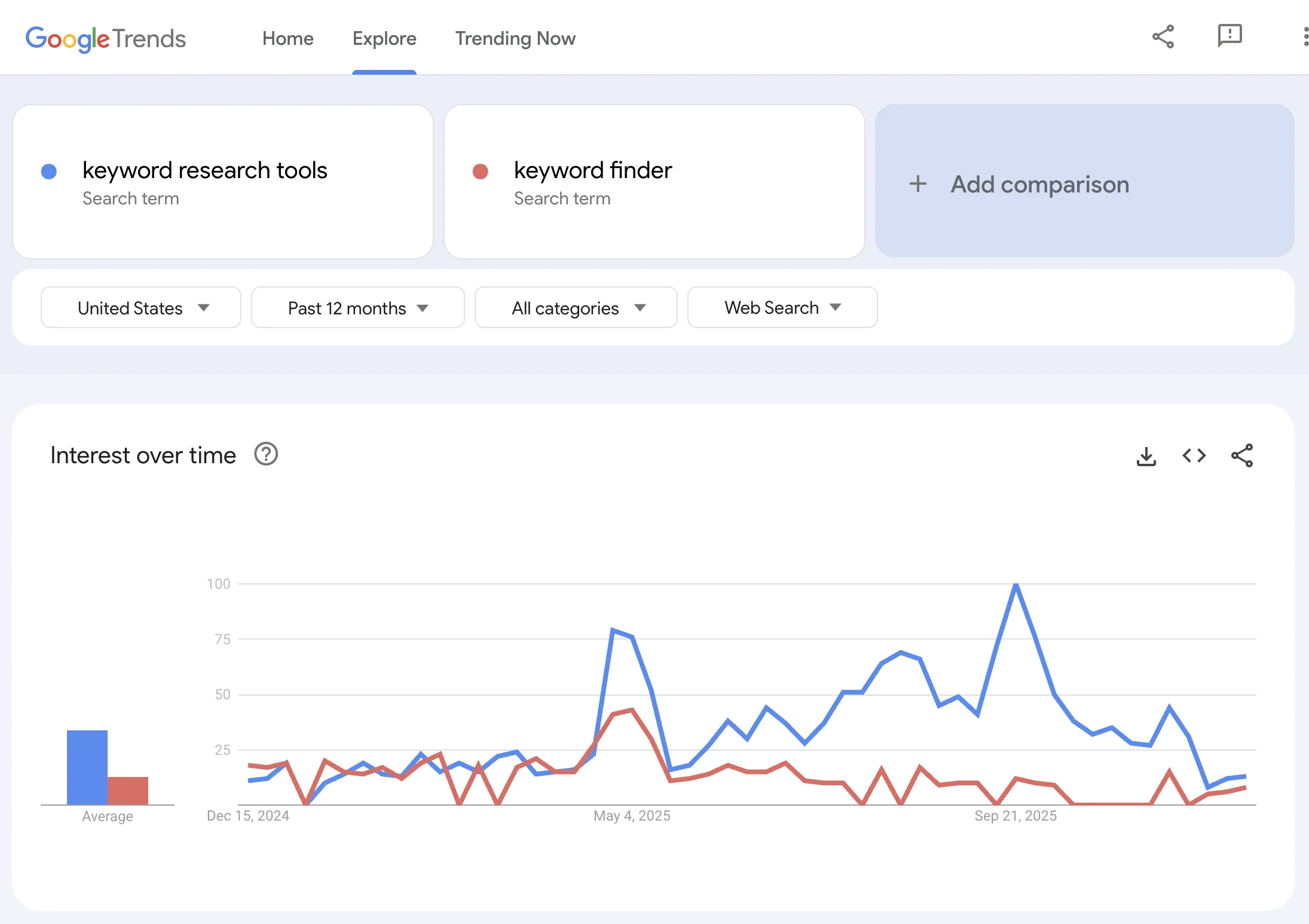
Google Trends helps you understand whether keywords are growing, declining, or seasonal.
Using Google Trends Effectively
Basic search:
1. Go to trends.google.com
2. Enter your keyword
3. Set your time range (12 months for seasonality, 5 years for trends)
4. Select your region
What to look for:
Stable interest: A flat line indicates consistent demand year-round. Good for evergreen content.
Growing interest: An upward trend means increasing opportunity. Prioritize these keywords.
Declining interest: A downward trend might indicate a fading topic. Consider whether it's worth the investment.
Seasonal spikes: Predictable peaks (like "tax software" in Q1) require timing your content 2-3 months before the spike.
Comparing Keywords
Google Trends lets you compare up to 5 keywords simultaneously:
- Enter your first keyword
- Click "+ Compare" to add more
- See relative interest between terms
This helps you choose between similar keywords. If "keyword research tools" consistently shows more interest than "keyword finder," focus on the former.
Regional Insights
For local businesses or international targeting:
- Search your keyword
- Scroll to "Interest by subregion"
- See which states/countries show highest interest
This helps you tailor content to your geographic audience.
Step 5: Analyze Competition Manually
Without paid tools, you can still assess keyword difficulty by analyzing the actual search results.
The Manual SERP Analysis Method
For each priority keyword:
Step 1: Search the keyword in Google (incognito mode)
Note what appears:
- Are there featured snippets?
- How many ads appear?
- What types of sites rank (brands, blogs, forums)?
Step 2: Analyze the top 5 results
For each result, assess:
| Factor | What to Look For | Good Sign for You |
|---|---|---|
| Domain type | Brand sites, niche blogs, forums | Forums or small blogs ranking |
| Content quality | Thin vs. comprehensive | Thin, outdated content in results |
| Content age | Published date | Old articles (2+ years) ranking |
| Title optimization | Keyword in title | Weak title optimization |
| URL structure | Keyword in URL | Generic or messy URLs |
Step 3: Check site authority (free method)
Use a free tool like Moz Link Explorer (10 free queries/month) or Ahrefs Webmaster Tools (free for your own site) to estimate the authority of ranking pages. Note: Domain Authority (DA) is Moz's proprietary metric, not something Google uses directly, but it's a useful proxy for how established a site is.
If sites with low DA scores (under 30) are ranking, you likely have a realistic shot.
Signs You Can Compete
Green lights (target this keyword):
- Forums, Reddit, or Quora in top 10
- Small blogs or personal sites ranking
- Outdated content (3+ years old) in top positions
- Thin content (under 500 words) ranking well
- Poor title/heading optimization in results
Yellow lights (proceed with caution):
- Mix of big and small sites
- Content is good but not exceptional
- Mid-range authority sites (Moz DA 30-60)
Red lights (skip for now):
- All results from major brands or publications
- Comprehensive, recently updated content everywhere
- High-authority sites (Moz DA 70+) dominating
- Lots of ads and SERP features reducing organic visibility
Document Your Findings
Add a "Competition" column to your spreadsheet:
| Keyword | Volume | Competition | Notes |
|---|---|---|---|
| best free keyword tools | 1K-10K | Low | Forum + small blogs in top 5 |
| keyword research guide | 1K-10K | High | Major sites dominating |
| keyword research for etsy | 100-1K | Low | Thin content ranking |
Step 6: Organize Keywords in Your Spreadsheet
With validated, competition-checked keywords, it's time to organize them for action.
Create a Master Keyword Database
Set up columns for:
| Column | Purpose |
|---|---|
| Keyword | The search term |
| Volume Range | From Keyword Planner |
| Competition | Your manual assessment (Low/Med/High) |
| Intent | Informational, Commercial, Transactional |
| Content Type | Blog post, landing page, product page |
| Priority | High, Medium, Low |
| Status | Not started, In progress, Published |
| URL | Link to published content |
Group Keywords by Topic
Related keywords should be targeted together, not in separate articles. Group keywords that:
- Answer the same fundamental question
- Would be satisfied by one comprehensive piece of content
- Share the same search intent
Example grouping:
Topic: Free Keyword Research
- free keyword research tools (primary)
- best free keyword tools
- free keyword planner
- keyword research without paid tools
- free seo keyword tool
One comprehensive guide can target all of these.
Assign Content Types
Match keywords to appropriate content formats:
| Intent Pattern | Content Type |
|---|---|
| "how to [X]" | Tutorial/guide |
| "what is [X]" | Explainer article |
| "best [X]" | Listicle or comparison |
| "[X] vs [Y]" | Comparison article |
| "[X] template" | Resource + download |
| "[product] review" | Review article |
Prioritize for Quick Wins
Score each keyword group using this simple framework:
Priority Score = Volume + Relevance + Achievability
- High volume + Low competition + High relevance = Priority 1 (do first)
- Medium volume + Low competition + High relevance = Priority 2
- High volume + High competition + High relevance = Priority 3 (long-term play)
- Low volume + Any competition + Medium relevance = Priority 4 (backlog)
Focus your first content efforts on Priority 1 keywords to build momentum.
Step 7: Turn Keywords into a Content Plan
Keywords without execution are just data. Let's turn your research into published content.
Create an Editorial Calendar
Map your prioritized keywords to a publishing schedule:
| Week | Topic | Primary Keyword | Content Type | Status |
|---|---|---|---|---|
| 1 | Free Keyword Research Guide | free keyword research tools | How-to guide | Planned |
| 2 | Competitor Analysis Basics | competitive analysis | Tutorial | Planned |
| 3 | Long Tail Keyword Strategy | long tail keywords | Strategy guide | Planned |
Be realistic about your capacity:
- Solo creator: 1-2 quality posts per week
- Small team: 2-4 posts per week
- Larger team: 5+ posts per week
Quality beats quantity. One comprehensive, well-researched article outperforms three rushed pieces.
Write Content Briefs
For each planned piece, create a brief that includes:
CONTENT BRIEF

Primary Keyword: free keyword research tools
Secondary Keywords: keyword generator, free keyword planner, best free keyword tools
Target Word Count: 2,500-3,500 words
Search Intent: Informational (how-to)

OUTLINE:
H1: [Title with primary keyword]
H2: Introduction (hook + what they'll learn)
H2: [Section addressing main question]
H2: [Step-by-step process]
H2: [Tools or resources needed]
H2: [Common mistakes to avoid]
H2: FAQ
H2: Conclusion + next steps

INTERNAL LINKS:
- Link to: [related article 1]
- Link to: [related article 2]

COMPETITOR CONTENT TO BEAT:
- [URL 1]: Good X, missing Y
- [URL 2]: Comprehensive but outdated
This ensures writers (even if that's you) know exactly what to create.
Track and Iterate
After publishing:
- Monitor rankings using Google Search Console (free)
- Track traffic with Google Analytics (free)
- Adjust underperforming content based on what you learn
- Refresh successful content to maintain rankings
Keyword research isn't a one-time task. Build in monthly reviews to mine your Search Console data for new opportunities and discover what's working.
Limitations of Free Methods (And How to Work Around Them)
Free tools are powerful, but they have constraints. Here's what to know.
Volume Accuracy
The limitation: Google Keyword Planner shows ranges (100-1K) instead of exact numbers. Other free tools use estimated data that may be inaccurate.
The workaround:
- Use ranges directionally (100-1K is meaningful, 0-10 probably isn't)
- Cross-reference multiple sources
- Focus on relative comparisons rather than absolute numbers
- Trust Google Search Console data for keywords you already rank for
Keyword Difficulty Scores
The limitation: Most free tools don't provide reliable difficulty metrics, or they limit the data severely.
The workaround:
- Use manual SERP analysis (described in Step 5)
- Look for signals like forums and small sites ranking
- Start with obviously low-competition terms and work up
- Track your actual rankings to calibrate your judgment
Limited Daily Searches
The limitation: Tools like Ubersuggest and AnswerThePublic restrict free users to 3 searches per day.
The workaround:
- Plan your searches strategically
- Use one search per day across multiple days
- Export and save all results before your limit resets
- Use Google Autocomplete (unlimited) for bulk ideation
No Competitor Gap Analysis
The limitation: Free tools can't show you which keywords competitors rank for that you don't.
The workaround:
- Manually search competitor sites with site:competitor.com [topic]
- Review competitor blog categories and popular posts
- Use free tiers of tools like Ubersuggest for limited competitor data
- Focus on your own opportunities rather than copying competitors
When to Consider Paid Tools
Upgrade makes sense when:
- Your content is generating revenue that justifies the cost
- You're spending 5+ hours weekly on manual research
- You need accurate data for client work
- You're scaling content production significantly
Until then, the free workflow in this guide will serve you well. If you're just launching a site, see our guide on keyword research for new websites for strategies specific to building authority from scratch.
Frequently Asked Questions
Is Google Keyword Planner really free?
Yes. You need a Google Ads account to access it, but you don't need to run ads or spend money. During signup, choose "Create an account without a campaign" to skip the billing requirement initially. Note that without ad spend, you'll see volume ranges instead of exact numbers.
Which free keyword tool is best for beginners?
Start with Google Autocomplete and Google Keyword Planner. These are completely free, use real Google data, and provide enough information to find good keywords. Add AnswerThePublic for question keywords when you're ready to expand.
How accurate are free keyword research tools?
Google's own tools (Autocomplete, Keyword Planner, Trends, Search Console) use real data and are highly reliable. Third-party free tools use estimated data that varies in accuracy. When in doubt, validate with multiple sources.
Can I do keyword research without any tools?
Yes, but it's slower. You can use Google Autocomplete, browse forums to find what people ask about, and check search results manually. Tools speed up the process but aren't strictly required.
How many keywords should I target per page?
Focus on one primary keyword and 3-10 related secondary keywords per page. Group keywords that share the same intent and can be addressed in one comprehensive piece. Don't create separate pages for slight variations of the same query.
How often should I do keyword research?
For most sites, quarterly keyword research reviews work well. Monthly is better if you're publishing frequently or in a fast-changing niche. Between formal research sessions, use Google Search Console to discover new opportunities from your existing rankings.
What's the difference between free and paid keyword tools?
Paid tools typically offer: exact search volumes (not ranges), reliable difficulty scores, competitor keyword data, rank tracking, backlink analysis, and higher usage limits. Free tools provide basic discovery and validation, but require more manual work for competitive analysis.
Can free tools help with local SEO keyword research?
Yes. Google Keyword Planner lets you filter by location, Google Trends shows regional interest, and you can add location modifiers to your searches ("keyword research [city name]"). For serious local SEO, Google Business Profile and local search analysis become important additions.
Start Finding Keywords Today
You don't need expensive tools to discover keywords worth targeting. With the free resources available, you can:
- Brainstorm hundreds of ideas using Google Autocomplete and free keyword generators
- Validate search demand with Google Keyword Planner's volume ranges
- Assess competition manually by analyzing the actual search results
- Organize and prioritize keywords in a simple spreadsheet
- Turn research into content with a structured editorial calendar
Here's your action plan for this week:
- Today: Set up Google Keyword Planner (if you haven't already)
- Tomorrow: Spend 30 minutes on Google Autocomplete brainstorming for your main topic
- This week: Validate your top 50 keywords in Keyword Planner and check competition manually for your top 10
- Next week: Create your first piece of content targeting a low-competition keyword
The workflow in this guide is the same process professionals use. The main difference with paid tools is speed and depth of data, not the fundamental approach.
When you're ready to accelerate your keyword research, BrightKeyword provides AI-powered keyword discovery with real advertiser data, including exact volumes, CPC, and 12-month trends, so you spend less time on manual research and more time creating content that ranks.
But you don't need to wait. Start finding keywords today with what you have. Your first organic traffic is closer than you think.