
Your Pages Are Fighting Each Other. And They're All Losing.
You have three blog posts about email marketing. All three rank somewhere between position 15 and 25. None of them get meaningful traffic. You keep wondering which one to promote, which one to update, which one Google actually prefers.
Here's the uncomfortable truth: Google doesn't prefer any of them. By creating multiple pages targeting the same keyword, you've split your ranking signals across three weak pages instead of concentrating them in one strong one. Your pages are competing against each other, not your competitors.
This is keyword cannibalization, and it's silently killing rankings across your site right now. I've audited sites where consolidating cannibalized pages increased organic traffic by 40% in eight weeks. No new content. No link building. Just eliminating internal competition.
The fix isn't complicated once you know what to look for. In this guide, you'll learn how to find cannibalization issues in your content, decide which pages to keep versus merge, and implement fixes that Google will recognize within weeks.
Your content should work together, not against itself. Let's fix that.
What Is Keyword Cannibalization?
Keyword cannibalization happens when multiple pages on your site target the same (or very similar) keywords. Instead of one authoritative page ranking well, you end up with several mediocre pages splitting the ranking signals.
Why It Hurts Your Rankings
Google tries to show diverse results. If you have three pages that could rank for "email marketing tips," Google will usually pick just one. But which one? Often, the wrong one. And the signals that could boost one page to position 3 get diluted across three pages stuck in positions 15-25.
| What Gets Diluted | The Problem |
|---|---|
| Internal links | Links spread across multiple pages instead of strengthening one |
| External backlinks | Different pages get different backlinks, none gets critical mass |
| Click-through rate | Users see different pages for same query, engagement spreads thin |
| Content authority | No single page becomes the definitive resource |
| Crawl budget | Google wastes resources crawling similar pages |
The Cannibalization Cycle
Here's what typically happens:
- You write a post about "keyword research tools" in 2023
- In 2024, you write another post about "best keyword research software"
- In 2025, you create a "keyword tool comparison" page
- All three target similar keywords with overlapping content
- Google can't decide which to rank, so none rank well
- You wonder why your "comprehensive content strategy" isn't working
Sound familiar? You're not alone. This is one of the most common keyword research mistakes I see on content-heavy sites.
When It's Not Cannibalization
Not every overlap is cannibalization. These situations are usually fine:
Different intent, same topic: A "what is email marketing" explainer and an "email marketing software comparison" target the same topic but different intents. One is informational, one is commercial. Google shows different results for different intents.
Pillar and cluster content: A comprehensive pillar page about "SEO" and a specific post about "technical SEO audits" naturally overlap. The cluster post should link to the pillar, and both can rank for different queries.
Location-based pages: "Plumber in Austin" and "Plumber in Dallas" might share template content, but they target genuinely different queries.
The problem is when two pages target the same keyword with the same intent and neither has a clear purpose distinction.
How to Find Keyword Cannibalization
Before you can fix cannibalization, you need to find it. Here are the most reliable methods.
Method 1: Google Search Console Query Analysis
This is the most accurate method because it shows what Google actually thinks.
Step-by-step process:
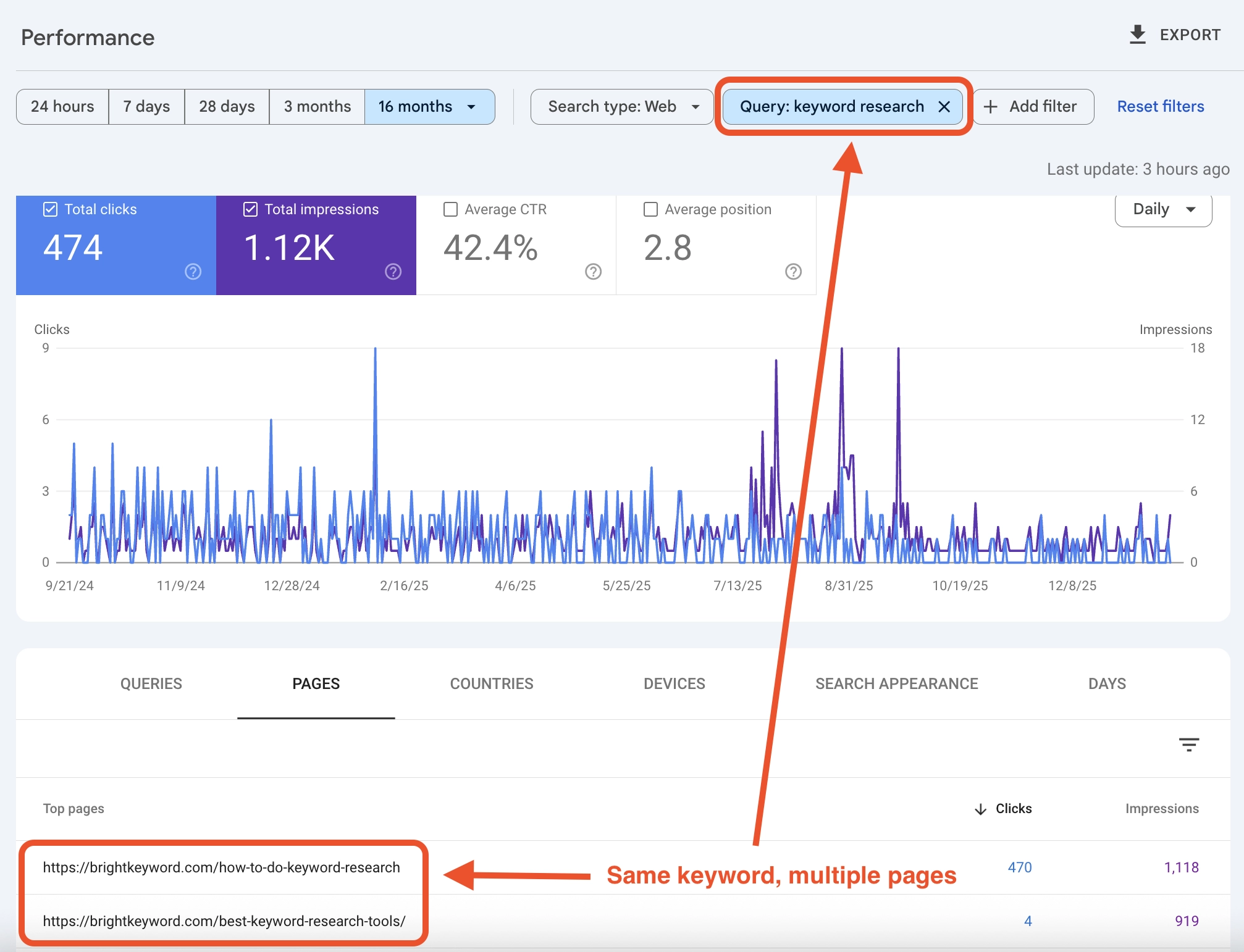
- Open Google Search Console > Performance
- Click "Pages" tab
- Add a filter: Query contains [your target keyword]
- Look for multiple pages appearing for the same query
If you see two or more URLs getting impressions for the same keyword, you likely have cannibalization.
Warning signs in GSC data:
| Pattern | What It Means |
|---|---|
| Two pages with similar impressions, low CTR | Neither page is winning |
| Pages swapping positions frequently | Google is testing which to show |
| One page with high impressions, another with clicks | Ranking page differs from preferred page |
| Multiple pages, all with poor average position | Signals too diluted to rank well |
For more on extracting insights from Search Console, see our guide on mining Google Search Console for keyword gold.
Method 2: Site Search Operator
A quick manual check for any keyword:
- Go to Google
- Search:
site:yourdomain.com "target keyword" - Review which pages appear
If multiple pages show up for the same core keyword, investigate further.
Method 3: Rank Tracking with URL Monitoring
If you use rank tracking software, look for:
- Keywords where your ranking URL changes frequently
- Keywords where multiple URLs from your site appear in top 100
- Historical data showing URL switches over time
Frequent URL changes for the same keyword is a classic cannibalization symptom. Google keeps testing different pages because none has established clear authority.
Method 4: Content Audit Spreadsheet
For a systematic audit:
- Export all your indexed URLs
- For each URL, list the primary target keyword
- Sort by keyword
- Flag any keyword that appears more than once
| URL | Target Keyword | Search Volume | Current Position |
|---|---|---|---|
| /blog/email-marketing-tips/ | email marketing tips | 2,400 | 23 |
| /blog/email-marketing-guide/ | email marketing tips | 2,400 | 18 |
| /resources/email-marketing/ | email marketing tips | 2,400 | Not ranking |
Three pages targeting the same keyword. Classic cannibalization.
Diagnosing Cannibalization Severity
Not all cannibalization requires immediate action. Use this framework to prioritize fixes.
Severity Assessment Matrix
| Factor | Low Severity | High Severity |
|---|---|---|
| Keyword value | Low volume, low intent | High volume or high commercial value |
| Ranking impact | Pages rank 50+ anyway | Pages stuck in positions 5-20 |
| Content overlap | 20-40% similar | 70%+ similar content |
| Business impact | Informational pages | Revenue-driving pages |
| Fix complexity | Simple redirect | Major content rewrite needed |
Priority Decision Framework
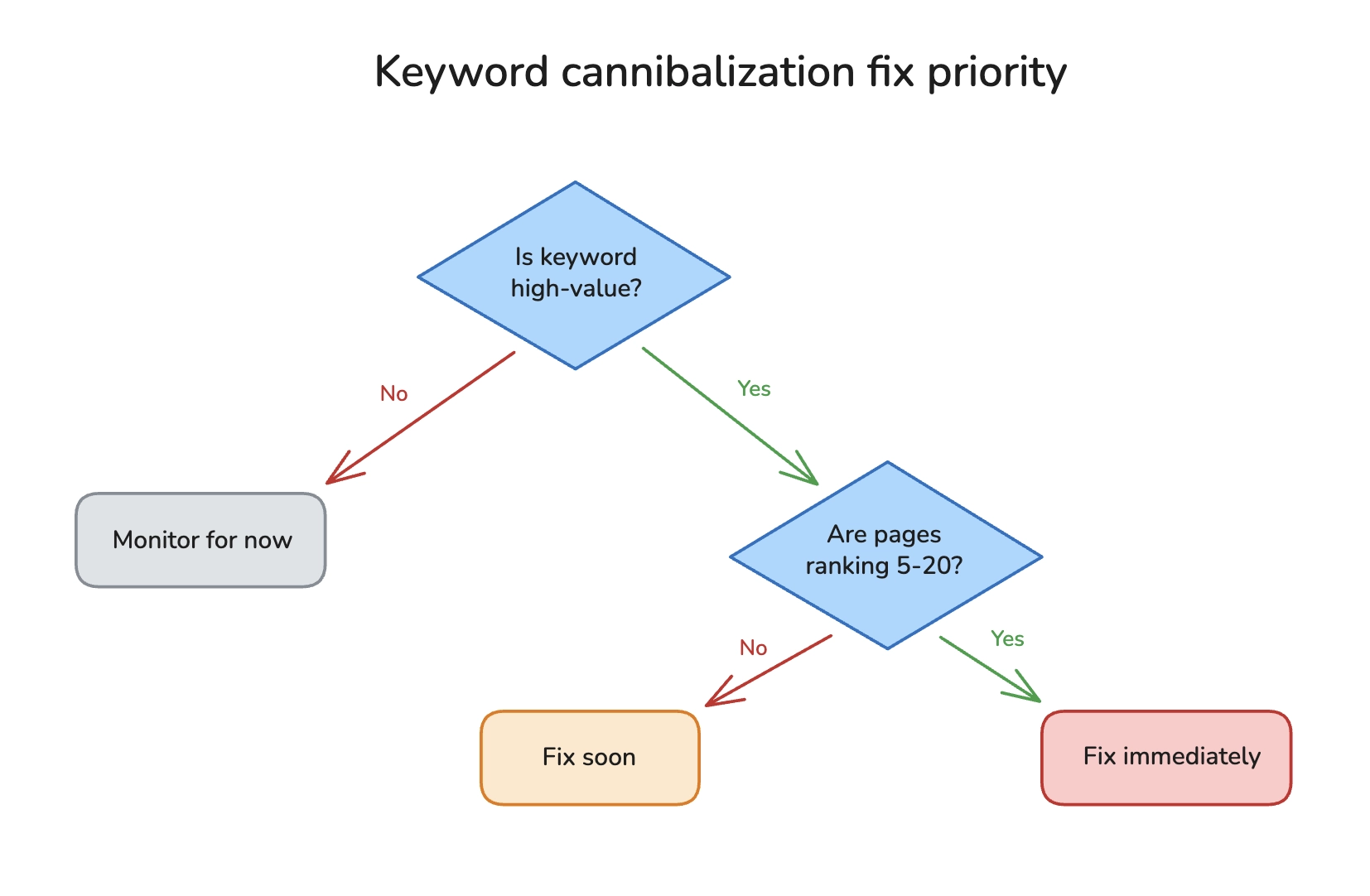
Fix immediately:
- High-value keywords where you rank 5-20 (close to page 1)
- Product or service pages cannibalizing each other
- Pages with significant backlinks pointing to the wrong one
Fix soon:
- Medium-value keywords with clear cannibalization
- Blog posts that could be consolidated for better content
Monitor for now:
- Low-value informational keywords
- Pages where one has clearly "won" already
- New content that hasn't stabilized in rankings yet
How to Fix Keyword Cannibalization
Once you've identified cannibalization, you have several fix options. The right choice depends on your specific situation.
Fix 1: Consolidate Into One Definitive Page
When to use: Multiple pages with similar content, none ranking well.
This is often the best solution. Take the best elements from each page and combine them into one comprehensive resource.
Process:
- Choose which URL to keep (usually the one with more backlinks or better current ranking)
- Merge the unique valuable content from other pages into the keeper
- Update the keeper's content to be comprehensive
- Set up 301 redirects from the deleted pages to the keeper
- Update internal links to point to the keeper
Example:
- Keep: /blog/complete-email-marketing-guide/
- Redirect: /blog/email-marketing-tips/ → keeper
- Redirect: /blog/email-marketing-best-practices/ → keeper
The keeper now has all the content value plus the redirect equity from the other pages.
For detailed guidance on when to merge versus delete content, see our guide on content pruning vs publishing more.
Fix 2: Differentiate With Distinct Intent
When to use: Pages that could serve different purposes with some adjustment.
Sometimes you don't need to merge. You need to clarify what makes each page unique.
Example transformation:
| Before (Cannibalized) | After (Differentiated) |
|---|---|
| "Email Marketing Tips" (generic) | "Email Marketing for E-commerce: Cart Abandonment Sequences" (specific niche) |
| "Email Marketing Guide" (generic) | "Email Marketing Software Comparison 2026" (commercial intent) |
Now one targets informational searches about e-commerce email, the other targets people ready to buy software. Different intent, no conflict.
Fix 3: Canonical Tags
When to use: You need both pages to exist but want Google to index only one.
Canonical tags tell Google: "These pages are similar. Please index this one."
Add to the non-preferred page:
<link rel="canonical" href="https://yoursite.com/preferred-page/">
Limitations: Canonical tags are hints, not commands. If other signals contradict your canonical (internal links, sitemaps), Google may ignore it. For more on this, see our guide on fixing canonicalization issues.
Fix 4: Noindex the Weaker Page
When to use: A page needs to exist for users but shouldn't compete in search.
Add to the page you want to hide from Google:
<meta name="robots" content="noindex">
This removes the page from Google's index entirely while keeping it accessible for users who navigate there directly.
Use cases:
- Thank you pages with keyword overlap
- Paginated archives
- Parameter-based filter pages
Fix 5: Internal Link Restructuring
When to use: Mild cannibalization where one page should clearly be the authority.
Sometimes the fix is simpler than content changes. If your internal links are pointing to multiple pages equally, restructure them to clearly favor one.
Action steps:
1. Identify your preferred page for the keyword
2. Update all internal links to point to that page
3. From secondary pages, add links pointing to the primary page
4. Update your sitemap to prioritize the primary page
This sends clear signals to Google about which page you consider authoritative.
Cannibalization Fix Checklist
Use this checklist when implementing fixes:
Before Making Changes
- Document current rankings for affected keywords
- Export backlink data for all affected URLs
- Screenshot current GSC data for comparison
- Identify which page has more backlinks and authority
- Decide on fix strategy (consolidate, differentiate, canonical, noindex)
During Implementation
- If consolidating: merge all valuable content into keeper page
- If redirecting: use 301 redirects (not 302)
- Update all internal links to point to the preferred URL
- Update XML sitemap to remove non-preferred URLs
- If using canonical: verify tag is in the
<head>section - Check that redirects work correctly (test manually)
After Implementation
- Request re-indexing in GSC for the preferred URL
- Monitor rankings weekly for 4-8 weeks
- Track GSC impressions and clicks for the target keyword
- Verify old URLs are being de-indexed (check with site: operator)
- Document results for future reference
Preventing Future Cannibalization
Fixing existing cannibalization is reactive. Here's how to prevent it proactively.
Build a Keyword Map
Before creating any content, maintain a keyword map that tracks:
| Keyword | Assigned URL | Status | Last Updated |
|---|---|---|---|
| email marketing tips | /blog/email-guide/ | Published | 2026-01 |
| email marketing software | /tools/email-software/ | Planned | - |
| email automation | /blog/email-guide/#automation | Section within guide | 2026-01 |
When someone proposes new content, check the map first. If a keyword is already assigned, either update the existing page or find a genuinely different angle.
Use Topic Clusters Intentionally
Organize content into pillar pages and cluster content:
Pillar page: Comprehensive guide targeting the broad keyword
Cluster pages: Specific subtopics that link back to the pillar
The pillar targets "email marketing." Cluster pages target specific variations like "email marketing for nonprofits" or "B2B email marketing automation." Each has a distinct purpose and links reinforce the hierarchy.
This is where keyword clustering tools become valuable. Instead of guessing which keywords are similar enough to cause problems, systematic clustering shows you the relationships upfront.
Establish Content Governance
For teams creating content:
- Require keyword assignment before writing: No content without a clear primary keyword that isn't already assigned
- Regular audits: Quarterly checks for new cannibalization
- Update over duplicate: Default to updating existing content rather than creating new posts on the same topic
- Document intent: Each page should have a documented purpose and target intent
Enterprise Cannibalization Challenges
Large sites face unique cannibalization issues.
Scale Problems
With thousands of pages, cannibalization can be systematic:
- Product pages for similar items
- Location pages with templated content
- Blog posts created by different teams targeting same keywords
- Historical content that nobody remembers exists
Solutions for Enterprise Sites
Automated monitoring: Set up alerts for when multiple URLs start ranking for the same keyword. Catch problems early.
Cross-team coordination: Marketing, product, and content teams need shared visibility into what keywords are already targeted.
Content inventory systems: Maintain a searchable database of all content with keyword assignments. Before creating anything new, search the inventory.
Template-level fixes: For e-commerce sites with thousands of product pages, fixes often need to happen at the template level (canonical tags, structured internal linking) rather than page by page.
Frequently Asked Questions
What is keyword cannibalization in SEO?
Keyword cannibalization occurs when multiple pages on your website compete to rank for the same keyword. Instead of having one strong page that ranks well, you end up with several weaker pages that dilute ranking signals. This typically results in lower rankings for all affected pages because link equity, content authority, and engagement metrics are split across multiple URLs.
How do I know if I have keyword cannibalization?
Check Google Search Console's Performance report. Filter by a specific query and look at the Pages tab. If multiple URLs from your site are getting impressions for the same keyword, you likely have cannibalization. Other signs include ranking positions that fluctuate frequently or multiple pages stuck in positions 10-30 for the same keyword.
What is keyword mapping and how does it prevent cannibalization?
Keyword mapping is the practice of assigning specific target keywords to specific pages on your site before creating content. By maintaining a map of which keywords belong to which pages, you prevent accidentally creating multiple pages targeting the same terms. It also helps identify gaps where you need new content versus opportunities to improve existing pages.
Should I delete or redirect cannibalized pages?
Usually redirect, not delete. A 301 redirect passes link equity from the old page to the new one, preserving any backlinks and authority the deleted page had. Only truly delete (return 404) if the page has no backlinks and provides no value even as a redirect destination.
How long does it take to see results after fixing cannibalization?
Typically 4-8 weeks for Google to fully process changes and for rankings to stabilize. You may see initial movement within 1-2 weeks, especially if you request re-indexing in Search Console. Monitor weekly and give the changes time to take full effect before concluding whether the fix worked.
Can category pages and product pages cannibalize each other?
Yes, this is common on e-commerce sites. A category page for "men's running shoes" and individual product pages optimized for "men's running shoes" can compete. The fix usually involves differentiating intent: category pages target browse/comparison intent while product pages target specific product searches. Internal linking should clearly establish the category as the parent.
Stop Your Pages From Competing
Keyword cannibalization is frustrating because it's self-inflicted. You created great content, but the way you organized it undermines your rankings. The pages fighting each other could be working together.
The fix is systematic, not complicated:
- Audit your content for keywords targeted by multiple pages
- Prioritize fixes based on keyword value and ranking potential
- Consolidate or differentiate depending on the content
- Implement redirects and update internal links to reinforce your preferred pages
- Prevent future issues with keyword mapping and content governance
Most sites have cannibalization problems they don't know about. The difference between sites that rank and sites that struggle is often just this: clarity about which page should rank for which keyword.
Your content should be a team, not a competition. Make every page count.