
Why New Websites Need a Different Keyword Strategy
Here's a hard truth: if you launch a new website and target "best project management software," you won't rank. Not this year. Probably not next year either.
New websites face a challenge that established sites don't: no established trust signals. Google has no reason to trust your content yet. You're competing against sites with thousands of backlinks, years of publishing history, and established topical authority.
The standard keyword research advice, find high-volume keywords and create great content, doesn't work when you're starting from zero. That advice assumes you can compete. New sites can't. Not yet.
But here's the opportunity: there are millions of keywords that established sites ignore. Long tail queries that are too small for big players to bother with. Specific questions that no one has answered well. Niche topics where a new, focused site can actually win.
In this guide, you'll learn a phased approach to keyword research specifically designed for new websites. We'll cover finding ultra-low-competition keywords you can actually rank for, building topical authority through keyword clusters, evaluating competition manually, and expanding your targets as your site grows.
Every successful website started with zero authority. The ones that grew fastest found keywords they could win, then built from there.
Understanding the New Website Challenge
Before diving into tactics, let's understand why traditional keyword research fails new sites and what to do instead.
Why You Can't Compete (Yet)
Google evaluates pages using hundreds of ranking factors, but for new sites, a few matter most:
Domain authority and trust:
Google doesn't know if your site is legitimate, expert, or trustworthy. Established sites have proven themselves over years. You haven't.
Backlink profile:
Links from other websites signal credibility. New sites have few or none. Competitors have thousands.
Content depth and history:
Sites that have published consistently on a topic have demonstrated expertise. You have one page. They have fifty.
User engagement signals:
Google learns from how users interact with search results. Established sites have years of click and engagement data. You're unknown.
What This Means for Keyword Selection
You can write the best content in the world for "keyword research," but if the first page is dominated by Ahrefs, Moz, Semrush, and HubSpot, you're not getting there. Those sites have:
- Domain authority scores of 80+
- Thousands of referring domains
- Hundreds of related articles building topical authority
- Years of ranking history for that term
Your brilliant new guide won't outrank them. Not because it's worse, but because Google has no evidence yet that you're trustworthy.
The New Site Advantage
Here's what most people miss: new sites have advantages too.
Focus: You can specialize in a narrow niche while big sites spread thin across hundreds of topics.
Speed: You can create exactly the content your research reveals. No bureaucracy, no approval processes.
Freshness: You can tackle emerging topics that established sites haven't covered yet.
Specificity: You can target long tail keywords that are too small for big players to prioritize.
The key is choosing keywords where these advantages matter more than site authority. (And whatever you do, resist the temptation to launch thousands of programmatic pages before you've built this foundation.)
Step 1: Define Your Niche and Topical Focus
New sites succeed fastest when they go narrow, not broad. Define your niche before researching keywords.
Why Narrow Beats Broad
Consider two approaches:
Broad approach: A site about "digital marketing" covering SEO, PPC, email, social media, analytics, and content marketing.
Narrow approach: A site specifically about "email marketing for course creators."
The broad site competes with every marketing blog on the planet. The narrow site competes with far fewer, and none of them are as focused.
Google rewards topical authority, demonstrated expertise in a specific subject area. A narrow site can build topical authority faster because:
- Every piece of content reinforces the same topic
- Internal linking connects related content naturally
- Users looking for that specific topic find comprehensive coverage
- You become the obvious expert in your slice of the market
Defining Your Topic Focus
Ask yourself:
What specific problem does your site solve? Not "help people with SEO," but "help Shopify store owners improve their product page rankings."
Who exactly is your audience? Not "marketers," but "solo founders doing their own marketing with limited time."
What makes your angle unique? What perspective, experience, or focus differentiates you from existing sites?
Create Your Topic Hierarchy
Map out your niche as a hierarchy:
MAIN TOPIC: Email Marketing for Course Creators

  SUB-TOPIC 1: Email List Building
    - Lead magnets for courses
    - Landing page conversion
    - Webinar registration funnels

  SUB-TOPIC 2: Email Sequences
    - Welcome sequences
    - Launch sequences
    - Re-engagement campaigns

  SUB-TOPIC 3: Email Tools
    - Platform comparisons
    - Integration guides
    - Automation setup
This hierarchy becomes your keyword research roadmap. Every keyword you target should fit somewhere in this structure.
Step 2: Find Ultra-Low-Competition Keywords
With your niche defined, it's time to find keywords where you can actually compete.
What "Low Competition" Really Means for New Sites
Keyword tools show "difficulty scores," but these are calibrated for established sites. A keyword with "30 difficulty" might still be impossible for a new site if the top results are all high-authority domains.
For new websites, low competition means:
- Weak domains ranking: Forums, Reddit threads, old blog posts, or low-authority sites in the top 5
- Poor content quality: Thin articles, outdated information, or content that doesn't fully answer the query
- Few exact-match results: The top results don't specifically target this exact keyword
- Low commercial value: Keywords that big sites ignore because they're not worth their time
Long Tail Keyword Research Strategy
Long tail keywords (queries with 3+ words) are your path to early wins.
Why long tails work for new sites:
- Lower competition: Fewer sites specifically target these queries
- Higher intent: Specific searches often indicate users closer to action
- Cumulative traffic: Many small keywords add up to meaningful traffic
- Ranking velocity: You can rank faster for specific queries
How to find long tail opportunities:
Start with your niche topic and add modifiers:
| Modifier Type | Examples |
|---|---|
| Question words | how to, what is, why does, can you |
| Specificity | for beginners, step by step, in 2026 |
| Audience | for small business, for freelancers, for startups |
| Comparison | vs, alternative, compared to |
| Problem | fix, solve, troubleshoot, not working |
Turn "email marketing" into:
- "how to write welcome email sequence for online course"
- "best email marketing for small course creators"
- "email marketing automation for Teachable"
Using Google Autocomplete Strategically
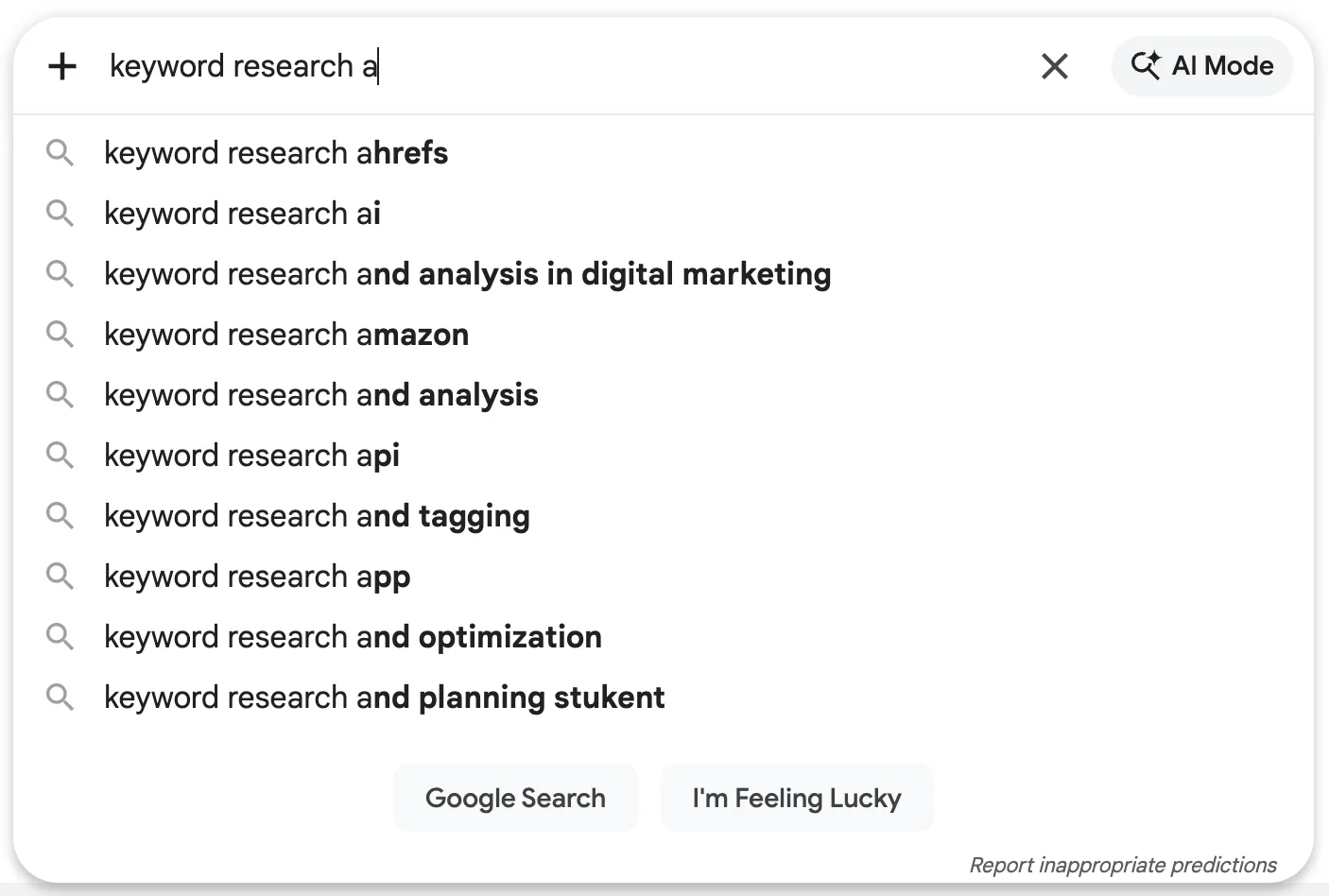
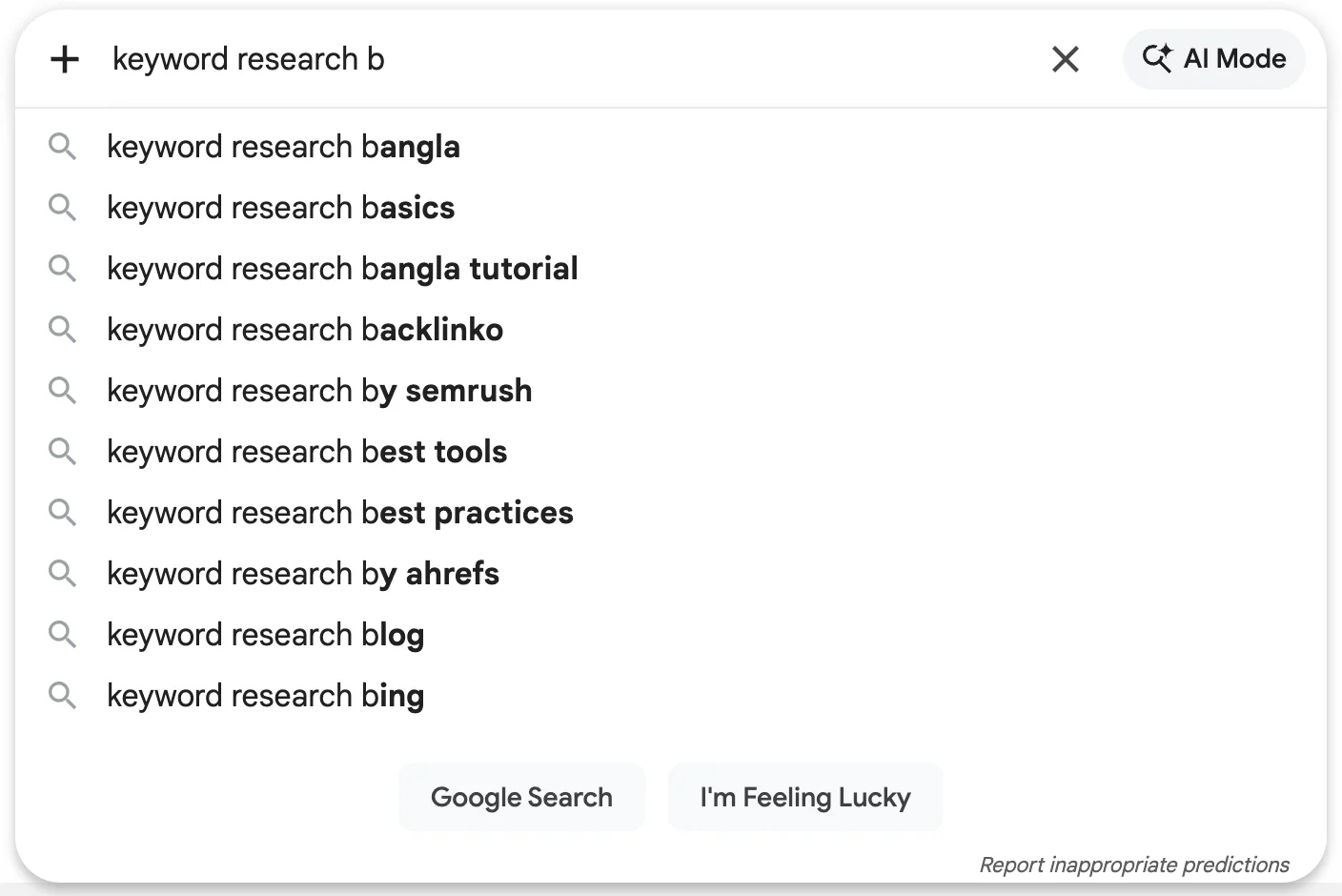
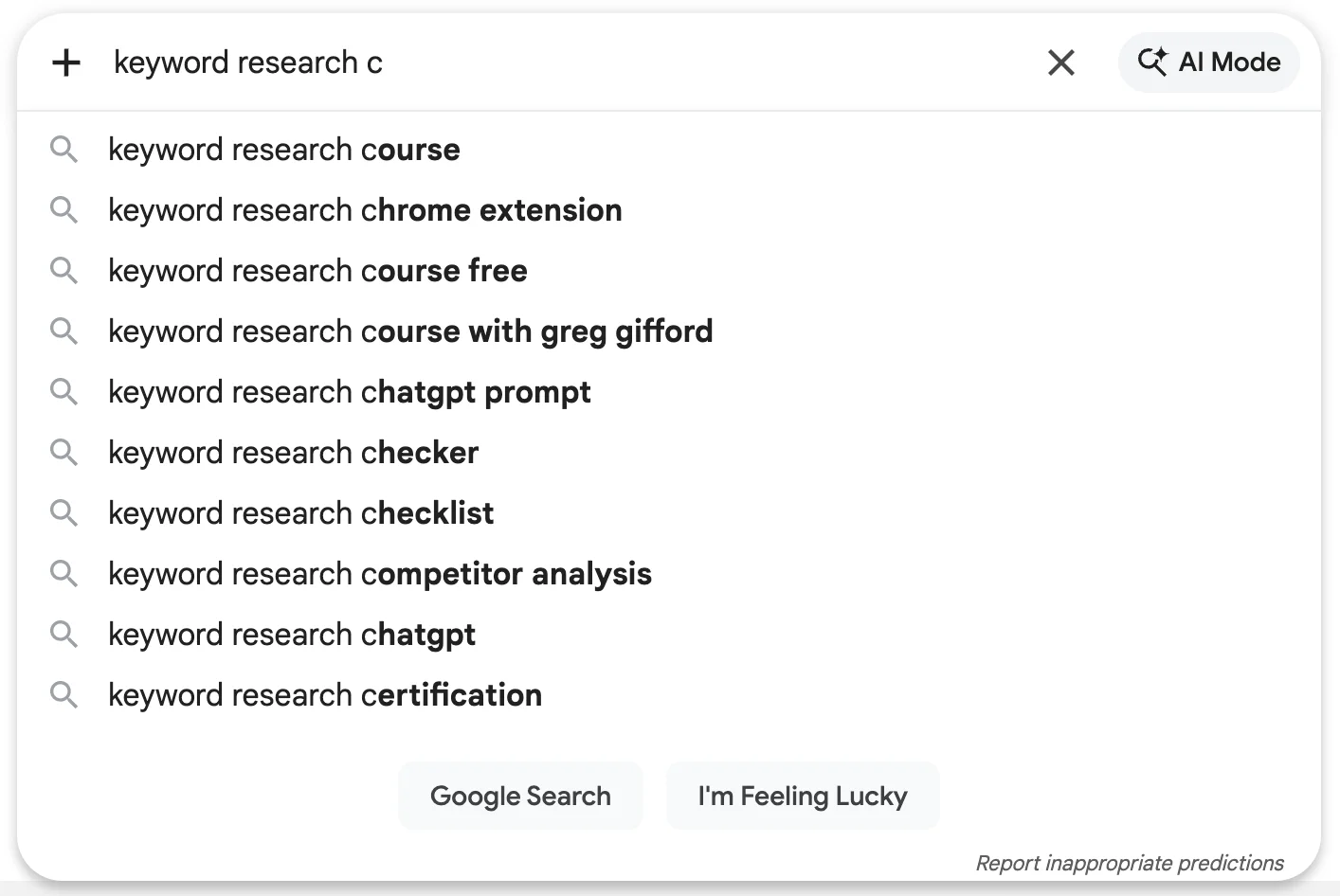
Google Autocomplete reveals actual searches, and many are long tail queries perfect for new sites.
The alphabet method:
1. Type your seed topic + space + a letter
2. Record the suggestions
3. Repeat for each letter a-z
The question method:
1. Type "how to [your topic]"
2. Type "what is [your topic]"
3. Type "why [your topic]"
4. Record all suggestions
For our example niche, typing "email sequence for course" might reveal:
- email sequence for course launch
- email sequence for course waitlist
- email sequence for free course
Each of these could be a blog post targeting a specific long tail keyword.
Validate with Search Results
Before committing to a keyword, check who currently ranks:
- Search the exact phrase in incognito mode
- Analyze the first 10 results
Good signs (target this keyword):
- Reddit, Quora, or forum posts ranking
- Small blogs or personal sites in top positions
- Old content (3+ years) ranking
- Content that doesn't fully answer the query
- Few results with the exact keyword in the title
Warning signs (skip for now):
- All results from major brands or publications
- Recent, comprehensive content in top positions
- Every result specifically targets this keyword
- High-authority sites (DA 70+) across all results
If you see forums and weak content ranking, you've found an opportunity.
Step 3: Evaluate Keyword Difficulty Manually
Keyword difficulty scores from tools aren't reliable for new sites. Learn to evaluate competition yourself.
The Manual SERP Analysis Process
For each potential keyword, perform this analysis:
Step 1: Note the domain types
| Domain Type | What It Tells You |
|---|---|
| Major publication (Forbes, HubSpot) | Very hard to outrank |
| Industry authority (Moz, Ahrefs for SEO) | Hard to outrank |
| Medium blogs (Moz DA 40-60) | Possible with great content |
| Smaller blogs (Moz DA under 30) | Achievable for new sites |
| Forum/Reddit | Clear opportunity |
Step 2: Assess content quality
- Is the content comprehensive?
- Does it directly answer the search query?
- Is it well-structured and easy to read?
- How recent is it?
If the ranking content is thin, outdated, or off-topic, you can win with better content.
Step 3: Check title optimization
Do the ranking pages have the keyword in their title? If not, they're ranking incidentally, not intentionally. A page optimized for the exact keyword has an advantage.
Create a Competition Scorecard
Build a simple scorecard for each keyword:
| Factor | Score (1-5) | Notes |
|---|---|---|
| Weakest domain in top 5 | DA of smallest site? | |
| Content quality gaps | What's missing from top results? | |
| Content freshness | How old is ranking content? | |
| Title optimization | Do titles include exact keyword? | |
| Total | Higher = better opportunity |
Keywords scoring 15+ are your priority targets.
Tools for Free Competition Analysis
You don't need paid tools to evaluate competition:
Moz Link Explorer (10 free searches/month)
- Check Domain Authority (DA), Moz's metric for estimating site strength
- See backlink counts
Ahrefs Webmaster Tools (free for your own site)
- Limited but useful for understanding metrics
Manual signals:
- Chrome extension showing DA
- Google's cache date (shows when Google last crawled)
- Site: search to count indexed pages
For detailed guidance on using free tools for keyword research, see our complete guide. Also review common keyword research mistakes to avoid pitfalls that derail new site growth.
Step 4: Build Topic Clusters for Authority
Individual keywords won't build authority. Keyword clusters create the topical depth that helps new sites rank.
What Are Keyword Clusters?
A keyword cluster is a group of related keywords that can be addressed through connected content:
Pillar content: A comprehensive guide covering the broad topic
Cluster content: Specific articles targeting long tail variations, all linking to the pillar
For a new site, clusters help because:
- Internal linking distributes authority across related pages
- Topical coverage signals expertise to Google
- User experience improves when related content is connected
- Ranking compounds as the cluster strengthens
Cluster Structure for New Sites
Start with one cluster. Don't spread thin across multiple topics.
CLUSTER: Email Welcome Sequences

PILLAR POST: "How to Write a Welcome Email Sequence That Converts"
(Targets: welcome email sequence, welcome series emails)

CLUSTER POSTS:
  → "7 Welcome Email Examples from Successful Course Creators"
     (Targets: welcome email examples, welcome email templates)

  → "How Many Emails Should Be in a Welcome Sequence?"
     (Targets: welcome sequence length, how many welcome emails)

  → "Welcome Email Subject Lines That Get Opened"
     (Targets: welcome email subject lines, first email subject)

  → "Welcome Sequence vs. Onboarding Sequence: What's the Difference?"
     (Targets: welcome vs onboarding, email sequence types)
Implementing Cluster Strategy
Week 1-2: Research and create the pillar post
- Make it comprehensive (2,000+ words)
- Include sections that can link to future cluster posts
- Optimize for the primary cluster keyword
Week 3-6: Create cluster posts
- Each targets a specific long tail keyword
- Each links back to the pillar post
- Pillar post links out to each cluster post as they're published
Ongoing: Expand and update
- Add new cluster posts as you discover keywords
- Update the pillar post to include new internal links
- Refresh content with new information
Tracking Cluster Performance
Monitor how your cluster develops:
- Which cluster posts rank first?
- Does ranking one post help others in the cluster?
- What new related keywords appear in Search Console?
Learn how to mine your Search Console data to discover cluster expansion opportunities.
Step 5: Learn from Competitor Keyword Analysis
Even as a new site, you can learn from what competitors are doing, and find gaps they've missed.
Find Your Real Competitors
Your competitors aren't the giant sites in your industry. They're sites similar in size and age that are succeeding in your niche.
How to find comparable competitors:
- Search your target keywords
- Note any smaller sites ranking (DA under 50)
- Check when these sites were created (Wayback Machine)
- Find sites 6-24 months old that are ranking
These sites show what's possible for a new site and what strategies work.
Manual Competitor Keyword Analysis
Without paid tools, you can still analyze competitors:
Site: search method:
site:competitor.com [topic]
This shows what pages the competitor has on that topic. Note:
- How many articles do they have?
- What specific angles do they cover?
- What questions do they answer?
Blog category browsing:
Visit competitor blogs and browse their categories. What topics do they cover that you don't? What keywords appear in their titles?
Google Search Console comparison:
Once you have some data, compare your impressions to what competitors rank for. Where do they appear that you don't?
Finding Keyword Gaps
Keyword gaps are terms competitors rank for that you don't. For new sites, look for:
Topics competitors covered once but didn't develop:
A single article without supporting content means they're not building authority there. You could build a whole cluster.
Outdated competitor content:
If their article is from 2021 and the topic has changed, you can win with fresh, updated content.
Questions they didn't answer:
Check "People Also Ask" for keywords competitors rank for. Are all those questions answered? Often they're not.
Specificity gaps:
If a competitor has "email marketing guide" but not "email marketing for Kajabi users," the specific version is your opportunity.
Step 6: Create Content That Deserves to Rank
Finding low-competition keywords is step one. Creating content that actually ranks is step two.
Content Requirements for New Sites
Because you lack established authority signals, your content must be significantly better than what currently ranks. Not slightly better. Significantly better.
Depth: Cover the topic more thoroughly than anyone else
Clarity: Make it easier to understand than competing content
Freshness: Include the most current information and examples
Actionability: Give readers specific steps they can take
Originality: Add perspectives, examples, or data others don't have
On-Page SEO Essentials
Strong on page seo helps new sites compete despite lower authority:
Title tags:
- Include primary keyword near the beginning
- Make it compelling enough to click
- Keep under 60 characters
URL structure:
- Include primary keyword
- Keep it short and readable
- Use hyphens between words
Heading structure:
- H1 contains primary keyword
- H2s target secondary keywords or questions
- H3s organize subsections logically
Content optimization:
- Primary keyword in first 100 words
- Secondary keywords distributed naturally
- Answer related questions throughout
Internal linking:
- Link to relevant existing content
- Use descriptive anchor text
- Update old posts to link to new ones
The "10x Content" Standard
For competitive keywords, aim for content that's 10 times better than what ranks. For low-competition keywords, you can win with "2x content," but better content always helps.
What makes content better:
- More comprehensive coverage
- Better examples and illustrations
- Clearer explanations
- More actionable advice
- Better visual design and readability
- More current information
Step 7: Expand as Your Site Grows
Your keyword strategy should evolve as your site gains authority.
Phase 1: Establish Foundation (Months 1-3)
Focus: Ultra-low-competition long tail keywords
Goals:
- Get first pages indexed and ranking
- Build initial topical cluster
- Generate some organic traffic (even small amounts)
- Learn what works for your niche
Keyword targets:
- Long tail queries with 10-100 monthly searches
- Keywords where forums or weak sites rank
- Very specific questions in your niche
Phase 2: Build Authority (Months 4-6)
Focus: Expand clusters and target medium competition
Goals:
- Strengthen existing clusters with more content
- Start ranking for slightly more competitive terms
- Begin building backlinks naturally through quality content
- Increase organic traffic significantly
Keyword targets:
- Long tail keywords with 100-500 monthly searches
- Questions and how-to queries in your niche
- Comparison and alternative keywords
Phase 3: Compete More Broadly (Months 7-12)
Focus: Target keywords with real search volume
Goals:
- Compete for medium-difficulty keywords
- Establish multiple topic clusters
- Build meaningful organic traffic
- Start appearing for some head terms
Keyword targets:
- Keywords with 500-2,000 monthly searches
- Some commercial intent keywords
- Category-level topics (not just long tail)
Track and Adjust
Use Google Search Console to monitor progress:
What to track:
- New keywords generating impressions
- Position changes for target keywords
- Click-through rates by query
- Pages gaining traction
How to adjust:
- Double down on topics showing momentum
- Update content that's ranking but not in top positions
- Abandon topics showing no progress after 3-4 months
- Discover new opportunities from GSC query data
Frequently Asked Questions
How long until a new website can rank for anything?
Most new sites start seeing some rankings within 2-4 months for low-competition keywords. Meaningful traffic typically takes 6-12 months. This varies widely based on niche, content quality, and keyword selection. Targeting ultra-low-competition keywords speeds up this timeline.
Should I target zero-volume keywords?
Yes, if they're relevant to your niche. "Zero volume" in tools often means under 10 searches per month, not actually zero. These keywords are often easier to rank for and can collectively drive meaningful traffic. Use Google Autocomplete to verify actual search interest.
How many keywords should I target per page?
One primary keyword plus 5-10 related secondary keywords. All keywords should be semantically related and answerable with the same content. Don't force unrelated keywords into a single page.
Is it worth competing for keywords where big brands rank?
Not initially. Focus on keywords where you can reach page one within 6 months. As your authority grows, you can gradually target more competitive terms. Competing for impossible keywords wastes resources you need elsewhere.
What's more important: search volume or ranking potential?
Ranking potential, especially for new sites. A keyword with 50 monthly searches that you can rank #1 for is worth more than a keyword with 5,000 searches where you'll never crack page two. Volume matters only if you can actually capture it.
How do I know if a keyword is too competitive?
Search it in incognito mode. If all results on page one are from major brands or high-authority sites with comprehensive content, it's too competitive for a new site. Look for keywords where at least some results come from smaller sites or non-optimized content.
Should I use AI to help with keyword research?
AI tools like ChatGPT are excellent for brainstorming keyword ideas and clustering related terms. However, AI can't provide accurate search volume or competition data. Use AI for ideation, then validate with actual tools. See our guide on combining AI with SEO tools for a complete workflow.
When should I start targeting more competitive keywords?
When you're consistently ranking on page one for your current targets and seeing steady organic traffic growth. This usually happens after 6-12 months of consistent publishing and some natural backlink acquisition.
Start Building Your SEO Foundation Today
Every authority site you see today started exactly where you are now: no established trust, no rankings, no traffic. What separated the successful ones wasn't luck or resources. It was strategic keyword selection.
The approach in this guide works because it matches your keyword targets to your current authority:
- Start ultra-narrow with long tail keywords where weak content ranks
- Build clusters to establish topical authority in your niche
- Evaluate competition manually because tools aren't calibrated for new sites
- Create exceptional content that deserves to outrank what's there
- Expand strategically as your site gains credibility (once established, you can even expand into international markets)
Here's your action plan:
- This week: Define your niche focus and create your topic hierarchy
- Next week: Research 20-30 ultra-low-competition long tail keywords using the methods above
- This month: Create your first pillar post and 2-3 cluster posts
- Ongoing: Track rankings in Search Console and expand your clusters based on what works
The keywords that will grow your site aren't the ones everyone else is targeting. They're the specific, focused queries that big sites ignore. Find them, serve them better than anyone else, and watch your authority build.
Your new website won't rank for competitive keywords today. But with the right strategy, today's new site becomes next year's authority. Start now.