
Google Found Your Page. Then Decided Not to Index It.
You published new content. Google crawled it within 24 hours. But weeks later, it still doesn't appear in search results. When you check Search Console, you see the dreaded status: "Crawled - currently not indexed."
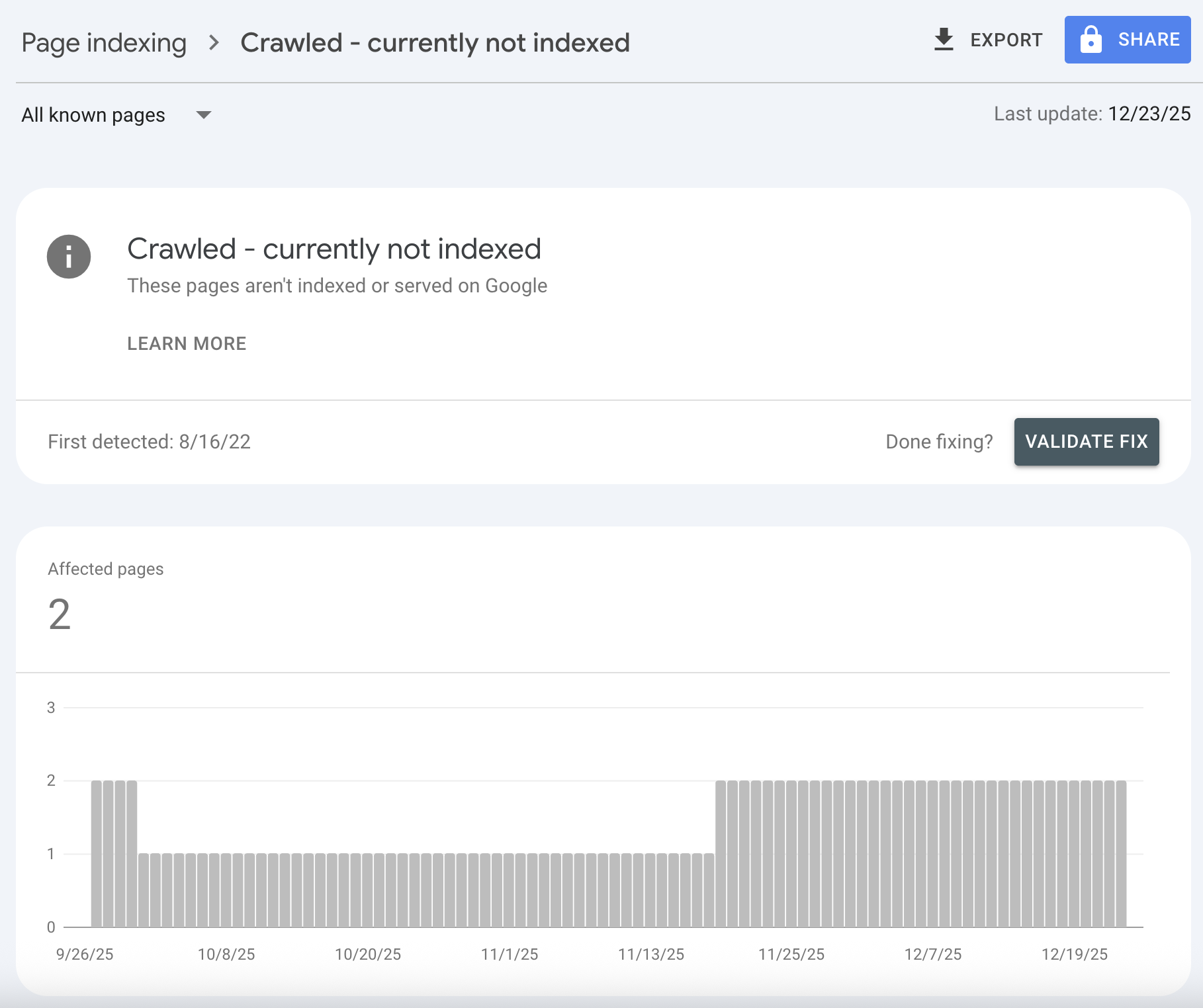
This is one of the most frustrating problems in SEO. Your page isn't blocked. It doesn't have technical errors. Google found it, read it, and then decided it wasn't worth indexing.
I've seen this status affect individual pages, entire site sections, and sometimes thousands of URLs. The fix depends entirely on understanding why Google made that decision. And Google won't tell you directly. You have to diagnose it yourself.
In this guide, you'll learn exactly what "crawled - currently not indexed" means, the seven most common causes, and a step-by-step troubleshooting process to get your pages indexed. No generic advice. Just the diagnostic framework that actually works.
Google already visited your page. Now you need to convince it your page deserves to exist in the index.
What "Crawled - Currently Not Indexed" Actually Means
Let's be precise about what this status tells you.
The Indexing Pipeline
Google processes URLs through distinct stages:
| Stage | Status in GSC | What Happened |
|---|---|---|
| 1. Discovery | "Discovered - currently not indexed" | Google found the URL but hasn't crawled it yet |
| 2. Crawl | (no separate status) | Googlebot fetched the page content |
| 3. Evaluation | "Crawled - currently not indexed" | Google read the page but chose not to index |
| 4. Indexing | "Indexed" | Page entered Google's search index |
"Crawled - currently not indexed" means your page passed stages 1 and 2 but failed stage 3. Google has the content. It made a deliberate choice not to include it.
Why This Is Different From Other Exclusions
Compare this to other common statuses:
| Status | Meaning | Typical Fix |
|---|---|---|
| "Blocked by robots.txt" | You told Google not to crawl | Update robots.txt |
| "Excluded by noindex tag" | You told Google not to index | Remove noindex |
| "Duplicate, submitted URL not canonical" | Google chose a different URL | Fix canonical tags |
| "Crawled - currently not indexed" | Google chose not to index | Improve the page |
The first three are configuration problems. You can fix them by changing settings. "Crawled - currently not indexed" is a quality judgment. Google doesn't think the page adds enough value to include in search results.
The Hard Truth
This status is Google saying: "I saw your page, and it's not good enough."
That sounds harsh, but it's useful information. It means the solution isn't technical. You can't fix this with a sitemap submission or a robots.txt change. You need to make the page more valuable, more unique, or more trustworthy.
The 7 Most Common Causes (And How to Identify Each)
Based on hundreds of indexing audits, these are the reasons pages get crawled but not indexed.
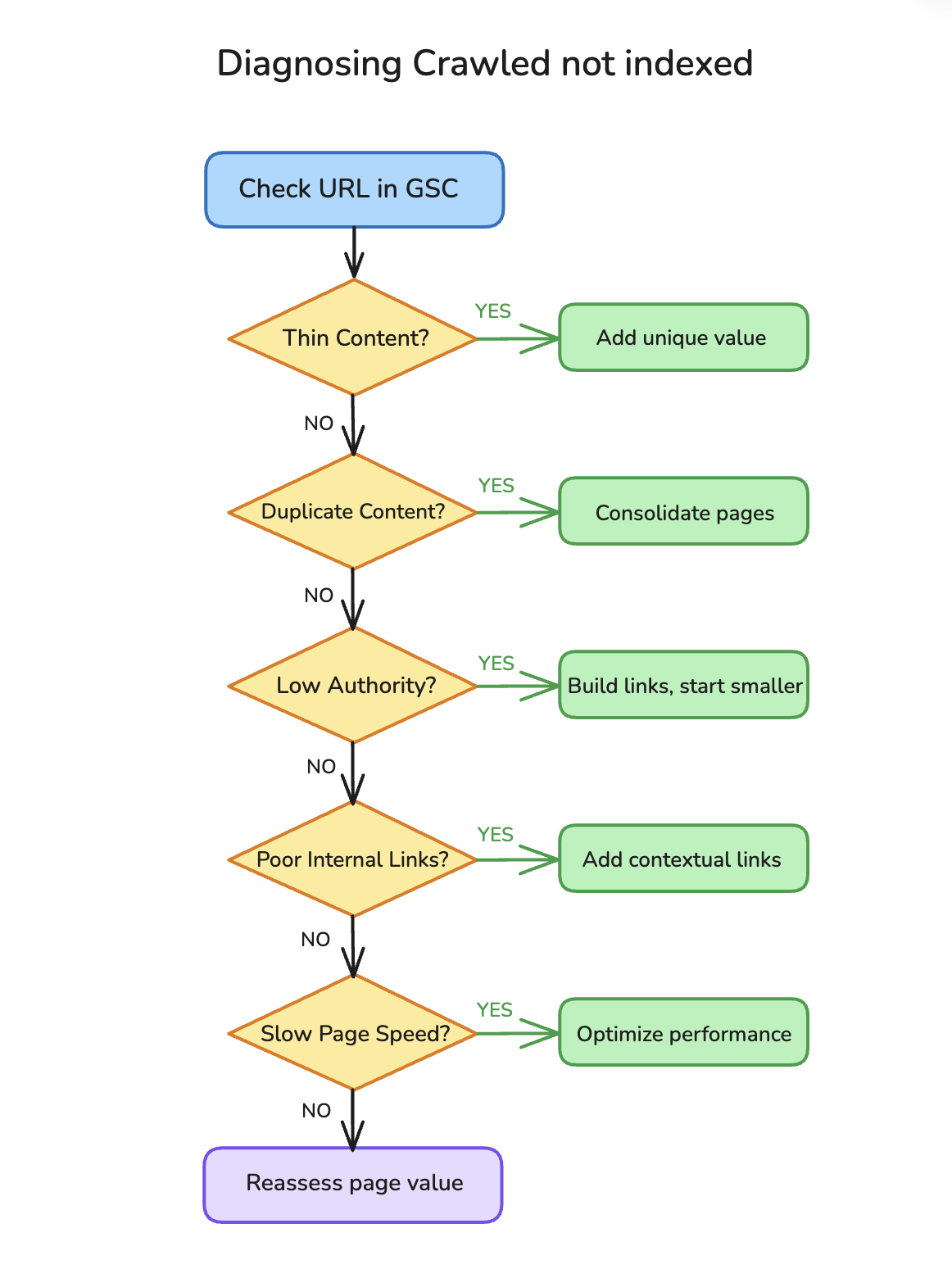
1. Thin or Low-Value Content
The problem: Your page doesn't offer enough unique value to justify indexing.
Signs this is your issue:
- Page has fewer than 500 words
- Content is mostly boilerplate or template text
- Similar content exists on thousands of other sites
- The page answers a question that can be answered in one sentence
How to check:
Search your page's main topic in Google. If the first page results are all 2,000+ word comprehensive guides and your page is a 300-word summary, Google has decided those other pages serve users better.
The fix:
Add substantial, unique content. Don't just add words. Add value: original data, specific examples, actionable steps, expert insights.
2. Duplicate or Near-Duplicate Content
The problem: Google found content too similar to pages already indexed (on your site or elsewhere).
Signs this is your issue:
- You have multiple pages targeting the same topic
- The page uses templated content with only minor variations
- The content is syndicated from or to other sites
How to check:
Copy a distinctive sentence from your page and search it in quotes. If other pages appear with the same text, you have a duplicate content issue.
The fix:
Either consolidate duplicate pages into one stronger page, or differentiate them significantly. Make each page serve a distinct purpose.
3. Low Site Authority for Competitive Topics
The problem: Your domain doesn't have enough authority for Google to trust your pages on competitive topics.
Signs this is your issue:
- Your site is relatively new (under 1-2 years)
- You have few backlinks from external sites
- The topic is covered by major authority sites
- Your other pages on less competitive topics are indexed fine
How to check:
Use the Google URL Inspection tool on indexed and non-indexed pages. If high-competition pages are stuck while low-competition pages index normally, authority is likely the issue.
The fix:
Start with less competitive topics where you can actually rank. Build authority over time. Or significantly differentiate your content with original research, unique data, or expert perspectives that authority sites don't have.
4. Poor Internal Linking
The problem: The page is orphaned or poorly connected to the rest of your site.
Signs this is your issue:
- Few or no internal links point to the page
- The page is buried deep in site structure (4+ clicks from homepage)
- No contextual links from related content
How to check:
Search site:yourdomain.com "exact page title" in Google. If your own site doesn't reference this page much, neither will Google.
Alternatively, check your site's internal linking in a crawl tool. Pages with fewer than 3 internal links are at risk.
The fix:
Add contextual internal links from related, high-authority pages on your site. Link from your homepage or main navigation if the page is important. For more on building effective internal linking structures, see our guide on mining Google Search Console for opportunities.
5. Crawl Budget Constraints
The problem: Google allocates limited crawling resources to your site, and this page is low priority.
Signs this is your issue:
- Your site has thousands of pages
- You recently launched many new pages at once
- Higher-priority pages (product pages, key landing pages) are indexed but blog posts aren't
- Site speed is slow
How to check:
In Search Console, go to Settings → Crawl stats. Look at your daily crawl requests. If you have 10,000 pages but Google only crawls 100/day, low-priority pages will wait months.
The fix:
Improve site speed. Remove low-value pages. Prioritize your sitemap to list important pages first. Build more internal links to priority pages. (For sites with programmatic content at scale, see our guide on programmatic SEO pitfalls.)
6. Page Experience Issues
The problem: Technical factors make the page a poor user experience.
Signs this is your issue:
- Page loads slowly (over 3 seconds)
- Poor Core Web Vitals scores
- Not mobile-friendly
- Intrusive interstitials or popups
- JavaScript rendering issues (common on single-page apps, see our JavaScript SEO guide)
How to check:
Run the page through Google's PageSpeed Insights. Check the Core Web Vitals section in Search Console. Test on mobile using Chrome DevTools' device emulator.
The fix:
Optimize images, improve server response time, fix layout shifts, ensure mobile responsiveness. JavaScript-heavy pages may need server-side rendering for proper indexing.
7. The Page Adds Nothing New
The problem: Your page covers a topic that's already well-served in Google's index, and doesn't add a unique perspective.
Signs this is your issue:
- The topic is extremely common ("What is SEO?")
- Your page says the same things as every other result
- No original research, data, examples, or expert insights
- The page is clearly aimed at SEO rather than helping users
How to check:
Honestly ask: why would Google index my page when 10,000 similar pages already exist? What does my page offer that others don't?
The fix:
Add something unique. Original data. Fresh angles. Real case studies. Expert quotes. First-hand experience. If you can't add something new, consider whether the page should exist at all.
Step-by-Step Diagnosis Process
When you find pages stuck in "Crawled - currently not indexed," follow this systematic process.
Step 1: Check the URL Inspection Tool
Go to Search Console → URL Inspection → enter the affected URL.
What to look for:
- Last crawl date (how recently did Google visit?)
- Crawl status (was it successful?)
- Whether a user-declared canonical exists
- Whether Google-selected canonical differs from your URL
If the crawl date is months old, the page might just need a fresh crawl. If Google selected a different canonical, you have a duplicate content issue.
Step 2: Compare to Similar Pages
Find pages on your site that ARE indexed successfully. Compare:
| Factor | Indexed Page | Non-Indexed Page |
|---|---|---|
| Word count | ||
| Internal links pointing to it | ||
| External backlinks | ||
| Page load time | ||
| Topic competitiveness | ||
| Uniqueness of content |
This comparison often reveals the issue immediately. If indexed pages have 10 internal links and your stuck page has 1, you've found the problem.
Step 3: Run a Content Quality Audit
For the specific page, evaluate:
- Does the content provide unique value not available elsewhere?
- Is the content comprehensive enough to satisfy search intent?
- Are there original examples, data, or insights?
- Is the content up-to-date and accurate?
- Would a real user find this helpful?
If you can't confidently answer "yes" to at least 3 of these, the page probably needs significant improvement.
Step 4: Check Technical Factors
Even though the page was crawled successfully, technical issues can still affect indexing decisions:
Server response headers:
Ensure the page returns a 200 status code and doesn't have conflicting headers.
Mobile rendering:
Test the page in Google's Mobile-Friendly Test. If it fails or renders poorly on mobile, Google may deprioritize it.
JavaScript dependencies:
If critical content requires JavaScript to render, Google may not see it. Check "View rendered HTML" in URL Inspection to see what Google actually sees.
Step 5: Assess Site-Wide Patterns
Don't look at one page in isolation. Check if there's a pattern:
- Are all pages of a certain type not indexed? (e.g., all category pages, all author pages)
- Did this start after a specific date? (possible algorithm update or site change)
- Are only new pages affected, or old pages too?
Patterns reveal systemic issues. Random pages not indexed suggests individual quality problems. Entire sections not indexed suggests structural or site-wide quality issues.
How to Fix Pages Stuck in "Crawled - Currently Not Indexed"
Once you've identified the cause, here's how to fix each issue.
Fixing Thin Content
Goal: Make the page substantially more valuable than alternatives.
- Research what top-ranking pages for your target keyword cover
- Identify gaps or angles they miss
- Add depth: more sections, more examples, more data
- Include original elements: custom graphics, proprietary data, expert quotes
- Aim for the page to be the best result for its target query
Don't: Just pad with words. Quality matters more than length.
Fixing Duplicate Content
Goal: Make each page distinct or consolidate into one strong page.
If pages should be consolidated:
1. Choose the strongest URL to keep
2. 301 redirect other URLs to it
3. Update internal links to point to the canonical URL
4. Combine the best content from all pages into one
If pages should remain separate:
1. Differentiate the content significantly (different angles, audiences, or purposes)
2. Use proper canonical tags if needed
3. Ensure each page serves a distinct search intent
For more on this decision, see our guide on content pruning vs. publishing.
Fixing Poor Internal Linking
Goal: Connect the page to your site's authority flow.
- Find your highest-authority pages (most backlinks, most traffic)
- Add contextual links from those pages to the stuck page
- Link from topically related content
- Consider adding the page to navigation if it's important
- Create a logical linking structure (hub and spoke or siloed)
Quick win: Add a link from your homepage or a popular page to the stuck URL.
Fixing Page Experience Issues
Goal: Meet Google's page experience thresholds.
Core Web Vitals targets:
- LCP (Largest Contentful Paint): under 2.5 seconds
- FID (First Input Delay): under 100 milliseconds
- CLS (Cumulative Layout Shift): under 0.1
Common fixes:
- Compress and properly size images
- Use next-gen formats (WebP)
- Implement lazy loading
- Remove render-blocking resources
- Add width/height attributes to images and embeds
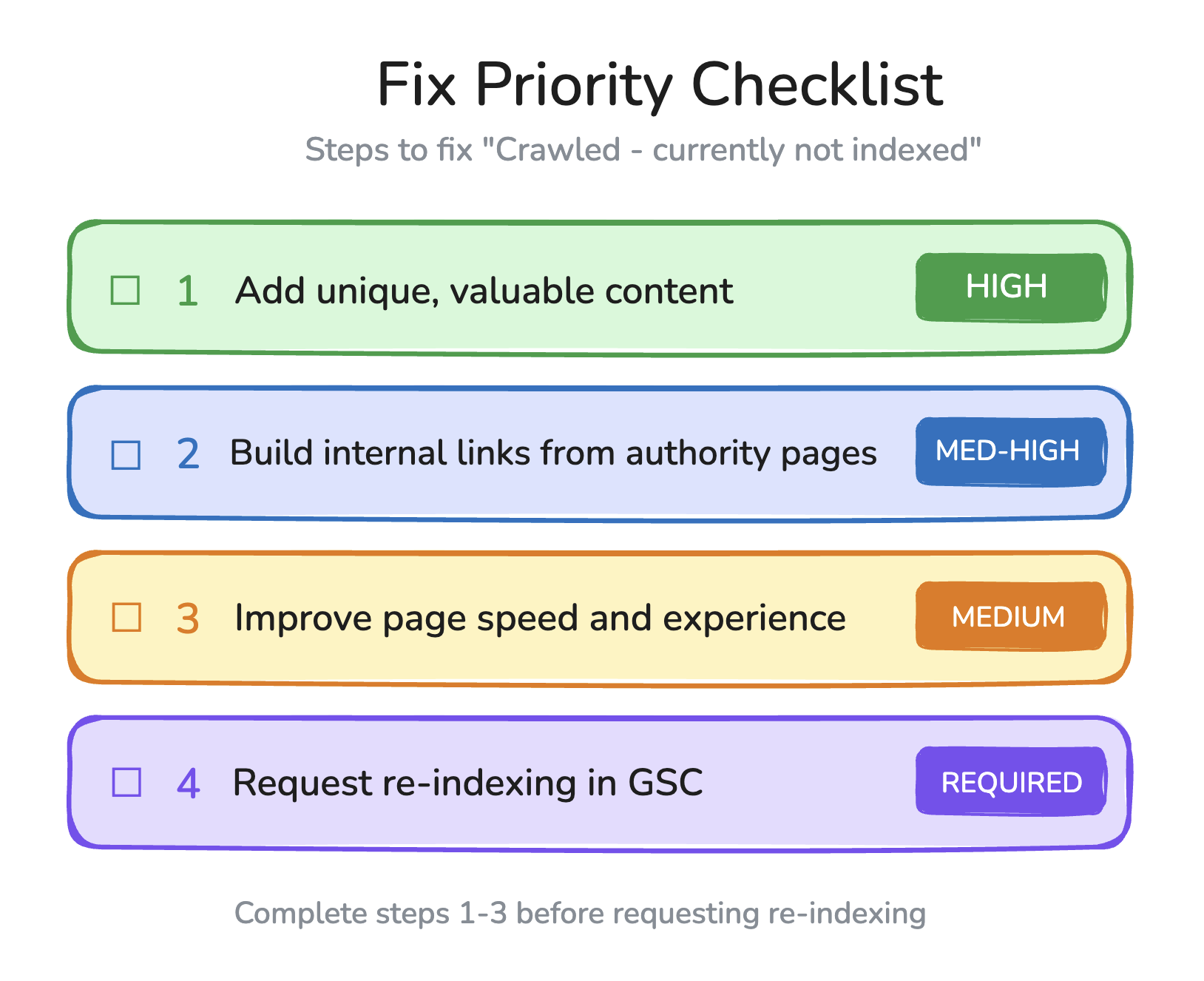
Requesting Re-indexing
After making improvements:
- Go to URL Inspection in Search Console
- Enter the improved URL
- Click "Request Indexing"
- Wait (typically 1-2 weeks, sometimes longer)
Important: Don't spam the request indexing button. One request per URL per significant update is enough. Repeated requests don't speed up the process.
Preventing Future Indexing Issues
Once you've fixed existing problems, prevent them from recurring.
Before Publishing New Content
Ask these questions before any page goes live:
- Does this page add unique value? If not, don't publish it.
- Is there already a better page on this topic? If so, improve that page instead.
- Does this page have internal links planned? Every new page needs links from existing content.
- Is the page technically sound? Fast, mobile-friendly, properly structured.
- What's the realistic chance this page ranks? Be honest about competition.
Ongoing Monitoring
Set up regular checks:
Weekly:
- Check Search Console's Index Coverage report
- Note any increases in "Crawled - currently not indexed"
Monthly:
- Review all pages stuck in this status
- Prioritize fixes based on page importance
- Track whether previous fixes worked
Quarterly:
- Full content audit
- Consider pruning pages that can't be fixed
- Review site-wide quality signals
Building Indexing Signals Over Time
Long-term strategies that improve indexing success:
- Build site authority: Earn backlinks through valuable content
- Publish consistently: Show Google your site is active and maintained
- Improve existing content: Update old pages instead of only publishing new
- Remove low-value pages: A smaller, higher-quality site indexes better
- Focus on topics you can win: Don't chase keywords you can't realistically rank for
Tools for Monitoring Indexing Status
Google Search Console (Essential, Free)
The primary source of truth.
Key reports:
- Index Coverage: See all pages by status (indexed, excluded, errors)
- URL Inspection: Check individual page status
- Crawl Stats: Monitor how Google crawls your site
Third-Party Crawlers
Tools like Screaming Frog, Sitebulb, or Ahrefs Site Audit can:
- Find orphan pages (no internal links)
- Identify thin content pages (by word count)
- Detect duplicate content issues
- Map internal linking structure
Log File Analysis
For advanced troubleshooting, analyze server logs to see:
- Which pages Googlebot actually crawls
- How often each page is crawled
- Whether important pages are being ignored
- Server response codes for each request
Custom Monitoring
Set up alerts for:
- Sudden increases in non-indexed pages
- Important pages dropping out of the index
- Changes in crawl frequency
Frequently Asked Questions
Why is my page "crawled - currently not indexed"?
Google crawled your page but decided not to add it to the search index. Common reasons include thin content, duplicate content, low site authority for competitive topics, poor internal linking, or page experience issues. The page wasn't blocked or errored, so Google made a quality judgment.
How long does it take for a page to get indexed?
For established, trusted sites, new pages often index within 1-7 days. For newer sites or pages with weak signals, it can take weeks to months. Some pages may never index if Google doesn't see sufficient value. Requesting indexing in Search Console can speed up the process but doesn't guarantee indexing.
Should I request indexing for every page?
No. Only request indexing for pages you've improved or that are particularly important. The request feature is rate-limited, and overuse won't help. Focus on fixing underlying issues rather than repeatedly requesting indexing.
How do I know if thin content is the problem?
Compare your page to top-ranking results for your target keyword. If competitors have 2,000+ word comprehensive guides and your page is 300 words, content depth is likely the issue. Also check if your page offers anything unique: original data, fresh angles, specific examples.
Can I fix this by submitting my sitemap again?
No. Google already crawled the page, so discovery isn't the issue. Re-submitting your sitemap doesn't change Google's evaluation of page quality. You need to improve the page itself.
Why are some pages indexed and similar pages not?
Google evaluates each page individually. Pages with more internal links, better content, or stronger relevance signals get indexed first. If you have many similar pages, Google may index only the strongest and skip others it sees as redundant.
Your Page Deserves to Be Indexed. Make It Prove That.
"Crawled - currently not indexed" isn't a technical error. It's a message from Google: your page isn't good enough yet.
That sounds discouraging, but it's actually useful feedback. You know exactly what you need to do: make the page better.
Here's your action plan:
- Check URL Inspection in Search Console for affected pages
- Compare to similar pages that ARE indexed
- Identify the cause using the diagnostic framework above
- Fix the root issue (don't just add words or request indexing)
- Request re-indexing after making substantial improvements
- Monitor to see if fixes worked (give it 2-4 weeks)
Most indexing problems come down to one thing: the page doesn't provide enough unique value. Fix that, and the indexing usually follows.
Stop asking "why won't Google index my page?" Start asking "why should Google index my page?"
If you can't answer that question clearly, neither can Google.