
You Set the Canonical Tag. Google Ignored It.
You did everything right. You added the canonical tag pointing to your preferred URL. Then you checked Search Console and saw the message: "Duplicate, Google chose different canonical than user." Google looked at your instruction and decided it knew better.
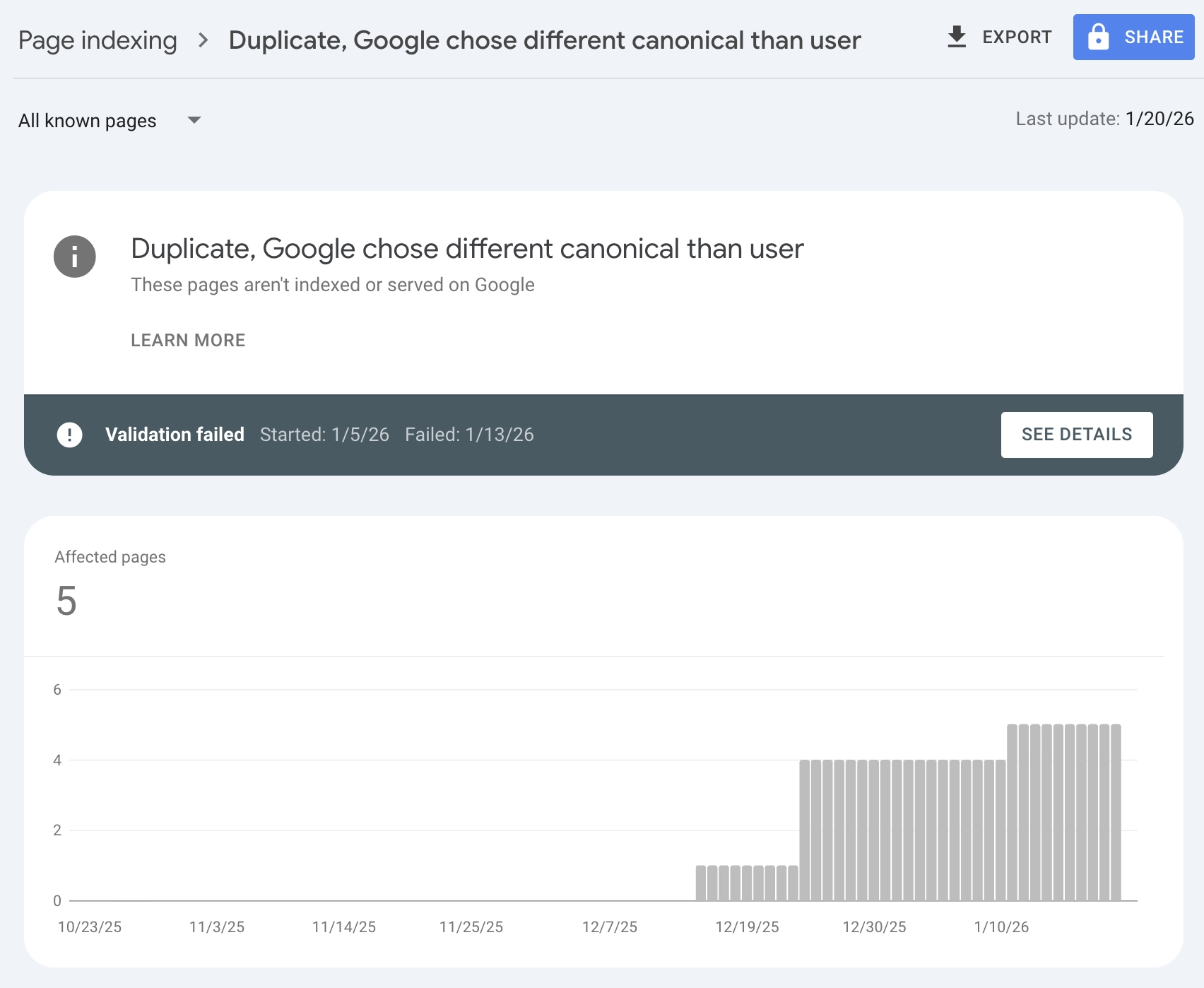
This is one of the most frustrating issues in technical SEO. You're explicitly telling Google which URL to index, and Google is picking a different one. Maybe it's indexing the HTTP version instead of HTTPS. Maybe it's choosing a URL with tracking parameters. Maybe it's picking a scraped copy of your content on someone else's site.
I've seen this issue affect everything from small blogs with a handful of duplicate URLs to enterprise e-commerce sites with millions of product variations. The good news: in most cases, it's fixable. The bad news: canonical tags alone often aren't enough.
In this guide, you'll learn exactly what causes Google to ignore your canonical tags, how to diagnose which duplicates are actually hurting you, and the systematic fixes that get Google to respect your preferred URLs. No panic required.
A canonical tag is a hint, not a command. To make Google listen, you need to send consistent signals.
What Is Canonicalization (And Why Google Overrides Your Tags)
Canonicalization is how Google handles duplicate or near-duplicate content. When multiple URLs contain the same (or very similar) content, Google groups them together and picks one to show in search results. That chosen URL is the "canonical."
How Google Decides Which URL to Canonicalize
Google doesn't blindly follow your canonical tag. It uses approximately 20 different signals to determine which URL should be the canonical, including:
| Signal | Weight | What Google Looks At |
|---|---|---|
| Canonical tag | Strong hint | The <link rel="canonical"> you specify |
| Internal links | Strong signal | Which URL your site links to most |
| Sitemap inclusion | Moderate signal | Which URL appears in your XML sitemap |
| HTTPS vs HTTP | Strong preference | Google prefers HTTPS |
| Redirect signals | Strong signal | Where redirects point |
| External backlinks | Strong signal | Which URL other sites link to |
| URL length/cleanliness | Weak preference | Shorter, cleaner URLs preferred |
| Hreflang annotations | Moderate signal | Language/region specifications |
When these signals align, Google follows your canonical tag. When they conflict, Google makes its own decision based on the overall picture.
User-Declared vs Google-Selected Canonical
Search Console distinguishes between:
- User-declared canonical: The URL you specified in your canonical tag
- Google-selected canonical: The URL Google actually chose to index
When these match, everything is working. When they differ, you have a canonicalization issue.
When Different Canonicals Are Actually Fine
Before you panic, understand that "Google chose different canonical" doesn't always mean something is wrong.
Benign situations:
- Google consolidated HTTP and HTTPS versions (and chose HTTPS). Good.
- Google consolidated www and non-www versions (and chose your preferred one). Good.
- Google picked a cleaner URL over one with unnecessary parameters. Usually good.
Problematic situations:
- Google indexed a competitor's scraped copy instead of your original
- Google indexed a tracking-parameter URL instead of the clean version
- Google indexed the wrong language version for a region
- Google split ranking signals between multiple URLs
The goal isn't to eliminate all canonical messages in Search Console. It's to ensure the right URL is being indexed and ranked.
Common Causes of Duplicate Content Issues
Understanding why duplicates exist helps you prevent and fix them. Here are the most common causes.
1. Protocol Variations (HTTP vs HTTPS)
If your site is accessible on both http:// and https://, Google sees two separate URLs for every page:
http://example.com/page
https://example.com/page
The fix: Implement HTTPS sitewide and redirect all HTTP URLs to HTTPS with 301 redirects.
2. WWW vs Non-WWW
Similarly, if both work:
www.example.com/page
example.com/page
The fix: Pick one format and redirect the other. Configure this in your server settings.
3. Trailing Slash Inconsistencies
These are technically different URLs:
example.com/page
example.com/page/
The fix: Pick one format and be consistent across your site. Redirect the non-preferred version.
4. URL Parameter Variations
Tracking parameters, filters, and session IDs create duplicates:
example.com/product
example.com/product?utm_source=email
example.com/product?color=blue
example.com/product?sessionid=abc123
All four URLs might show the same content.
The fix: Use canonical tags pointing to the clean URL. For parameters that don't change content (like UTM codes), configure Search Console's URL Parameters tool or use canonical tags consistently.
5. Case Sensitivity
On some servers, these are different URLs:
example.com/Page
example.com/page
example.com/PAGE
The fix: Standardize to lowercase and redirect variations.
6. Pagination and Sorting
E-commerce sites often create duplicates through:
example.com/category?page=1
example.com/category?sort=price
example.com/category?page=1&sort=price
The fix: Use canonical tags to point paginated and sorted pages to the main category URL, or use rel="prev" and rel="next" for pagination (though Google has deprecated these signals).
7. Product Variants with Minimal Differences
E-commerce sites with color/size variants often have pages that are 95% identical:
example.com/shirt-blue
example.com/shirt-red
example.com/shirt-green
The fix: If content is truly identical except for one attribute, canonicalize to the main product. If each variant has unique content (different images, descriptions), keep them separate with self-referencing canonicals.
8. Syndicated or Scraped Content
Sometimes your content appears on other sites:
- You syndicated an article to a partner site
- Someone scraped your content without permission
- Press releases appear on multiple news sites
The problem: Google might index the other site's version instead of yours.
The fix: Ask syndication partners to use cross-domain canonical tags pointing to your original. For scraped content, file DMCA takedowns if necessary.
9. International Versions Without Hreflang
If you have the same content in multiple languages or regions:
example.com/product (US)
example.co.uk/product (UK)
example.de/product (Germany)
Google might see these as duplicates and canonicalize them together incorrectly.
The fix: Implement hreflang tags to tell Google these are regional variations, not duplicates. Each page should self-reference and reference its alternates. For more on this, see our guide on international keyword research.
Why Google Ignores Your Canonical Tag
If you've set a canonical tag and Google is still choosing a different URL, one of these is likely the cause.
Your Internal Links Contradict the Canonical
This is the most common cause. You set a canonical tag pointing to URL A, but your site's internal links mostly point to URL B.
Example:
- Canonical tag says: https://example.com/product
- But navigation links to: https://example.com/product/
- And category pages link to: https://example.com/product?ref=category
Google sees the canonical tag as one vote, but dozens of internal links as stronger evidence.
The fix: Audit your internal links and ensure they all point to the canonical URL. This is often the highest-impact fix.
Your Sitemap Contains the Wrong URL
If your XML sitemap includes a URL different from your canonical, you're sending mixed signals.
The fix: Ensure only canonical URLs appear in your sitemap. Remove duplicate variations.
The Canonical Tag Is Improperly Implemented
Common implementation errors:
| Error | Example | Problem |
|---|---|---|
| Relative URL | <link rel="canonical" href="/page"> |
Should be absolute URL |
| Multiple canonical tags | Two different canonical tags on same page | Confusing signals |
| Canonical in body | Tag placed in <body> instead of <head> |
May be ignored |
| Canonical tag via JavaScript | Rendered only after JS execution | Googlebot might miss it |
| Self-referencing missing | Page doesn't canonicalize to itself | Ambiguous signal |
The fix: Use absolute URLs, place the tag in <head>, ensure only one canonical tag per page, and verify server-side rendering.
External Backlinks Point to a Different URL
If authoritative external sites link to a variant URL, Google may consider that variant more important.
Example: A news article linked to http://example.com/page (HTTP), even though your canonical points to the HTTPS version.
The fix: You can't control external links, but you can redirect the linked URL to your preferred canonical. The redirect passes the link equity.
The Content Isn't Actually Duplicate
Sometimes Google doesn't honor your canonical because it doesn't agree the pages are duplicates.
If Page A and Page B have significantly different content, Google may decide they should both be indexed separately, ignoring cross-canonicals.
The fix: Only use canonical tags between pages that are genuinely duplicate or near-duplicate. For different content, each page should have a self-referencing canonical.
Google Thinks Its Choice Is Better
Google's algorithms sometimes decide that a different URL is more appropriate to show users, even if you prefer another.
Example: You canonical to a URL with a tracking parameter because that's how your CMS generates links, but Google prefers the clean URL.
In this case, Google might be right. Consider whether you should change your declared canonical to match Google's preference.
How to Find and Diagnose Canonical Issues
Before fixing anything, you need to understand the scope of your problem.
Step 1: Check Search Console Page Indexing Report
Go to Search Console > Pages (formerly Index Coverage).
Look for these statuses:
| Status | Meaning | Action Required |
|---|---|---|
| "Duplicate, Google chose different canonical than user" | Google overrode your canonical tag | Investigate why |
| "Duplicate without user-selected canonical" | Duplicate with no canonical tag | Add canonical tags |
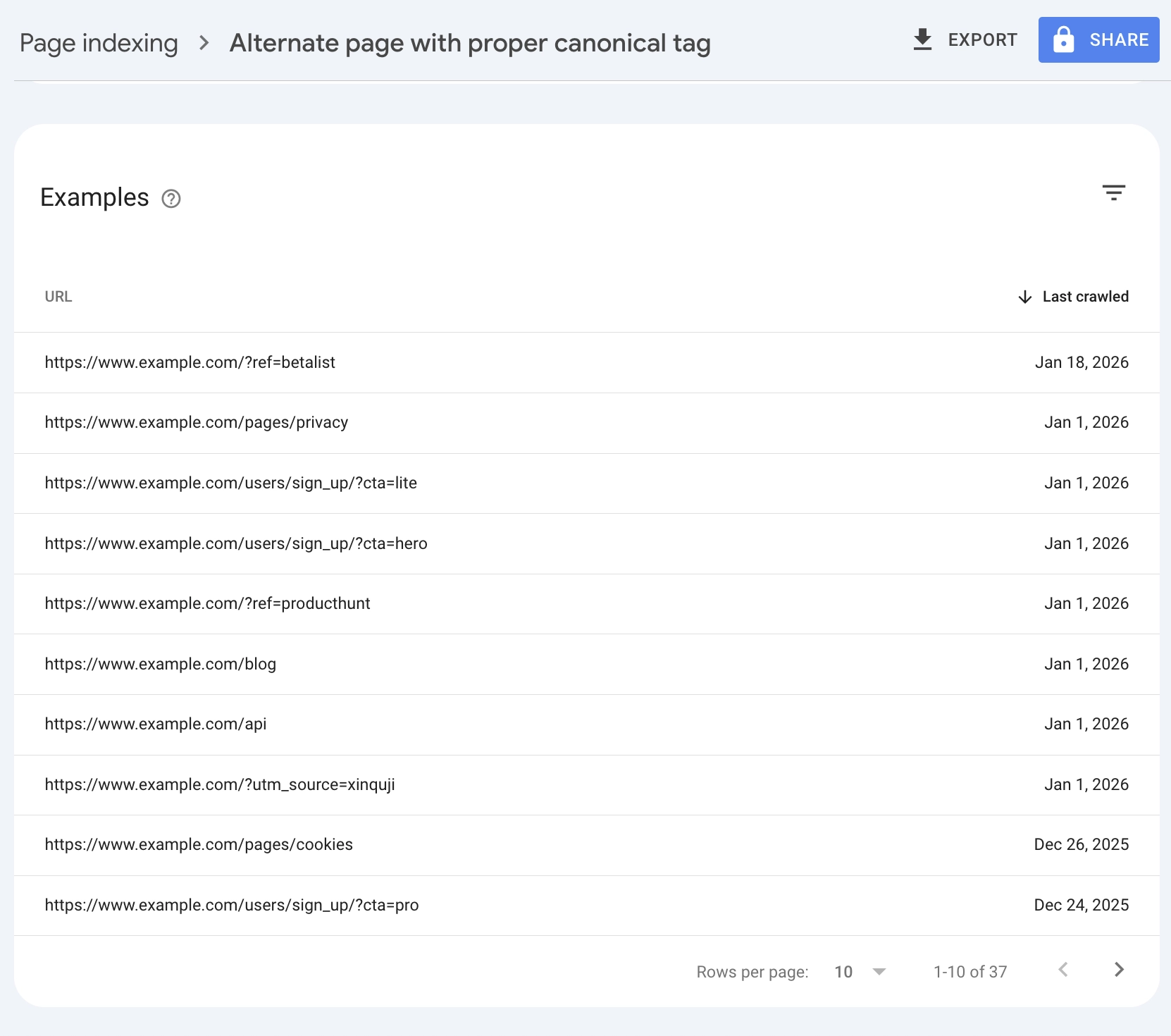
| "Alternate page with proper canonical tag" | Google recognized your canonical (working correctly) | None (this is good) |
| "Duplicate, submitted URL not selected as canonical" | Sitemap URL not canonical | Update sitemap |
Click into each category to see affected URLs.
Step 2: Use URL Inspection Tool
For specific pages, use Search Console's URL Inspection tool:
- Enter the URL you want to be canonical
- Look at "Google-selected canonical"
- If it differs from the inspected URL, you have an issue
This tells you exactly which URL Google chose instead.
Step 3: Crawl Your Site for Duplicate Detection
Use a crawler like Screaming Frog or Sitebulb to find:
- Pages with identical content (by content hash or similarity)
- Pages with duplicate titles or meta descriptions
- Multiple URLs pointing to the same content
- Inconsistent internal linking patterns
Export a list of all URLs with their canonical tags and compare them.
Step 4: Check for External Duplicates
Search Google for unique phrases from your content:
site:* "exact unique sentence from your page"
If results show your content on other domains, you may have syndication or scraping issues.
Step 5: Map the Signals
For each problematic URL, document:
| Signal | Points To |
|---|---|
| Canonical tag | ? |
| Internal links | ? |
| Sitemap | ? |
| External backlinks | ? |
| Redirects | ? |
If these don't all point to the same URL, that's your problem.
How to Fix Canonicalization Issues
Once you've diagnosed the problem, here's how to fix it.
Fix 1: Align All Signals to One URL
The most reliable fix is making every signal point to the same URL:
- Set the canonical tag on all duplicate pages pointing to your preferred URL
- Update internal links to use only the canonical URL
- Update your sitemap to include only canonical URLs
- Implement redirects from non-canonical URLs to the canonical (when possible)
When all signals agree, Google almost always follows.
Fix 2: Implement 301 Redirects
For true duplicates (same content, different URL), redirects are more authoritative than canonical tags.
Use 301 redirects when:
- HTTP to HTTPS migration
- WWW to non-WWW consolidation
- URL structure changes
- Trailing slash standardization
Redirect vs Canonical decision:
| Scenario | Use Redirect | Use Canonical |
|---|---|---|
| Pages are identical, only one should exist | Yes | No |
| Both pages need to be accessible (e.g., print version) | No | Yes |
| Cross-domain duplicate | No | Yes |
| Parameter variations users might bookmark | No | Yes |
For complex migrations involving many URLs, see our SEO site migration checklist.
Fix 3: Fix URL Parameter Handling
For URL parameters that don't change content:
Option A: Server-side canonicalization
Strip parameters at the server level and redirect to the clean URL.
Option B: Canonical tags
Keep parameters functional but add canonical tags to the clean version.
Option C: Search Console configuration
Use Search Console's URL Parameters tool to tell Google how to handle specific parameters (though Google has deprecated much of this functionality).
Fix 4: Handle E-commerce Faceted Navigation
Faceted navigation (filters for color, size, price, etc.) creates massive duplication.
Best practices:
- Use canonical tags pointing filtered pages to the main category
- Consider using
noindexon low-value filter combinations - Use AJAX to load filter results without changing URLs
- Block parameter URLs in robots.txt (last resort, loses link equity)
Fix 5: Fix Cross-Domain Canonicalization
If your content legitimately appears on multiple domains (syndication):
<!-- On the syndicated copy -->
<link rel="canonical" href="https://yoursite.com/original-article">
The receiving site must implement this. You can't force it from your side.
For unauthorized copies, options include:
- DMCA takedown requests
- Contacting the site owner
- Building stronger signals to your original (more backlinks, earlier publish date)
Fix 6: Implement Hreflang for International Sites
If Google is canonicalizing across language/region versions incorrectly, implement hreflang:
<link rel="alternate" hreflang="en-us" href="https://example.com/page">
<link rel="alternate" hreflang="en-gb" href="https://example.co.uk/page">
<link rel="alternate" hreflang="de" href="https://example.de/page">
<link rel="alternate" hreflang="x-default" href="https://example.com/page">
Each page should include all hreflang annotations, including a self-reference.
Verifying Your Fixes
After implementing fixes, verify they're working.
Immediate Verification
- Check the live page: View source and confirm the canonical tag is correct
- Test redirects: Verify they return 301 status codes
- Re-crawl with a tool: Ensure your crawler sees the changes
Request Re-indexing
For important pages:
- Go to Search Console > URL Inspection
- Enter the canonical URL
- Click "Request Indexing"
This prompts Google to re-crawl and re-evaluate.
Monitor Over Time
Canonical changes can take weeks to reflect in Search Console. Check:
- Week 1-2: URL Inspection should show updated canonical
- Week 2-4: Page Indexing report should update
- Week 4+: Search results should show correct URL
Track the Right Metrics
| Metric | Where to Find | What to Look For |
|---|---|---|
| Indexed canonical | URL Inspection | Google-selected matches user-declared |
| Duplicate count | Page Indexing report | Decrease in "different canonical" errors |
| Rankings | Rank tracker | Correct URL ranking (not variant) |
| Organic traffic | Analytics | Traffic going to canonical URL |
Preventing Future Canonical Issues
Once you've fixed existing issues, prevent new ones.
Establish URL Standards
Document and enforce:
- HTTPS everywhere
- Preferred domain (www or non-www)
- Trailing slash convention (with or without)
- Lowercase URLs only
- Parameter handling rules
Audit Regularly
Add canonical checks to your regular SEO audits:
- All pages have self-referencing canonical tags
- Internal links use canonical URLs
- Sitemap contains only canonical URLs
- No redirect chains exist
- New content follows URL standards
Configure Your CMS
Most CMS platforms can be configured to:
- Auto-generate canonical tags
- Force URL format consistency
- Strip unnecessary parameters
- Generate clean sitemaps
Set this up once and avoid ongoing issues.
Frequently Asked Questions
What is a canonical tag in SEO?
A canonical tag (<link rel="canonical">) tells search engines which URL is the "official" version of a page when duplicate or similar content exists at multiple URLs. It's placed in the HTML <head> section and points to the preferred URL. Search engines use it as a strong hint (but not a directive) when deciding which URL to index and rank.
Why did Google choose a different canonical than I specified?
Google uses multiple signals beyond the canonical tag, including internal links, sitemap inclusion, external backlinks, and URL structure. If these signals contradict your canonical tag, Google may override it. The most common cause is internal links pointing to a different URL than your canonical tag specifies.
Is "Google chose different canonical" always bad?
No. Sometimes Google's choice is actually better (like choosing HTTPS over HTTP, or a clean URL over one with parameters). The issue is only problematic if Google chose the wrong page to index, causing ranking dilution or user experience problems.
Should every page have a canonical tag?
Yes. Every page should have a self-referencing canonical tag pointing to itself. This removes ambiguity and prevents issues from URL parameters or tracking codes that might get appended. Without a declared canonical, you leave the decision entirely to Google.
What's the difference between canonical tags and 301 redirects?
301 redirects send users and search engines to a different URL. Canonical tags allow both URLs to be accessible but tell search engines which one to index. Use redirects when only one URL should exist. Use canonicals when both URLs need to remain functional.
How long does it take for canonical changes to take effect?
Typically 2-4 weeks for Google to recognize and act on canonical changes, though it can take longer for large sites or pages that are crawled infrequently. Use URL Inspection in Search Console to check if Google has processed your changes.
Can I use canonical tags across different domains?
Yes. Cross-domain canonical tags tell Google that content on Domain A is a copy of content on Domain B. This is useful for syndicated content. However, you can only implement this on pages you control. You can't force another site to canonical to you.
Take Control of Your Canonicals
Canonical issues are frustrating because they feel like Google is ignoring your explicit instructions. But Google isn't being difficult. It's trying to determine the best URL to show users based on all available signals.
Your job is to make sure all those signals agree.
Here's your action plan:
- Audit your current state: Check Search Console for "Google chose different canonical" errors
- Map the signals: For each problem URL, identify where canonical tags, internal links, sitemaps, and redirects point
- Align everything: Make all signals point to your preferred URL
- Implement redirects: For true duplicates, 301 redirects are stronger than canonical tags
- Verify and monitor: Use URL Inspection to confirm Google recognizes your changes
- Prevent recurrence: Establish URL standards and include canonical checks in regular audits
Canonical tags are a hint, but consistent signals are a command. When your entire site architecture points to the same URL, Google listens.
Stop fighting Google's canonicalization. Start making your preference obvious.