
Your Rankings Just Crashed. Here's What to Do First.
You wake up, check your analytics, and your stomach drops. Traffic is down 40%. Your main keyword went from position 3 to position 27. Overnight.
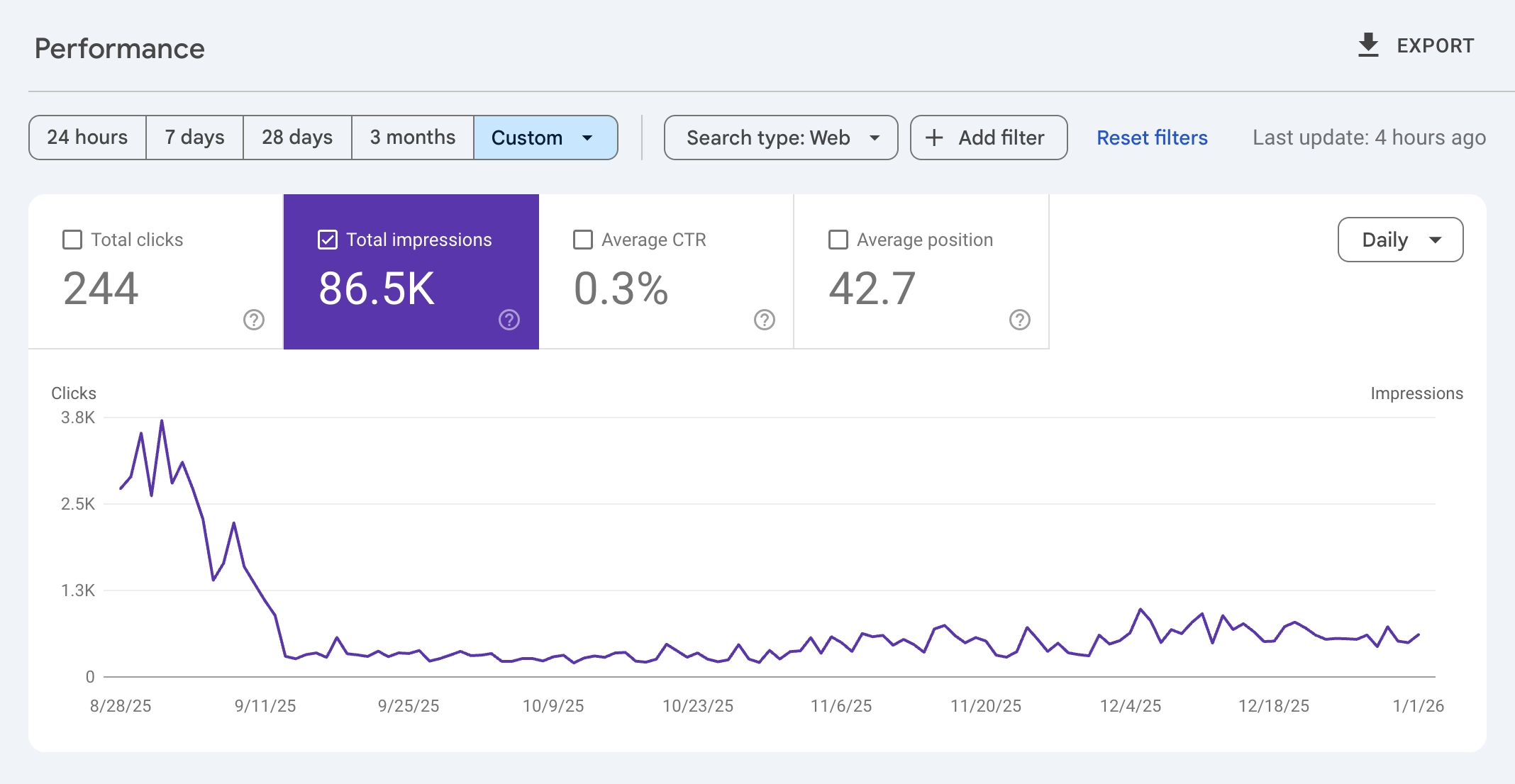
Panic sets in. You start Googling "why did my rankings drop" while refreshing Search Console every 30 seconds, hoping it's a glitch.
I've been on the receiving end of calls from site owners in exactly this situation. The pattern is always the same: confusion, then fear, then frantic changes that often make things worse. One client deleted half their blog posts because someone on a forum said thin content was the problem. It wasn't. They'd just broken their internal linking during a redesign.
The first rule of an SEO ranking drop: don't make it worse by panicking.
Most ranking drops have identifiable causes. Algorithm updates, technical errors, manual penalties, lost backlinks, competitor improvements. Each has different symptoms and different fixes. The key is diagnosing correctly before you touch anything.
In this guide, you'll learn a systematic approach to diagnose why your rankings dropped, determine if it's something you can fix, and execute a recovery plan. We'll cover algorithm updates, technical SEO audits, manual actions, content issues, and backlink problems.
Your rankings can recover. But only if you fix the right problem.
Step 1: Verify the Drop (Don't Panic Yet)
Before you do anything else, confirm the drop is real and understand its scope. Sometimes what looks like a disaster is actually a tracking glitch or normal fluctuation.
Check Multiple Data Sources
A single data point can lie. Cross-reference these sources:
Google Search Console: The most reliable source for organic search data. Check the Performance report for the last 28 days compared to the previous period. Look at both clicks and impressions.
Google Analytics (or your analytics tool): Filter for organic traffic only. Does the drop match what Search Console shows? If analytics shows a drop but Search Console doesn't, you might have a tracking issue, not a ranking issue.
Rank tracking tools: If you use rank tracking software, check historical data. Did multiple keywords drop, or just one? Did you drop on mobile, desktop, or both?
Determine the Scope
The pattern of the drop tells you a lot about the cause:
| Drop Pattern | Likely Cause |
|---|---|
| Entire site dropped suddenly | Algorithm update or site-wide technical issue |
| One section dropped | Technical issue with that section or content quality problem |
| Single page dropped | Lost featured snippet, competitor improvement, or page-specific issue |
| Gradual decline over weeks | Content decay, lost backlinks, or increased competition |
| Mobile only dropped | Mobile usability or Core Web Vitals issue |
If your entire site dropped on a specific date, note that date. You'll need it for the next step.
Rule Out Tracking Issues
Before assuming the worst, verify your tracking is working:
- Check that your analytics code is still on all pages
- Verify Search Console hasn't lost access to your site
- Look for any site changes around the drop date (redesign, migration, plugin updates)
- Test that your pages are still loading correctly
I've seen "catastrophic ranking drops" that turned out to be a developer accidentally removing the analytics script during a deployment. Five minutes to fix, but three days of panic first.
Step 2: Check for Algorithm Updates
If your drop coincides with a known Google algorithm update, that's your primary suspect. Google rolls out core updates several times per year, plus smaller updates constantly.
How to Find Update Dates
Check these resources against your drop date:
- Google Search Status Dashboard: Official announcements of confirmed updates
- Search Engine Land / Search Engine Journal: Industry news on algorithm changes
- SEO Twitter/X: Often the first to notice ranking volatility
If your traffic dropped within 1-3 days of a confirmed core update, the update likely caused it.
What Algorithm Updates Target
Different updates target different issues:
| Update Type | What It Targets | Recovery Approach |
|---|---|---|
| Core Update | Overall content quality, E-E-A-T | Improve expertise, depth, and user value |
| Helpful Content Update | AI-generated or low-value content | Remove or substantially improve thin content |
| Spam Update | Manipulative practices, link schemes | Clean up spammy tactics, disavow bad links |
| Product Reviews Update | Thin affiliate/review content | Add original research, first-hand experience |
| Link Spam Update | Unnatural link patterns | Audit and disavow manipulative links |
The Hard Truth About Core Updates
Google's core updates reassess content quality across the web. If you were hit by a core update, there's often no quick fix. Google has said that recovery may not happen until after subsequent updates, even if you make improvements.
This doesn't mean you shouldn't improve your content. It means you should make genuine quality improvements and be patient. Months, not days.
If your site wasn't hit by an algorithm update (or you're not sure), move to the next step.
Step 3: Run a Technical SEO Audit
Technical issues can tank rankings overnight. A single misconfiguration can make your entire site invisible to Google.
Check for Catastrophic Technical Errors
Start with the issues that cause immediate, severe drops:
Accidental noindex: Check if pages have <meta name="robots" content="noindex"> tags that shouldn't be there. This is common after site migrations or when staging sites go live.
Robots.txt blocking: Verify your robots.txt isn't blocking Googlebot from important pages. A misplaced Disallow: / blocks your entire site.
Site downtime: Check your server logs or uptime monitoring. If your site was down for hours or days, Google may have demoted it temporarily.
HTTPS issues: Expired SSL certificates or mixed content warnings can trigger ranking drops.
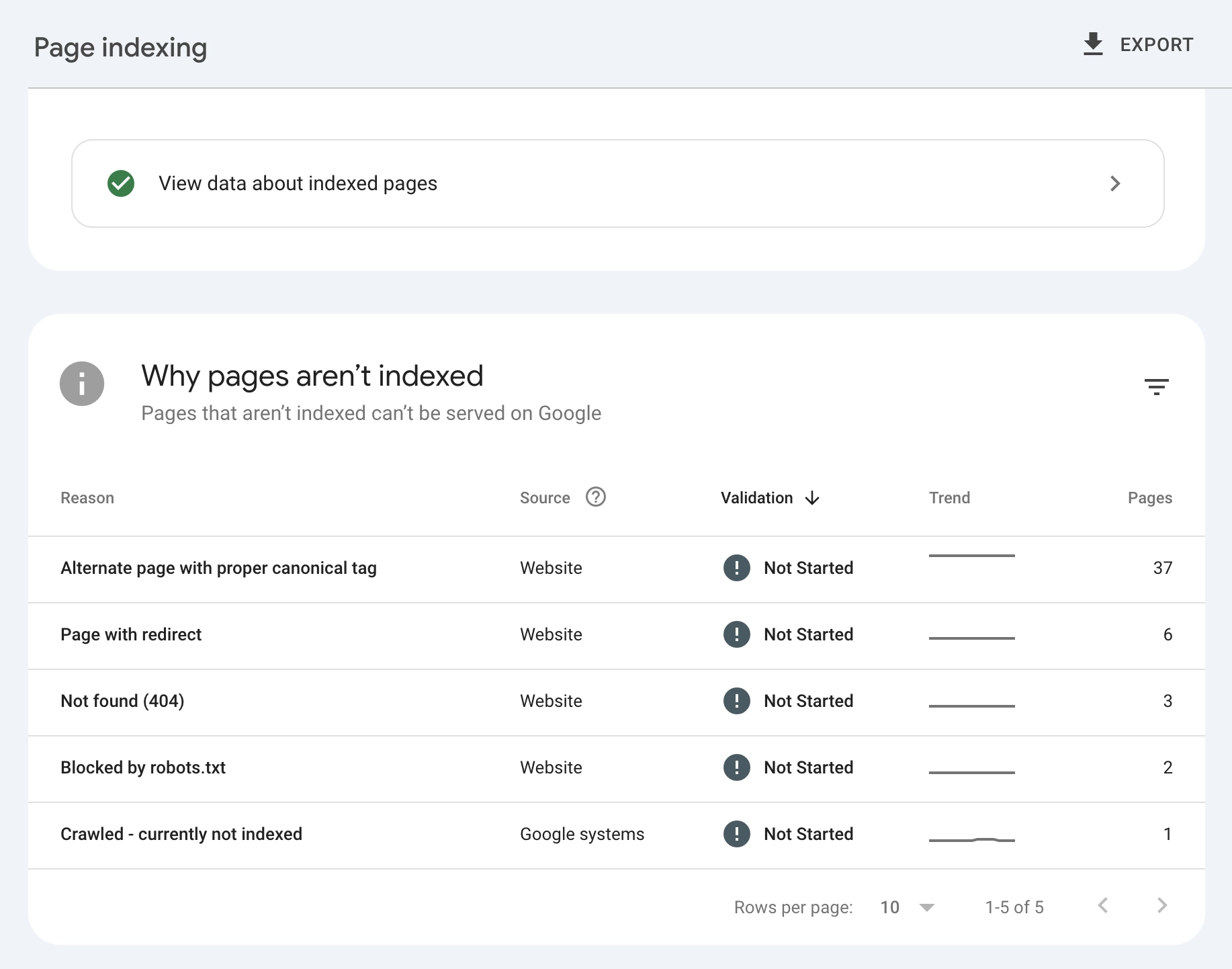
In Search Console, go to Settings > Crawl stats and Pages > Indexing to spot crawl errors quickly. If you see many pages with "Crawled - currently not indexed" status, that's a separate issue. See our guide on why Google skips pages after crawling.
If your site relies heavily on a single-page app or client-side rendering, also check our JavaScript SEO guide. JavaScript rendering issues can look like indexing problems, but the fix is architectural.
Core Web Vitals and Page Experience
Google uses Core Web Vitals as a ranking factor. Check if your scores degraded:
- LCP (Largest Contentful Paint): Should be under 2.5 seconds
- INP (Interaction to Next Paint): Should be under 200 milliseconds
- CLS (Cumulative Layout Shift): Should be under 0.1
In Search Console, go to Experience > Core Web Vitals to see field data. If you recently deployed code changes that hurt performance, that could explain a drop.
Crawl Errors and Server Issues
Check Search Console for increases in:
- 404 errors (broken pages)
- 500 errors (server problems)
- Redirect errors (loops or chains)
- Soft 404s (pages returning 200 but with no content)
A spike in crawl errors around your drop date is a strong signal that technical issues are the cause.
Quick Technical Checklist
Run through this list to catch common issues:
| Check | How to Verify | Fix |
|---|---|---|
| Noindex tags | View source, search for "noindex" | Remove errant noindex tags |
| Robots.txt | Visit yourdomain.com/robots.txt | Fix blocking rules |
| SSL certificate | Check browser padlock icon | Renew or fix certificate |
| Canonical tags | View source, check rel="canonical" | Ensure correct self-referencing |
| Sitemap | Submit to Search Console | Update and resubmit |
| Page speed | PageSpeed Insights | Optimize per recommendations |
If you find a technical issue, fix it immediately and request reindexing for affected pages. Technical fixes often show results within days to weeks.
Step 4: Check for Manual Actions
Manual actions are penalties applied by Google's human reviewers. They're rare, but devastating when they happen.
Where to Find Manual Actions
In Search Console, go to Security & Manual Actions > Manual actions. If you have a penalty, it will be listed here with the specific reason.
Common manual action types:
- Unnatural links to your site: Someone (maybe you, maybe not) built spammy backlinks
- Unnatural links from your site: You're selling links or have excessive affiliate links
- Thin content with little or no added value: Pages that exist only to rank, not to help users
- Cloaking or sneaky redirects: Showing different content to Google than to users
- Pure spam: Automatically generated content, scraped content, or other spam tactics
How to Recover from Manual Actions
If you have a manual action:
- Understand the specific issue. Read Google's documentation for your penalty type.
- Fix the problem completely. Don't half-fix it. Google reviewers will check.
- Document your changes. Keep records of what you fixed and when.
- Submit a reconsideration request. In Search Console, explain what you fixed and why it won't happen again.
- Wait. Reviews can take weeks. Be patient.
For unnatural links, you may need to use the Disavow Tool to tell Google to ignore bad backlinks. Only do this for links you genuinely can't remove and that are clearly manipulative. Don't disavow legitimate links out of paranoia.
If you don't have a manual action, your drop isn't a penalty. Move to the next step.
Step 5: Audit Your Content Quality
Content quality issues cause gradual declines more often than sudden drops. But if a core update hit your site, content is likely the problem.
Signs of Content Quality Problems
Your content may have issues if:
- Pages are thin (under 300 words with no real value)
- Content is outdated (references from years ago, broken links)
- Multiple pages target the same keyword (keyword cannibalization)
- Content doesn't match search intent (informational page for transactional query)
- AI-generated content with no human oversight or expertise
- Missing author credentials on YMYL topics (Your Money, Your Life)
If you suspect content quality is the problem, a systematic audit helps. See our guide on content pruning vs. publishing for a framework to identify which pages are helping and which are hurting.
The E-E-A-T Framework
Google evaluates content on Experience, Expertise, Authoritativeness, and Trustworthiness. Ask yourself:
Experience: Does your content demonstrate first-hand experience with the topic? Real screenshots, case studies, and personal insights signal experience.
Expertise: Is the author qualified to write about this topic? Does the page demonstrate deep knowledge?
Authoritativeness: Is your site recognized as an authority in this space? Do other reputable sites link to you?
Trustworthiness: Is your site secure, transparent about who runs it, and honest in its claims?
For YMYL topics (health, finance, legal), E-E-A-T matters even more. A health article without author credentials from a medical professional will struggle to rank.
Content Audit Process
Identify your most affected pages (biggest traffic drops) and evaluate each:
| Factor | Question | Action if Failing |
|---|---|---|
| Depth | Does this answer the query completely? | Expand with more detail |
| Freshness | Is information current and accurate? | Update with recent data |
| Uniqueness | Does this add value beyond competitors? | Add original insights |
| Intent match | Does content match what searchers want? | Restructure or retarget |
| Author credibility | Is author expertise clear? | Add author bio, credentials |
| Readability | Is it easy to read and navigate? | Improve formatting, structure |
Don't make surface-level changes and expect recovery. If Google's algorithms decided your content doesn't deserve to rank, minor tweaks won't change that. You need substantial improvements.
Step 6: Analyze Your Backlink Profile
Backlinks can cause ranking drops in two ways: you lost good links, or you gained bad ones.
Check for Lost Backlinks
Use Search Console's Links report or a backlink audit tool to see if you recently lost significant backlinks. If a high-authority site removed their link to you, that could explain a drop.
Common reasons for lost links:
- The linking page was deleted or updated
- The linking site did their own link cleanup
- Your linked page returned a 404, so they removed the link
If you lost valuable links, consider outreach to rebuild them. But focus on creating link-worthy content rather than begging for links back.
Check for Toxic Links
If you were hit by a link spam update, or if a competitor engaged in negative SEO against you, you might have bad links pointing to your site.
Signs of a toxic link profile:
- Sudden influx of links from low-quality sites
- Links from irrelevant foreign-language sites
- Links with over-optimized anchor text (exact match keywords)
- Links from known link farms or PBNs
A backlink audit helps you identify these. If you find genuinely toxic links you can't remove, use Google's Disavow Tool as a last resort.
When to Worry About Backlinks
Backlink-related drops are less common than most people think. Google is generally good at ignoring low-quality links rather than penalizing for them.
Only take action on backlinks if:
- You received a manual action specifically about links
- You previously engaged in link building practices you know were manipulative
- You see clear evidence of negative SEO (thousands of spammy links appearing suddenly)
Don't disavow links just because they're low quality. Google ignores most of those automatically.
Step 7: Check What Competitors Are Doing
Sometimes your rankings drop not because you did something wrong, but because competitors did something right.
Did Someone Outrank You?
Search your dropped keywords and see who's ranking now. If a competitor published better content or earned more backlinks, that's not a penalty. That's competition.
Signs it's a competitor issue:
- Your impressions stayed the same but position dropped
- A specific competitor's page now ranks where you used to
- The competitor's content is genuinely better than yours
How to Respond to Competitor Gains
If competitors outranked you with better content:
- Analyze what they did better. More depth? Better visuals? Fresher data?
- Improve your content to exceed theirs. Don't just match them.
- Check their backlinks. Did they earn links you could also pursue?
- Consider if you can differentiate. Maybe target a different angle or audience.
This isn't recovery from a problem you caused. It's catching up to an evolving competitive landscape.
Step 8: Execute Your Recovery Plan
By now, you should have identified the likely cause. Here's how to prioritize your recovery based on what you found.
Recovery Priority by Cause
| Cause | Recovery Time | Priority Actions |
|---|---|---|
| Technical error (noindex, robots) | Days to weeks | Fix immediately, request reindexing |
| Manual action | Weeks to months | Fix issues, submit reconsideration |
| Algorithm update (content) | Months | Substantial content improvements |
| Lost backlinks | Weeks to months | Outreach, create link-worthy content |
| Competitor improvement | Ongoing | Improve content, differentiate |
| Core Web Vitals | Weeks | Performance optimization |
What to Fix First
- Technical issues: These block everything else. Fix them immediately.
- Manual actions: You can't rank with an active penalty.
- Content quality: The most common cause and the hardest to fix.
- Backlink issues: Usually less urgent unless you have a manual action.
Monitor Your Progress
After making changes, track your recovery in Search Console:
- Set up weekly exports of your Performance data
- Compare each week to the same period before your drop
- Watch for impressions to stabilize first, then clicks, then position improvements
Recovery isn't linear. You might see small gains, then plateau, then more gains. Algorithm updates can help or hurt your recovery depending on what you fixed.
Step 9: Prevent Future Drops
Once you recover (or while you're recovering), put systems in place to catch problems early.
Set Up Monitoring
Search Console alerts: Enable email notifications for critical issues like manual actions or indexing problems.
Rank tracking: Monitor your most important keywords weekly. A small drop is easier to diagnose than a catastrophic one.
Uptime monitoring: Use a tool to alert you if your site goes down.
Performance monitoring tools: Track Core Web Vitals over time to catch degradation before it impacts rankings.
Build Ranking Stability
Sites that recover well and stay recovered share these characteristics:
- Diversified keyword portfolio: Don't rely on one keyword for all your traffic
- Regular content updates: Keep important pages fresh and accurate
- Strong technical foundation: Fast, secure, mobile-friendly, properly indexed
- Natural backlink profile: Links earned through quality, not schemes
- Clear E-E-A-T signals: Author credentials, about pages, contact information
For more on building a resilient keyword strategy, see our guide on keyword research mistakes to avoid.
Frequently Asked Questions
Why did my Google rankings drop suddenly?
Sudden ranking drops usually come from algorithm updates, technical errors, or manual penalties. Check if your drop coincides with a known Google update. Then audit for technical issues like accidental noindex tags or robots.txt problems. Finally, check Search Console for manual actions.
How long does it take to recover from a Google ranking drop?
Technical fixes can show results in days to weeks. Manual action recoveries take weeks to months after submitting a reconsideration request. Algorithm-related drops may take months and may require waiting for subsequent updates to see improvement.
How do I know if I was hit by a Google algorithm update?
Compare your drop date to confirmed Google update dates on the Search Status Dashboard or industry news sites. If your drop happened within 1-3 days of a confirmed update, it's likely related. Site-wide drops affecting many pages are more indicative of algorithm changes than single-page drops.
What is a Google manual action?
A manual action is a penalty applied by a human reviewer at Google, not an algorithm. You can check for manual actions in Search Console under Security & Manual Actions. They're issued for specific policy violations like unnatural links, thin content, or spam.
Should I disavow backlinks after a ranking drop?
Only disavow links if you have a manual action related to links, or if you have clear evidence of manipulative link building. Don't disavow links just because they're low quality. Google usually ignores those automatically. Over-disavowing can hurt more than help.
Can a website redesign cause ranking drops?
Yes. Redesigns often cause drops when URLs change without proper redirects, when content is removed or substantially changed, or when technical elements break during migration. See our SEO site migration checklist for proper procedures. Always audit redirects, check for crawl errors, and verify indexing after a redesign.
How do I recover from a Google core update?
Focus on genuine content quality improvements: add depth, demonstrate expertise, update outdated information, and ensure your content truly helps searchers. Core update recovery isn't about quick fixes. It requires substantial improvements and patience. Recovery may not happen until subsequent updates.
My traffic dropped but my rankings didn't. What happened?
If rankings are stable but traffic dropped, check for: seasonal trends, a featured snippet you lost, increased SERP features pushing organic results down, or changes in search demand for your keywords. Also verify your analytics tracking is working correctly.
Your Rankings Can Recover. Start With the Right Diagnosis.
A ranking drop feels like an emergency. But the worst thing you can do is panic and start making random changes.
Here's the process:
Verify the drop is real. Check multiple data sources and rule out tracking issues.
Check for algorithm updates. If your drop matches an update date, you have your primary suspect.
Run a technical SEO audit. Look for noindex tags, robots.txt issues, and crawl errors.
Check for manual actions. If you have one, that's your priority.
Audit content quality. Especially if an algorithm update is the likely cause.
Analyze backlinks. Look for lost links or toxic link attacks.
Check competitors. Sometimes it's not you. It's them getting better.
Execute the right fix. Based on what you found, not on forum speculation.
Prevent future drops. Set up monitoring and build ranking stability.
Most sites that experience ranking drops can recover. The ones that don't are usually the ones that never identified the real cause, or the ones that panicked and made things worse.
Take a breath. Follow the process. Fix the right problem.
Your rankings will thank you.