
SEO Split Testing: How to A/B Test Changes Without Tanking Your Rankings
You changed your title tags across 500 product pages. Traffic dropped 30%. Was it the title change? A Google update? Seasonality? You'll never know.
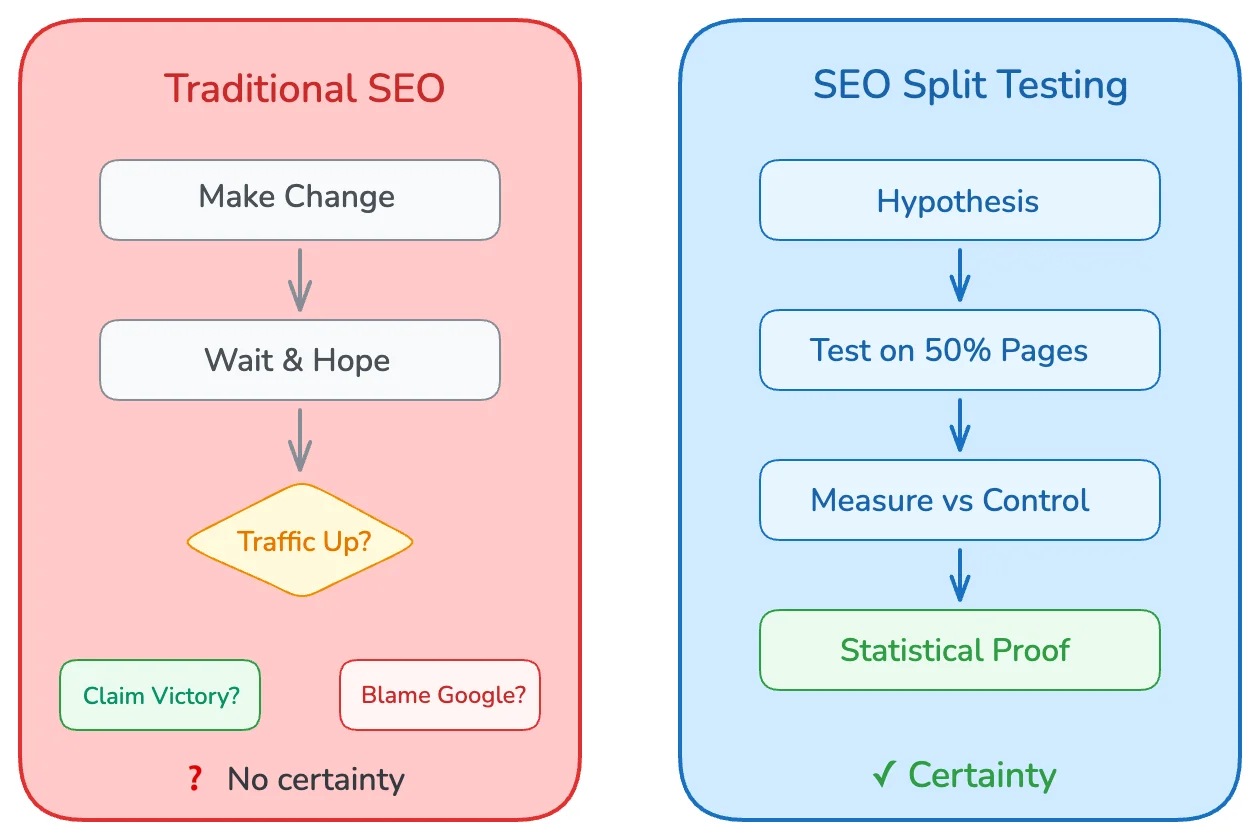
Most SEO changes are guesses dressed up as strategies. You implement something, wait a few weeks, look at traffic, and hope the line went up. If it went down, you blame an algorithm update. If it went up, you claim victory. Neither conclusion is scientifically valid.
SEO split testing changes everything. Instead of guessing, you measure. Instead of hoping, you know. You change half your pages, keep the other half as a control, and let statistics tell you whether your change actually worked.
In this guide, you'll learn how to run controlled SEO experiments that produce statistically valid results. We'll cover experiment design, page grouping, measurement methodology, and tools that make split testing practical. You'll walk away knowing how to test title tags, content changes, internal links, and schema markup without risking your entire site's traffic.
Guessing is free. Data costs effort. But data-driven SEO is the only kind that compounds.
What Is SEO Split Testing?
SEO split testing applies the scientific method to search engine optimization. You change one variable, measure the outcome against a control group, and determine whether the change caused a statistically significant difference.
The concept borrows from conversion rate optimization (CRO), where A/B testing is standard practice. But SEO split testing has a critical difference: you can't show different versions to different users like you can with landing pages. Google sees one version of each page.
Instead, SEO split testing divides your pages into groups:
- Control group: Pages that stay unchanged
- Variant group: Pages where you implement the change
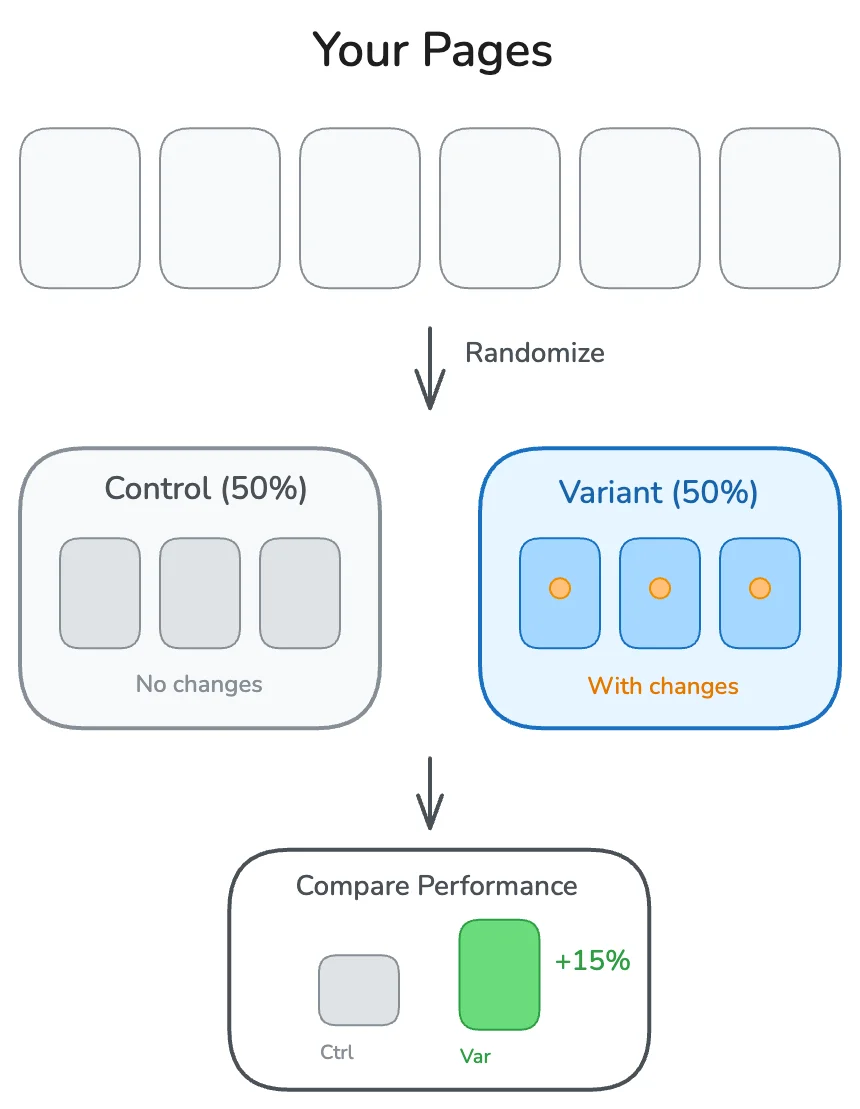
After running the experiment for a sufficient period, you compare organic traffic, rankings, or clicks between the two groups. If the variant outperforms the control by a statistically significant margin, the change worked. If not, you saved yourself from rolling out a bad idea site-wide.
Why Traditional SEO Measurement Fails
The typical approach to measuring SEO changes looks like this:
1. Make a change across all pages
2. Wait 2-4 weeks
3. Compare traffic before vs. after
4. Declare success or failure
This approach has fatal flaws:
External factors contaminate results. Google releases updates. Competitors change their content. Seasonality shifts demand. A before/after comparison can't isolate whether your change caused the traffic difference or whether something else did.
No statistical rigor. Saying "traffic went up 10%" tells you nothing about whether that increase is within normal variance or a genuine signal. Without statistical significance testing, you're reading tea leaves.
Fear of experimentation. When every change affects your entire site, you become risk-averse. Bold experiments that might produce breakthroughs never happen because the downside is too scary.
How Split Testing Solves These Problems
With proper SEO split testing:
- External factors affect both groups equally. If a Google update hits, it hits control and variant pages alike. The comparison remains valid.
- Statistical significance tells you what's real. You can calculate whether the difference between groups is large enough to be a true signal vs. random noise.
- Experimentation becomes safe. If a change hurts performance, it only affects half your pages. You can revert quickly and limit damage.
Designing Your First SEO Experiment
A well-designed experiment answers a specific question with minimal variables. Here's the step-by-step process.
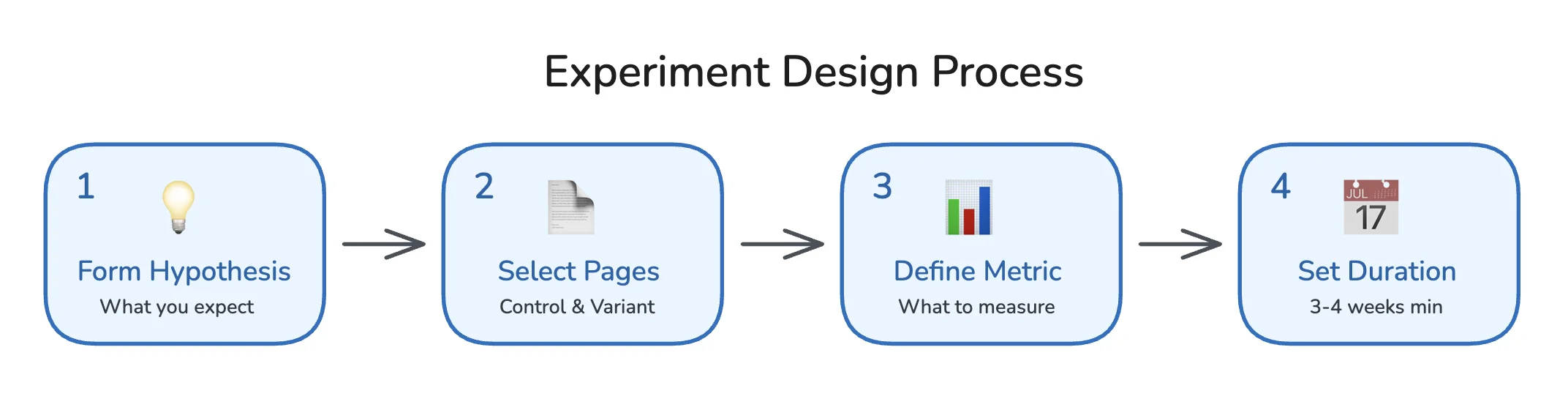
Step 1: Form a Hypothesis
Every experiment starts with a hypothesis: a clear, testable statement about what you expect to happen.
Bad hypothesis: "Changing title tags will improve SEO."
Good hypothesis: "Adding the current year to product page title tags will increase CTR from search results by at least 5%, resulting in higher organic traffic to those pages."
A good hypothesis includes:
- What you're changing (adding the year to title tags)
- Where you're changing it (product pages)
- What outcome you expect (5% CTR increase)
- Why you expect it (freshness signals attract more clicks)
Document your hypothesis before running the test. This prevents post-hoc rationalization where you reinterpret results to fit whatever happened.
Step 2: Select Your Page Groups
You need enough pages to achieve statistical significance. Generally, this means:
| Page Count | Viability |
|---|---|
| Under 50 pages | Difficult to reach significance; consider other methods |
| 50-200 pages | Possible with large effect sizes |
| 200-1000 pages | Ideal for most experiments |
| 1000+ pages | Excellent statistical power |
Selecting similar pages is critical. Your control and variant groups must be comparable:
- Same page type (all product pages, or all blog posts)
- Similar traffic levels (don't put your top performers all in one group)
- Similar content characteristics (word count, topic clusters)
Most tools randomize page assignment automatically. If you're doing this manually, use a random number generator, not your judgment. Human selection introduces bias.
Step 3: Define Your Success Metric
What are you measuring? Common metrics include:
| Metric | Best For | Caveats |
|---|---|---|
| Organic sessions | Overall traffic impact | Affected by CTR and rankings |
| Organic clicks (GSC) | Direct click measurement | Doesn't capture assisted conversions |
| Average position | Ranking changes | Position alone doesn't equal traffic |
| CTR | Title/description changes | Requires stable rankings to interpret |
| Conversions | Business impact | Needs sufficient volume |
Choose one primary metric. Secondary metrics are fine for additional insight, but your go/no-go decision should rest on a single, pre-defined metric.
Step 4: Determine Test Duration
SEO experiments need more time than CRO tests because:
- Google takes time to recrawl and reindex changes
- Ranking fluctuations need time to stabilize
- Weekly traffic patterns require multiple weeks to average out
Minimum recommended duration: 3-4 weeks. For pages with lower traffic, extend to 6-8 weeks.
End the test when you reach statistical significance OR when you've hit your maximum duration. Never peek at results early and stop because you like what you see. That's p-hacking, and it produces false positives.
Running Your SEO Experiment: Step by Step
Here's the practical workflow for executing an SEO split test.
Before You Start
Baseline your groups. Before making any changes, verify that your control and variant groups have similar historical performance. If they're wildly different, your randomization failed.
Pull 4-8 weeks of historical data for both groups and compare:
- Total organic sessions
- Average organic sessions per page
- Click-through rates (if available)
The groups should be within 10-15% of each other on key metrics. Larger discrepancies indicate a grouping problem.
Document everything. Create a test log with:
- Hypothesis
- Start date
- Pages in each group (URLs or identifiers)
- Exact change being made
- Success metric and target
- Planned duration
Implementing the Change
Make your change to the variant group only. Common test types include:
Title tag tests:
Control: "Running Shoes for Men | BrandName"
Variant: "Running Shoes for Men (2026) | BrandName"
Meta description tests:
Control: "Shop our collection of running shoes for men."
Variant: "Shop our collection of running shoes for men. Free shipping + 60-day returns."
Content tests:
- Adding FAQ sections
- Expanding thin content
- Adding comparison tables
- Updating outdated information
Technical tests:
- Adding schema markup
- Improving internal linking
- Page speed optimizations
Important: Change only one variable per test. If you change the title AND add schema markup simultaneously, you won't know which caused any observed effect.
Monitoring During the Test
Check your test weekly but resist the urge to act on early results. Things to monitor:
- Crawl activity: Are Google bots recrawling your variant pages? Check server logs or use Google Search Console's URL Inspection tool.
- Indexation: Have changes been indexed? Search
site:yoursite.com "your new title"to verify. - No contamination: Ensure control pages haven't accidentally received the variant treatment.
If something breaks (pages returning errors, changes not deploying correctly), pause the test, fix the issue, and restart with fresh timing.
Analyzing Results and Statistical Significance
When your test concludes, it's time to analyze. This is where most teams go wrong by eyeballing percentages instead of applying proper statistics.
Understanding Statistical Significance
Statistical significance answers one question: "Is the difference between groups large enough that it's unlikely to have occurred by random chance?"
The standard threshold is p < 0.05, meaning there's less than a 5% probability that the observed difference is due to chance. Some teams use stricter thresholds (p < 0.01) for high-stakes decisions.
What statistical significance is NOT:
- It doesn't tell you the effect is large or meaningful
- It doesn't guarantee the effect will persist
- It doesn't prove causation beyond doubt
Calculating Significance for SEO Tests
For traffic-based experiments, you're typically comparing two groups' session counts. The simplest approach uses a two-sample t-test.
Here's a Python script to calculate significance:
import pandas as pd
from scipy import stats

# Load your data (daily sessions per group)
control_data = [1200, 1150, 1300, 1250, 1180, 1220, 1190]  # 7 days
variant_data = [1350, 1400, 1380, 1420, 1390, 1410, 1360]  # 7 days

# Perform t-test
t_stat, p_value = stats.ttest_ind(control_data, variant_data)

print(f"Control mean: {sum(control_data)/len(control_data):.0f}")
print(f"Variant mean: {sum(variant_data)/len(variant_data):.0f}")
print(f"P-value: {p_value:.4f}")

if p_value < 0.05:
    print("Result: Statistically significant")
else:
    print("Result: Not statistically significant")
For more sophisticated analysis, consider:
- Causal Impact (Google's R package): Uses Bayesian structural time-series to model what would have happened without the change
- Difference-in-differences: Compares pre/post changes between control and variant, accounting for baseline differences
Interpreting Your Results
Once you have your numbers, interpretation follows a decision tree:
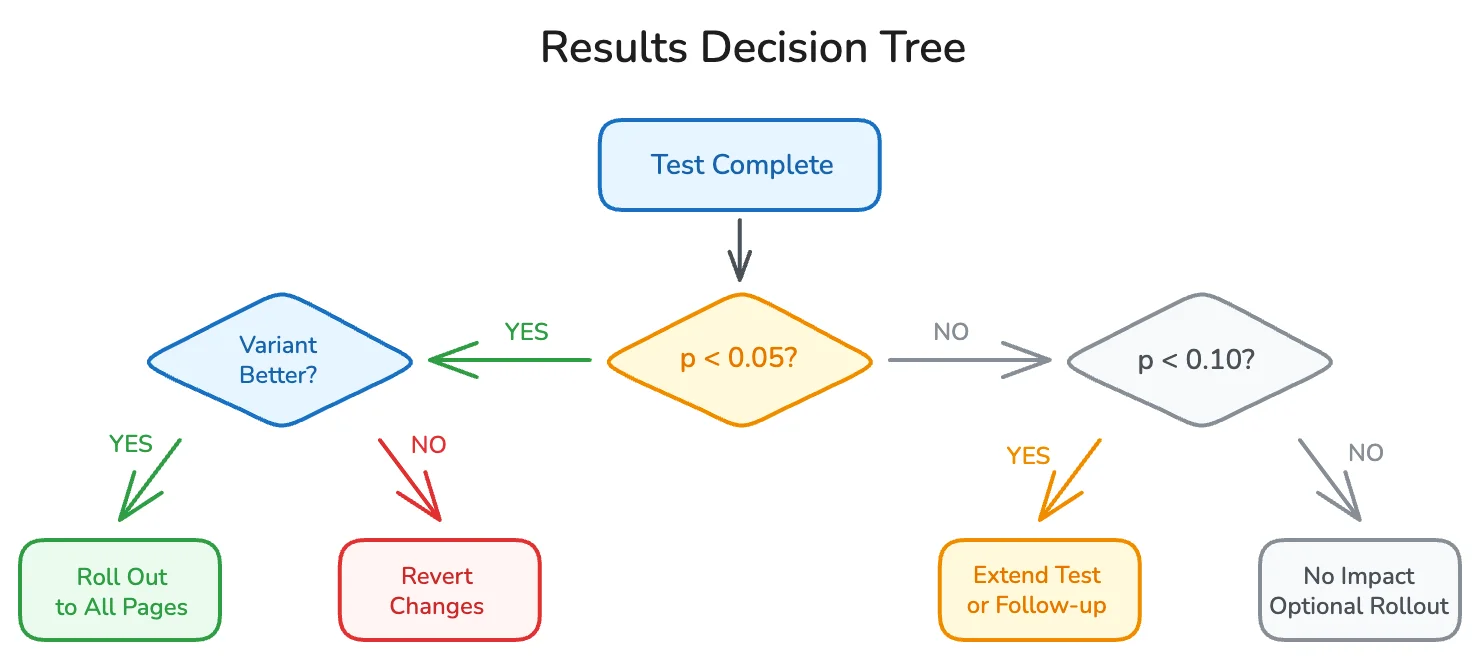
Variant significantly outperforms control (p < 0.05)?
→ Roll out the change to all pages. Document the win.
Variant significantly underperforms control (p < 0.05)?
→ Revert the variant pages immediately. You've learned what doesn't work.
No significant difference (p >= 0.05)?
→ The change likely has no meaningful impact. You can roll it out if it has other benefits (brand consistency, user experience) or skip it to save implementation effort.
Borderline significance (0.05 < p < 0.10)?
→ Consider extending the test duration or running a follow-up experiment with more pages. Don't treat borderline results as wins.
Calculating Lift and Business Impact
Statistical significance tells you the change is real. Lift tells you how big it is.
lift_percentage = ((variant_mean - control_mean) / control_mean) * 100

# Example
control_mean = 1200
variant_mean = 1390

lift = ((1390 - 1200) / 1200) * 100
print(f"Lift: {lift:.1f}%")  # Output: Lift: 15.8%
To project business impact:
1. Calculate the lift percentage
2. Multiply by total traffic across all candidate pages
3. Apply your conversion rate and average order value
Example projection:
- Test showed 15% lift on 100 pages
- 100 pages receive 50,000 monthly sessions
- 15% lift = 7,500 additional sessions
- 2% conversion rate = 150 additional conversions
- $100 AOV = $15,000 monthly revenue impact
This projection assumes the lift holds when rolled out to all pages. Real-world results may vary, so track post-rollout performance to verify.
SEO Testing Tools: What to Use
You can run SEO split tests manually with spreadsheets, or use dedicated platforms that automate the process. Here's how they compare.
Manual Testing (Spreadsheets + GSC)
Pros:
- Free
- Full control over methodology
- No vendor lock-in
Cons:
- Time-intensive data collection
- Manual statistical calculations
- No automated alerts or dashboards
- Prone to human error
Best for: Teams with strong analytics skills, small page counts, or limited budgets.
Dedicated SEO Testing Platforms
Several tools specialize in SEO experimentation:
| Tool | Best For | Pricing Model |
|---|---|---|
| SearchPilot | Enterprise e-commerce and publishers | Enterprise pricing (custom) |
| SplitSignal | Mid-market teams wanting simplicity | Subscription |
| RankScience | Automated meta tag optimization | Performance-based |
| ClickFlow | Content-focused experiments | Subscription |
Pros:
- Automated page grouping and randomization
- Built-in statistical significance calculations
- Visual dashboards and reporting
- Faster time to insight
Cons:
- Monthly costs
- Learning curve for each platform
- May require technical integration (DNS, CDN, or tag manager)
Best for: Teams running multiple concurrent tests, enterprise sites with thousands of pages, or organizations where time is more valuable than tool costs.
DIY Tools for Technical Teams
If you have engineering resources, you can build your own testing framework using:
- Google Search Console API: Pull query and click data programmatically
- Python + pandas: Analyze and visualize results
- Google BigQuery: Store historical data for long-term analysis
- Causal Impact library: Advanced statistical modeling
We covered the basics in our Python SEO automation guide. For split testing specifically, the Google Search Console API is your primary data source for organic performance metrics.
Common SEO Experiments Worth Running
Not sure what to test first? These experiments have high potential payoff and are relatively easy to implement.
Title Tag Experiments
Title tags are the most testable SEO element because changes are easy to implement and CTR impact is measurable.
Test ideas:
- Adding the current year: "Best Running Shoes (2026)"
- Adding numbers: "15 Best Running Shoes for Men"
- Adding modifiers: "Best Running Shoes (Expert Tested)"
- Brand position: "Running Shoes | Brand" vs. "Brand | Running Shoes"
- Emotional triggers: "Best Running Shoes" vs. "Running Shoes That Won't Hurt Your Feet"
Typical lift: 5-15% CTR improvement for winning variants.
Meta Description Experiments
Meta descriptions don't directly affect rankings, but they influence CTR, which affects traffic.
Test ideas:
- Adding calls to action: "Shop now", "Learn more"
- Including pricing or promotions: "From $49", "Free shipping"
- Adding trust signals: "Rated 4.8/5 by 10,000 customers"
- Question format: "Looking for the best running shoes?"
Typical lift: 3-10% CTR improvement.
Content Experiments
Content tests take longer to show results but can have larger impacts.
Test ideas:
- Adding FAQ sections (can also win People Also Ask boxes)
- Expanding word count on thin pages
- Adding comparison tables
- Including expert quotes or original data
- Updating publish dates with fresh content
Typical lift: 10-30% traffic improvement for content expansion tests.
Schema Markup Experiments
Adding structured data can improve how your pages appear in search results.
Test ideas:
- Product schema (stars, price, availability)
- FAQ schema (expandable questions in SERPs)
- HowTo schema (step-by-step displays)
- Article schema (publish dates, authors)
Typical lift: 5-20% CTR improvement when rich results trigger. Note that schema doesn't guarantee rich results will display.
Internal Linking Experiments
Internal links pass authority and help Google understand page relationships.
Test ideas:
- Adding contextual links within content
- Adding "related products/posts" sections
- Improving anchor text from generic ("click here") to keyword-rich
- Adding breadcrumb navigation
Typical lift: 5-25% ranking improvement for linked pages.
Common Mistakes That Invalidate SEO Tests
I've seen teams waste months on experiments that never produced valid results. Here are the mistakes that kill tests.
Stopping Tests Too Early
"We saw a 20% lift after one week, so we rolled it out!"
One week is almost never enough time. Early results are noisy. Google hasn't fully processed your changes. Weekly variance can make any test look like a winner or loser temporarily.
Fix: Set your test duration before starting and stick to it. Three weeks minimum, longer for lower-traffic pages.
Testing on Dissimilar Page Groups
If your control group is all high-traffic category pages and your variant group is low-traffic product pages, any comparison is meaningless. Different page types have different baseline performance.
Fix: Only test within homogeneous page groups. Product pages vs. product pages. Blog posts vs. blog posts.
Changing Multiple Variables
"We updated the title tags, added schema, and improved page speed all at once."
If traffic goes up, which change caused it? You'll never know. And if one change helped while another hurt, they might cancel out, making a valuable insight invisible.
Fix: One variable per test. Always.
Ignoring Seasonality
Launching a test on November 1st and ending it December 15th? You're measuring holiday traffic patterns, not your SEO change.
Fix: Run tests during stable periods, or ensure they span multiple weeks to average out weekly patterns. For seasonal businesses, compare year-over-year data carefully.
P-Hacking (Data Snooping)
Looking at results daily and stopping when you see significance is statistically invalid. You'll get false positives approximately 1 in 20 times you check, regardless of whether your change actually worked.
Fix: Pre-define your test duration. Check results at the end, not during. If you must peek, adjust your significance threshold using Bonferroni correction.
Contamination Between Groups
A developer accidentally applies your variant change to control pages. Or a CMS update resets your changes. Now your groups are mixed, and your data is garbage.
Fix: QA your implementation before, during, and after the test. Create monitoring alerts for unexpected changes.
Scaling Your SEO Testing Program
One successful test is great. A systematic testing program is transformative. Here's how to scale.
Building a Testing Roadmap
Maintain a prioritized backlog of test ideas. Score each idea on:
| Factor | Weight | Questions to Ask |
|---|---|---|
| Potential impact | 40% | How much traffic could this affect? |
| Confidence | 30% | How sure are we this will work? (Based on industry data, competitor analysis, or prior tests) |
| Ease of implementation | 30% | How quickly can we deploy this? |
Rank ideas by (Impact × Confidence × Ease) and work down the list.
Running Multiple Tests
With enough pages, you can run concurrent tests on different page groups:
- Test A: Title tag changes on product pages
- Test B: FAQ additions on blog posts
- Test C: Schema markup on category pages
Just ensure page groups don't overlap. A page should only be in one test at a time.
Documenting and Sharing Learnings
Every test, win or lose, generates knowledge. Document:
- The hypothesis
- The methodology
- The results (with statistical details)
- The business decision made
- What you learned for future tests
Share results across your organization. A test that failed on one site might succeed on another, or vice versa. Accumulated learnings compound over time.
Connecting Tests to Business Outcomes
The ultimate goal isn't winning tests. It's improving business metrics. Track:
- Cumulative traffic lift from rolled-out winners
- Revenue attributed to testing-driven improvements
- Test velocity (tests completed per quarter)
- Win rate (percentage of tests producing significant positive results)
A healthy testing program has a 20-40% win rate. Higher than 40% suggests you're not being bold enough. Lower than 20% suggests hypothesis quality needs work.
Frequently Asked Questions
What is SEO split testing?
SEO split testing is a methodology for measuring the impact of SEO changes by comparing a group of pages that receive the change (variant) against a group that doesn't (control). Statistical analysis determines whether observed differences are significant. This approach isolates the effect of your change from external factors like algorithm updates or seasonality.
How many pages do I need for an SEO split test?
At minimum, 50-100 pages total (25-50 per group), though 200+ pages is ideal for most experiments. More pages mean faster statistical significance and the ability to detect smaller effects. Sites with fewer pages can still test, but may need longer test durations or can only detect large effect sizes.
How long should an SEO split test run?
Three to four weeks minimum for most tests. Pages with lower traffic need longer (6-8 weeks). The test should run until you achieve statistical significance or reach your maximum planned duration. Never stop early just because results look good.
Can I run SEO tests on a small site?
Yes, but with limitations. With fewer pages, you'll only detect large effects (20%+ differences). You may also need to use time-based analysis (comparing the same pages before/after) rather than true split testing. Consider testing high-impact changes where even small page counts can show significant results.
What's the difference between SEO split testing and A/B testing?
Traditional A/B testing shows different versions to different users on the same page. SEO split testing applies changes to different pages and compares their aggregate performance. You can't show Google different versions of the same URL, so SEO tests must use page-level variation.
Do I need special tools for SEO split testing?
No, but they help. You can run tests manually using Google Search Console data and spreadsheet analysis. Dedicated tools like SearchPilot or SplitSignal automate randomization, data collection, and statistical analysis, making testing faster and less error-prone.
Stop Guessing. Start Testing.
Every SEO change you make without measurement is a guess. Some guesses work. Most don't. And you'll never know the difference without data.
SEO split testing transforms your optimization process from hope-based to evidence-based. You'll stop rolling out changes that secretly hurt performance. You'll stop reverting changes that actually worked. You'll build a compounding advantage as each test teaches you something new about what moves rankings for your site.
Here's your action plan:
- Pick one testable element (title tags are easiest to start)
- Form a hypothesis with a specific expected outcome
- Group your pages into control and variant (minimum 50 pages total)
- Implement the change on variant pages only
- Run the test for at least 3-4 weeks
- Analyze results using proper statistical significance tests
- Roll out winners, revert losers, and document everything
The SEO teams that test consistently outperform those that don't. They compound learnings. They avoid costly mistakes. They build institutional knowledge about what actually works.
Stop guessing. Start testing. Your rankings will thank you.